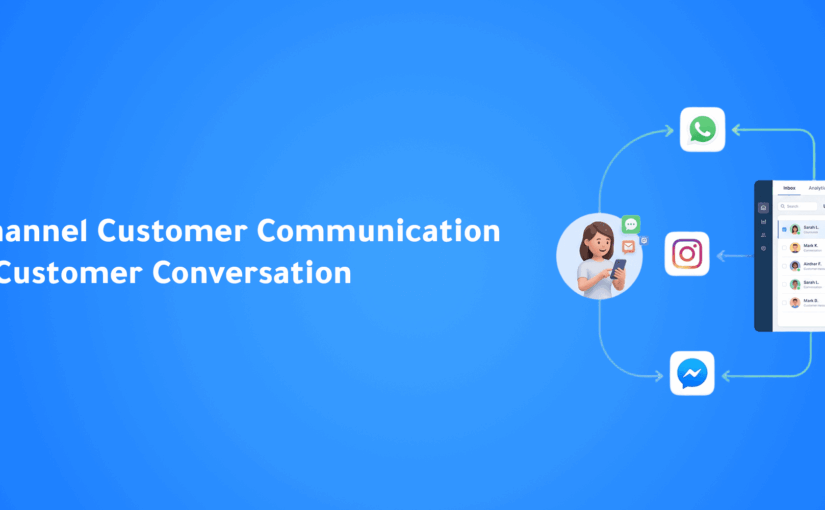
Why Businesses Lose Customers Across Multiple Channels (And How to Fix It)

Introduction

Imagine this.

A potential customer discovers your business on Instagram.

Later that day, they send a message on WhatsApp asking about pricing.

The following morning, they call your sales team to ask another question.

A few hours later, they submit a contact form through your website.

From the customer’s perspective, this is one continuous conversation.

From your company’s perspective, it’s often four completely separate conversations.

Each interaction is handled by a different employee.

Each channel stores different information.

Each department sees only part of the customer’s journey.

And that’s exactly where businesses begin losing customers.

Today’s customers don’t think in channels.

They don’t care whether they contacted you through WhatsApp, Instagram, Email, or your website.

They expect every conversation to continue exactly where the previous one ended.

When businesses fail to provide that experience, customers become frustrated, sales cycles become longer, and opportunities quietly disappear.

The problem isn’t slow replies.

The problem is fragmented communication.

The Hidden Cost of Fragmented Communication

Most companies don’t realize how much money fragmented communication actually costs them.

At first glance, everything appears to be working.

The marketing team generates leads.

The sales team answers inquiries.

Customer support resolves tickets.

Managers monitor reports.

Each department uses the tools they prefer.

Everything seems organized.

Until you follow one customer journey.

Suddenly, the cracks become obvious.

The customer’s Instagram conversation never reaches the sales team.

The WhatsApp inquiry isn’t attached to the CRM.

The phone call isn’t linked to previous messages.

Support has no idea what Sales promised.

Marketing continues sending promotional campaigns to customers who already purchased.

No individual employee made a mistake.

The systems simply never communicated with one another.

The customer experiences your business as one company.

Your technology behaves like six different companies.

That disconnect creates friction at every stage of the customer journey.

Customers Don’t Care About Your Internal Systems

Businesses often organize communication based on departments.

Marketing handles social media.

Sales manages WhatsApp.

Support answers emails.

Operations handle phone calls.

Each team works efficiently inside its own environment.

The customer, however, doesn’t see departments.

They only see your brand.

If they need to explain the same problem to three different employees, they don’t blame your CRM.

They blame your company.

Modern customers expect businesses to remember who they are, what they asked yesterday, and what happened five minutes ago—regardless of which communication channel they choose next.

The expectation isn’t unreasonable.

Technology has made seamless experiences the new standard.

Companies that fail to deliver them appear disorganized, even when their employees are working incredibly hard.

Every Conversation Starts From Zero

One of the biggest warning signs of disconnected communication is hearing customers say:

“I already explained this.”

Or:

“Can you see my previous messages?”

Or even worse:

“Never mind.”

Every time a customer has to repeat information, trust decreases.

Not because repeating information is difficult.

Because it signals that your business isn’t listening.

Imagine explaining your requirements through WhatsApp.

The next day, you call the company.

The representative asks for your name again.

Then asks you to explain the issue again.

Then asks which product you’re talking about.

Later, another employee emails asking exactly the same questions.

By the fourth interaction, the customer no longer feels like they’re speaking to one company.

They feel like they’re starting over every single time.

That experience creates frustration long before price or product quality become factors.

Customers don’t leave because they dislike your solution.

Many leave because communicating with your business feels unnecessarily difficult.

Communication Silos Create Invisible Revenue Loss

The financial impact of disconnected conversations is rarely obvious.

Businesses usually measure:

  • Marketing spend
  • Lead generation
  • Sales revenue
  • Customer support performance

But very few measure the cost of communication silos.

Consider what happens when:

  • A high-value customer messages your business on Instagram but receives a reply three hours later because the social media team doesn’t work evenings.
  • The same customer switches to WhatsApp, where the sales representative has no idea about the previous conversation.
  • The customer calls your office and repeats everything once again.
  • Support eventually resolves the issue, but the CRM still shows the customer as an active sales opportunity.

Every delay.

Every repeated question.

Every disconnected interaction.

Adds friction.

And friction quietly kills conversions.

Customers rarely tell you they left because your communication was fragmented.

They simply stop replying.

Why This Problem Is Getting Worse

Ten years ago, most businesses managed only two communication channels:

  • Phone
  • Email

Today, customers expect businesses to be available across:

  • WhatsApp
  • Instagram
  • Facebook Messenger
  • Live Chat
  • Email
  • Voice Calls
  • SMS
  • Website Forms
  • Mobile Apps

Each new channel creates another opportunity for customer data to become isolated.

Without a unified communication strategy, every new platform adds complexity instead of convenience.

Ironically, businesses invest in more communication channels to improve customer experience.

Yet without connecting those channels together, they often achieve the opposite.

Instead of becoming more accessible…

They become more fragmented.


Why Customers Hate Repeating Themselves

Customers don’t mind answering questions.

They mind answering the same questions repeatedly.

There is an important psychological difference.

When someone contacts your business, they’re looking for progress.

Each interaction should move the conversation forward.

Instead, many businesses unintentionally reset the conversation every time the customer switches communication channels.

A typical customer journey might look like this:

  • They ask about pricing through Instagram.
  • They request more details on WhatsApp.
  • They schedule a phone call.
  • They receive an email.
  • They contact support after purchasing.

From the customer’s perspective, every interaction belongs to one continuous relationship.

Yet every new employee asks the same questions.

“What product are you interested in?”

“Can I have your phone number?”

“When did you contact us?”

“Could you explain the issue again?”

Eventually, customers stop feeling understood.

Instead, they feel like they’re speaking to strangers every single time.

The frustration isn’t caused by the questions themselves.

It’s caused by the lack of continuity.

Businesses spend years building trust through branding, advertising, and customer service.

Then they unknowingly destroy part of that trust by asking customers to repeat information they’ve already provided.

Great customer experiences don’t feel repetitive.

They feel connected.

The Difference Between Multi-Channel and Omnichannel

Many businesses believe they’re already omnichannel because they’re active on multiple platforms.

Unfortunately, that’s not what omnichannel means.

Being present everywhere is not the same as being connected everywhere.

A company may have:

  • WhatsApp
  • Instagram
  • Facebook Messenger
  • Email
  • Live Chat
  • Phone Support

Yet every channel still operates independently.

That’s called Multi-Channel Communication.

Customers can contact you from many places.

But every conversation starts from zero.

Omnichannel communication is fundamentally different.

Every interaction becomes part of a single customer timeline.

No matter where the conversation starts—or continues—employees have the complete picture.

The customer never has to repeat themselves.

The business never loses context.

Multi-Channel vs. Omnichannel

Multi-Channel Omnichannel
Multiple disconnected channels All channels connected
Customer repeats information Customer history follows every conversation
Teams work independently Teams collaborate using shared context
Different customer records One unified customer profile
Conversations live in separate systems Every interaction appears in one timeline
Employees search for information Information appears automatically
Slower response times Faster, contextual responses
Inconsistent customer experience Consistent customer journey

The difference isn’t the number of channels.

It’s whether those channels work together.

The Real Cost of Context Switching

Now let’s look at the problem from the employee’s perspective.

Imagine a sales representative starting their day.

They check:

  • WhatsApp Business
  • Instagram Messages
  • Facebook Messenger
  • Email
  • CRM
  • Call logs
  • Calendar
  • Internal chat

Before speaking to a single customer, they’ve already switched between multiple systems.

Every platform requires another search.

Another login.

Another notification.

Another customer history.

This constant context switching creates hidden costs that most businesses never measure.

Employees become slower.

Mistakes increase.

Customer information gets duplicated.

Follow-ups are forgotten.

Managers lose visibility.

The more systems people use…

The less productive they become.

Ironically, businesses invest in more software hoping to improve efficiency.

Instead, they increase complexity.

Why AI Needs Unified Conversations

Artificial Intelligence is only as intelligent as the information it receives.

Imagine asking AI to help your sales team…

But the AI can only see WhatsApp messages.

It cannot access:

  • Phone calls
  • Previous emails
  • CRM notes
  • Purchase history
  • Website interactions
  • Previous support conversations

Its recommendations will always be incomplete.

Now imagine something different.

The AI has access to every customer interaction.

Every conversation.

Every purchase.

Every support ticket.

Every call summary.

Every proposal.

Every follow-up.

Suddenly, AI understands not only what the customer is saying…

But why they’re saying it.

It recognizes buying signals.

Detects frustration.

Identifies urgency.

Recommends the next best action.

Suggests the best salesperson.

Schedules follow-ups automatically.

Generates accurate summaries.

Predicts which opportunities deserve immediate attention.

This isn’t because the AI became smarter.

It’s because the business finally provided complete context.

Context is what transforms automation into intelligence.

AI Doesn’t Need More Data…

It Needs Better Context

Many organizations believe AI success depends on collecting more customer data.

In reality, the biggest challenge isn’t quantity.

It’s connection.

A thousand disconnected conversations are less valuable than one complete customer journey.

Modern AI doesn’t simply analyze messages.

It understands relationships between interactions.

It connects events across channels.

It identifies patterns that humans often miss.

When every conversation becomes part of one continuous timeline, AI begins making decisions that feel remarkably human.

Not because it’s replacing employees.

Because it finally understands the entire story.

The Future of Customer Communication

Customer expectations will continue to evolve.

Businesses will inevitably add new communication channels.

New messaging platforms.

New AI assistants.

New sales tools.

The companies that succeed won’t necessarily adopt the most software.

They’ll build the most connected customer experience.

Instead of thinking:

“Which channel should we answer next?”

Leading organizations will ask:

“How do we make every conversation feel like the same conversation?”

That simple shift changes everything.


A Real Omnichannel Customer Journey

Let’s compare two different customer experiences.

The first belongs to a traditional business.

The second belongs to a business powered by connected conversations and Agentic AI.

Scenario 1 — Fragmented Communication

Sarah discovers your company through Instagram.

She sends a message asking about your services.

The marketing team replies.

Later that evening, she continues the conversation on WhatsApp.

The sales representative asks her to explain everything again.

The next day, she calls your office.

The employee answering the phone cannot see either previous conversation.

Sarah repeats her questions for the third time.

After receiving a proposal, she sends another message through your website.

Customer support has no visibility into her previous discussions with Sales.

They ask for the same information again.

A week later, Sarah chooses another company.

Not because of pricing.

Not because of the product.

Not because of poor service.

She simply became tired of starting over.

Scenario 2 — Connected Customer Conversations

Now imagine the same customer journey with ConnectGain.

Sarah discovers your company on Instagram.

The AI immediately creates a unified customer profile.

When she later sends a WhatsApp message, the sales representative already sees:

  • Her Instagram conversation
  • The products she viewed
  • Previous questions
  • Marketing campaign source
  • Customer profile
  • CRM history

The next day Sarah calls your office.

Before answering, the AI presents the complete customer timeline.

The representative greets her by name.

Instead of asking:

“How can I help you?”

They say:

“Hi Sarah, I see you were asking yesterday about our Enterprise plan. Let’s continue from there.”

No repetition.

No searching.

No switching systems.

Just one continuous conversation.

From Sarah’s perspective…

The company remembers her.

Why Conversation Intelligence Matters

Most businesses focus on communication channels.

The companies leading the future focus on conversation intelligence.

These are not the same thing.

A communication platform allows messages to move between customers and businesses.

Conversation Intelligence understands everything happening inside those conversations.

It identifies:

  • Buying intent
  • Customer sentiment
  • Urgency
  • Objections
  • Frequently asked questions
  • Follow-up opportunities
  • Sales readiness
  • Customer satisfaction

Instead of simply storing conversations…

AI begins learning from them.

Every interaction improves future decisions.

Every conversation makes the business smarter.

This is the next evolution of customer communication.

Why ConnectGain Was Built This Way

Most software companies build another inbox.

ConnectGain was designed around a different idea.

Businesses don’t need another place to read messages.

They need a platform that understands conversations and helps teams act on them.

Instead of functioning as another communication tool, ConnectGain becomes the intelligence layer connecting every customer interaction across the organization.

Whether customers communicate through:

  • WhatsApp
  • Instagram
  • Facebook Messenger
  • Email
  • Live Chat
  • Voice Calls
  • SMS
  • Web Forms
  • Mobile Applications

Every interaction becomes part of one intelligent customer timeline.

AI continuously analyzes conversations.

CRM updates automatically.

Follow-ups happen on time.

Managers gain complete visibility.

Sales teams focus on selling.

Support teams focus on solving problems.

Customers experience one business.

Not multiple disconnected departments.

What Modern Businesses Should Aim For

The future isn’t about adding more communication channels.

It’s about making every channel work together.

Organizations should aim to create customer experiences where:

  • Every employee has complete customer context.
  • AI understands the full customer journey.
  • Customer information never needs to be entered twice.
  • Conversations continue naturally across every platform.
  • Every interaction moves the relationship forward.

Technology should reduce complexity.

Not create more of it.

Key Takeaways

Modern customer communication is no longer about being available on every platform.

It’s about creating one connected customer experience.

Remember these principles:

✔ Customers think in conversations—not channels.

✔ Repeating information reduces customer trust.

✔ Multi-channel communication is not the same as omnichannel communication.

✔ AI performs best when it understands the complete customer journey.

✔ Unified conversations improve customer experience, sales performance, and operational efficiency.

✔ ConnectGain transforms disconnected conversations into one intelligent customer timeline.

Frequently Asked Questions

What is omnichannel customer communication?

Omnichannel communication connects every customer interaction across all communication channels into one continuous experience, allowing businesses to maintain complete customer context regardless of where conversations begin.

What’s the difference between multichannel and omnichannel?

Multichannel simply means customers can contact your business through multiple platforms.

Omnichannel means every one of those platforms shares the same customer history, context, and conversation timeline.

Why do customers dislike repeating themselves?

Repeating information makes customers feel that the business isn’t listening and that departments are disconnected. It increases frustration and reduces confidence in the overall customer experience.

Why is unified communication important for AI?

AI can only make intelligent recommendations when it has access to complete customer context. Connected conversations allow AI to qualify leads, recommend next actions, personalize responses, and automate workflows far more accurately.

How does ConnectGain improve customer communication?

ConnectGain unifies conversations from WhatsApp, Instagram, Messenger, Email, Voice, Live Chat, SMS, websites, and CRM systems into one AI-powered workspace, enabling businesses to deliver faster, more personalized, and more consistent customer experiences.

Conclusion

Customers don’t think in channels.

They think in relationships.

Every interaction they have with your business is part of one continuous journey.

The companies winning today aren’t simply responding faster.

They’re responding with complete context.

Instead of asking customers to repeat themselves, they remember every conversation.

Instead of switching between disconnected systems, they work from one unified customer timeline.

And instead of using AI to automate isolated tasks, they use it to understand the entire customer journey.

That’s what creates exceptional customer experiences.

And that’s what separates modern businesses from everyone else.

Ready to Unify Every Customer Conversation?

ConnectGain helps businesses centralize customer communication, automate workflows, and build one continuous customer journey across every interaction.

Connect WhatsApp, Instagram, Messenger, websites, Email, SMS, Voice, Web Push, and App Push into one AI-powered platform that keeps every conversation connected, every customer remembered, and every opportunity moving forward.

📞 WhatsApp: +20 111 998 5526

🌐 Website: https://appgain.io

📧 Email: He***@*****in.io

Multi-Channel Customer Communication Best Practices: How to Deliver a Seamless Customer Experience Across Every Channel

Introduction

Customers no longer communicate with businesses through a single channel.

One customer may discover your business on Instagram, ask questions through WhatsApp, receive an email, visit your website, and later contact customer support through Facebook Messenger—all before making a purchase.

Today’s customer journey is no longer linear.

It moves across multiple communication channels, and customers expect businesses to recognize them and continue the conversation without requiring them to repeat information.

Unfortunately, many organizations still manage each communication channel separately.

  • Sales teams use WhatsApp.
  • Marketing relies on email.
  • Support works through Messenger.
  • Website inquiries are handled independently.

The result is fragmented customer experiences, slower response times, duplicated work, and lost sales opportunities.

This is why Multi-Channel Customer Communication has become a critical business strategy.

In this article, we’ll explore the best practices that help businesses deliver faster, smarter, and more consistent customer experiences across every communication channel.


What Is Multi-Channel Customer Communication?

Multi-channel customer communication is the ability to engage customers across multiple platforms while maintaining consistent, high-quality interactions.

Common communication channels include:

  • WhatsApp
  • Instagram
  • Facebook Messenger
  • Email
  • Website Live Chat
  • Phone Calls
  • SMS
  • Mobile Applications

Customers choose whichever channel is most convenient for them.

Businesses must be prepared to deliver the same quality of service across every touchpoint.


Why Multi-Channel Communication Matters

Customer expectations have changed dramatically.

People expect businesses to:

  • Respond quickly
  • Remember previous conversations
  • Offer personalized support
  • Be available across multiple platforms
  • Deliver a seamless customer experience

Businesses that fail to meet these expectations often experience:

  • Lower customer satisfaction
  • Missed sales opportunities
  • Poor customer retention
  • Increased support costs

A well-designed communication strategy improves both customer experience and operational efficiency.


Best Practice #1: Meet Customers on Their Preferred Channels

Every customer has a preferred way of communicating.

Some prefer WhatsApp.

Others choose Instagram, Messenger, or email.

Rather than forcing customers to use one platform, businesses should be available wherever their customers already communicate.

Making communication convenient removes friction from the customer journey.


Best Practice #2: Centralize Every Conversation

One of the biggest challenges businesses face is managing conversations across multiple applications.

Important customer information becomes scattered between:

  • WhatsApp
  • Instagram
  • Messenger
  • Email
  • CRM
  • Phone calls

This makes it difficult to maintain context.

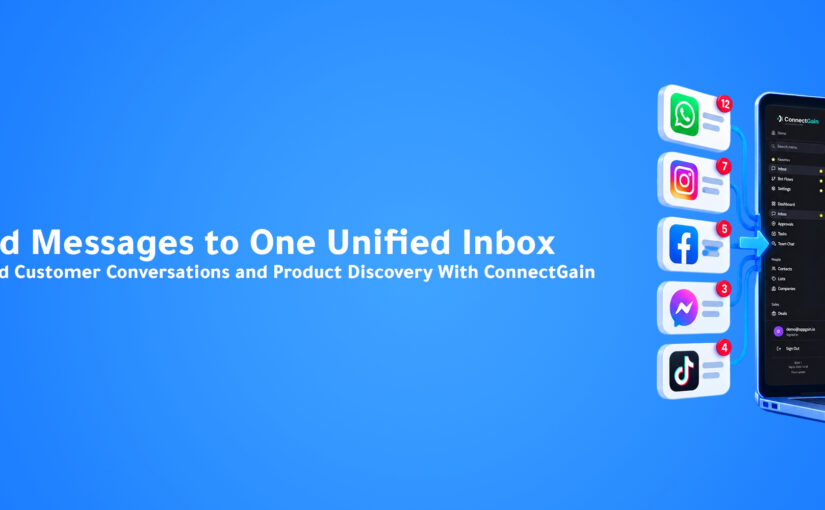
A Unified Inbox solves this problem by bringing every customer conversation into one centralized workspace.

Teams gain complete visibility into every interaction, regardless of the communication channel.


Best Practice #3: Keep Customer Data in One CRM

Conversations alone are not enough.

Businesses also need a complete customer profile.

A modern CRM should include:

  • Contact information
  • Previous conversations
  • Purchase history
  • Sales opportunities
  • Notes
  • Tasks
  • Customer preferences

Centralized customer data allows every department to deliver more personalized service.


Best Practice #4: Respond Quickly Across Every Channel

Response time directly impacts customer satisfaction and conversion rates.

Customers expect businesses to acknowledge their inquiries within minutes.

Long delays often result in lost opportunities.

Businesses can improve response times by using:

  • AI-powered assistants
  • Automated greetings
  • Smart conversation routing
  • Internal notifications

Fast responses create stronger first impressions and improve customer trust.


Best Practice #5: Maintain a Consistent Brand Voice

Customers should receive the same experience regardless of where they contact your business.

Whether communication happens through WhatsApp or email, your brand should maintain:

  • Consistent tone of voice
  • Accurate information
  • Professional communication
  • Unified messaging

Consistency strengthens brand identity and builds customer confidence.


Best Practice #6: Personalize Every Interaction

Customers appreciate businesses that remember previous interactions.

Instead of sending generic responses, personalize communication using:

  • Customer name
  • Previous purchases
  • Conversation history
  • Interests
  • Customer behavior

Personalization creates stronger relationships and increases engagement.


Best Practice #7: Use Automation Without Losing the Human Touch

Automation improves efficiency but should never make customer interactions feel robotic.

The best customer experiences combine:

  • AI-powered chatbots
  • Automated workflows
  • Human support when needed

Automation should handle repetitive tasks while human agents focus on conversations requiring empathy and problem-solving.


Best Practice #8: Give Every Team Access to Customer History

Customer conversations often involve multiple departments.

Sales, marketing, and customer support should all have access to the same customer information.

This eliminates repeated questions and creates smoother customer experiences.

Customers should never have to explain the same issue multiple times.


Best Practice #9: Measure Communication Performance

Improvement begins with measurement.

Businesses should monitor key communication metrics such as:

  • First response time
  • Resolution time
  • Customer satisfaction
  • Conversion rates
  • Customer engagement
  • Channel performance

Analytics help identify opportunities to improve customer communication continuously.


Best Practice #10: Continuously Optimize the Customer Journey

Customer expectations continue to evolve.

Businesses should regularly review:

  • Customer feedback
  • Communication workflows
  • Automation performance
  • Sales outcomes
  • Customer engagement

Continuous optimization ensures communication strategies remain effective as customer behavior changes.


Common Mistakes Businesses Should Avoid

Even businesses with multiple communication channels can struggle if they make common mistakes.

These include:

  • Managing each channel separately
  • Responding inconsistently
  • Delayed customer replies
  • Lack of CRM integration
  • Sending generic messages
  • Overusing automation
  • Ignoring customer history
  • Measuring only response volume instead of customer outcomes

Avoiding these mistakes creates a more connected and customer-centric experience.


The Role of Artificial Intelligence in Multi-Channel Communication

Artificial Intelligence is helping businesses manage customer communication more effectively than ever before.

AI can:

  • Respond instantly to common questions
  • Route conversations to the right department
  • Qualify sales leads
  • Recommend next actions
  • Analyze customer sentiment
  • Personalize communication
  • Trigger automated workflows

Instead of replacing employees, AI enables teams to work more efficiently while delivering better customer experiences.


How ConnectGain Helps Businesses Deliver Better Multi-Channel Communication

ConnectGain brings customer conversations, CRM, Artificial Intelligence, and workflow automation together in one intelligent platform.

With ConnectGain, businesses can:

  • Manage WhatsApp, Instagram, Messenger, Website Chat, Email, SMS, Web Push, and App Push from a single Unified Inbox
  • Centralize customer information with an integrated CRM
  • Automate customer journeys and follow-up workflows
  • Qualify leads using AI
  • Assign conversations automatically to the right teams
  • Track customer interactions across every communication channel
  • Monitor performance through real-time dashboards and analytics

By combining AI, CRM, automation, and omnichannel communication, ConnectGain helps businesses create seamless customer experiences while improving productivity and increasing sales opportunities.


The Future of Customer Communication

Customer communication will continue becoming more intelligent, connected, and personalized.

Businesses are moving beyond simply supporting multiple channels.

The future lies in creating one continuous conversation where customers can move effortlessly between platforms without losing context.

Organizations that invest in unified communication strategies today will be better prepared to meet the expectations of tomorrow’s customers.


Conclusion

Successful customer communication is no longer about being present on multiple platforms.

It is about creating one connected experience across every channel.

Businesses that centralize conversations, personalize interactions, automate repetitive tasks, and empower their teams with AI and CRM technology can improve customer satisfaction, strengthen relationships, and drive sustainable business growth.

ConnectGain enables organizations to manage customer communication from one intelligent platform, helping teams respond faster, collaborate better, and deliver exceptional customer experiences across every touchpoint.


Ready to Transform Your Customer Communication?

ConnectGain helps businesses manage customer conversations, automate workflows, and engage customers across WhatsApp, Instagram, Messenger, Websites, Email, SMS, Web Push, and App Push from one centralized AI-powered platform.


Contact Us

WhatsApp:
+20 111 998 5526

Website:
https://appgain.io

Email:
He***@*****in.io

WhatsApp Automation: 2026 Guide for MENA Businesses

Introduction

WhatsApp automation for business is no longer optional in the MENA region. It is now the main channel where customers ask about prices, confirm bookings, and make buying decisions.

However, most businesses still manage conversations manually. As a result, response times are slow, opportunities are missed, and potential customers move to competitors.

This guide explains how WhatsApp automation for business works in 2026, and how MENA companies can use it to improve response speed, reduce workload, and increase conversions.


Why WhatsApp Automation for Business Is No Longer Optional

During peak hours, most businesses receive dozens of WhatsApp messages at the same time.

For example, a customer might ask about availability while your team is busy handling other conversations. Therefore, the reply is delayed. In many cases, the customer leaves before receiving a response.

In addition, high-intent customers expect fast replies. If they do not get one, they move on quickly.

Key Statistics

  • Average manual response time: 2 to 4 hours
  • Customer patience: less than 5 minutes
  • Automation improves response speed by up to 60%
  • AI reduces agent workload by up to 80%

Clearly, this is not just an operational issue. It directly impacts revenue.


Types of WhatsApp Automation for Business

Not all automation solutions offer the same level of performance. Therefore, it is important to understand the different types.

1. Basic Auto-Reply

This is the simplest form of automation.

  • Sends replies outside working hours
  • Requires no integrations
  • Limited functionality

However, it only solves a small part of the problem.


2. Template-Based Messaging

This method uses pre-approved templates.

  • Order confirmations
  • Appointment reminders
  • Notifications

These messages are reliable. However, they are one-way and do not support full conversations.


3. Flow-Based Chatbots

These bots follow a structured path.

For example:

  • Press 1 for pricing
  • Press 2 for support

They are useful for handling repetitive inquiries. However, they often feel rigid and lack flexibility.


4. AI-Powered Conversational Agents

This is the most advanced form of WhatsApp automation for business.

  • Understands natural language
  • Responds instantly
  • Uses your business data
  • Updates CRM automatically

As a result, conversations feel natural and scalable at the same time.


5. WhatsApp CRM Integration

Every interaction becomes structured data.

  • Contacts are created automatically
  • Deals are updated
  • Follow-ups are triggered

Therefore, no lead is lost and no conversation is forgotten.


How to Build a WhatsApp Automation for Business Flow

A successful system starts with planning, not tools.

Step 1 — Identify Top Inquiries

Review your recent conversations.

In most businesses, customers ask about:

  • Pricing
  • Availability
  • Booking
  • Order status
  • Support

These should be automated first.


Step 2 — Design the Flow

For each inquiry, define:

  • What the customer wants
  • What data you need
  • What the final outcome is

For example, the flow may end with a booking, a response, or a human handoff.


Step 3 — Write Natural Messages

Messages should feel human.

  • Keep them short
  • Avoid complex words
  • Match your brand tone

In addition, support both Arabic and English to serve MENA audiences effectively.


Step 4 — Connect to Real Systems

Automation becomes powerful when it connects to live data.

For example:

  • Inventory systems
  • CRM platforms
  • Booking tools

Static answers are not enough.


Step 5 — Define Human Handoff

Not every conversation should be automated.

For instance, you should transfer to a human when:

  • The customer is frustrated
  • The request is complex
  • The lead is high-value

This balance improves both efficiency and customer experience.


Step 6 — Measure and Improve

Track key metrics from the start.

  • Response time
  • Resolution rate
  • Customer satisfaction

Over time, these insights help you improve performance.


ConnectGain: WhatsApp Automation for Business Platform

ConnectGain by Appgain is built specifically for WhatsApp automation for business in MENA.

Core Features

AI Flow Builder
A visual interface that allows you to build automation without coding.

WhatsApp API Integration
Supports large-scale messaging, media, and interactive communication.

Unified Inbox
Manages conversations across multiple channels in one place.

AI Auto-Reply (RAG)
Answers customer questions using your real business data.

Broadcast Campaigns
Send targeted WhatsApp messages with tracking and segmentation.

Post-Call Follow-Up
Automatically send messages after calls without manual effort.


Use Cases by Industry

Real Estate

  • Qualify leads
  • Recommend properties
  • Schedule viewings

Tourism and Hospitality

  • Handle bookings 24/7
  • Check availability
  • Send confirmations

Healthcare

  • Book appointments
  • Send reminders
  • Handle patient inquiries

E-commerce

  • Recover abandoned carts
  • Send order updates
  • Automate returns

Financial Services

  • Qualify leads
  • Send document reminders
  • Manage follow-ups

Common Mistakes to Avoid

No Human Option

Customers should always be able to reach a real person.


Robotic Messages

Generic responses reduce trust and engagement.


No Arabic Support

Automation must support Arabic to work effectively in MENA.


No CRM Integration

Disconnected systems lead to lost data.


No Performance Tracking

Without data, you cannot improve or scale.


Getting Started

If you are still handling WhatsApp manually, you are limiting your growth.

With the right setup, WhatsApp automation for business can:

  • Improve response speed
  • Reduce workload
  • Increase conversions
  • Ensure consistent follow-ups

To learn more, visit:
https://appgain.io
📱 WhatsApp: +20 111 9985526
🌐 Website: https://appgain.io
📩 Email: ***@*****in.io“>He***@*****in.io


Conclusion

Customers already use WhatsApp to communicate with your business. Therefore, your ability to respond quickly determines whether you win or lose the deal.

WhatsApp automation for business is no longer a competitive advantage. It is a necessity.

ConnectGain Is Officially Live: The AI-Powered Omnichannel Inbox for Modern Sales Teams

In November 2025, Appgain officially launched ConnectGain, a unified communication and automation platform built to solve one of the biggest challenges modern businesses face today: fragmented customer conversations.

Sales and support teams often struggle to manage messages scattered across WhatsApp, Instagram, Facebook, website chat, and other channels — leading to delayed responses, missed leads, and lost context.

ConnectGain changes that.


One Inbox for Every Customer Conversation

With ConnectGain, all customer conversations are brought together into one intelligent inbox.

Powered by AI agents, the platform understands customer intent, automates follow-ups, and routes conversations instantly to the right team — without manual effort.

This allows teams to manage conversations at scale while maintaining speed, accuracy, and personalization.


Why Fragmented Conversations Hurt Growth

When customer messages are spread across multiple channels, businesses face real operational challenges, including:

  • Slow response times

  • Missed or unqualified leads

  • Lost conversation history

  • Inconsistent follow-ups

  • Limited visibility across teams

ConnectGain eliminates these issues by centralizing conversations and automating key sales actions.


What ConnectGain Helps Businesses Do

With ConnectGain, businesses can:

  • Respond in real time across all customer channels from one inbox

  • Automate lead qualification and follow-ups using AI agents

  • Track conversations through clear, actionable pipelines

  • Turn conversations into measurable revenue automatically

Every interaction becomes structured, trackable, and growth-focused.


Built for Modern Sales and Support Teams

ConnectGain is designed for fast-moving teams that rely on conversations to drive revenue.

By combining omnichannel messaging with AI-powered automation, ConnectGain helps teams sell faster, follow up smarter, maintain full conversation context, and scale customer engagement without increasing headcount.


A Step Forward in Appgain’s Mission

This launch represents a major step in Appgain’s mission to simplify customer communication and help businesses grow faster with fewer manual processes.

ConnectGain is not just an inbox — it is a growth engine built for modern sales teams.


Conclusion

ConnectGain eliminates fragmented conversations and transforms them into a clear, actionable system that helps modern teams grow faster and work smarter.

Ready to see ConnectGain in action?
Request a ConnectGain demo and discover how your team can turn conversations into revenue.

Better WhatsApp for Business: Our Integration with Route Mobile


How Appgain’s new integration delivers reliable message delivery and professional brand verification for growing businesses

The $50,000 Wake-Up Call: Why Reliable Messaging Matters

Last month, I received a call from the marketing director of a fast-growing e-commerce company. She told me bluntly:

“We’re losing over $50,000 each month because our WhatsApp messages aren’t getting through—especially in markets like the Middle East and Africa.”

She’s not alone. Businesses everywhere face the same problems:

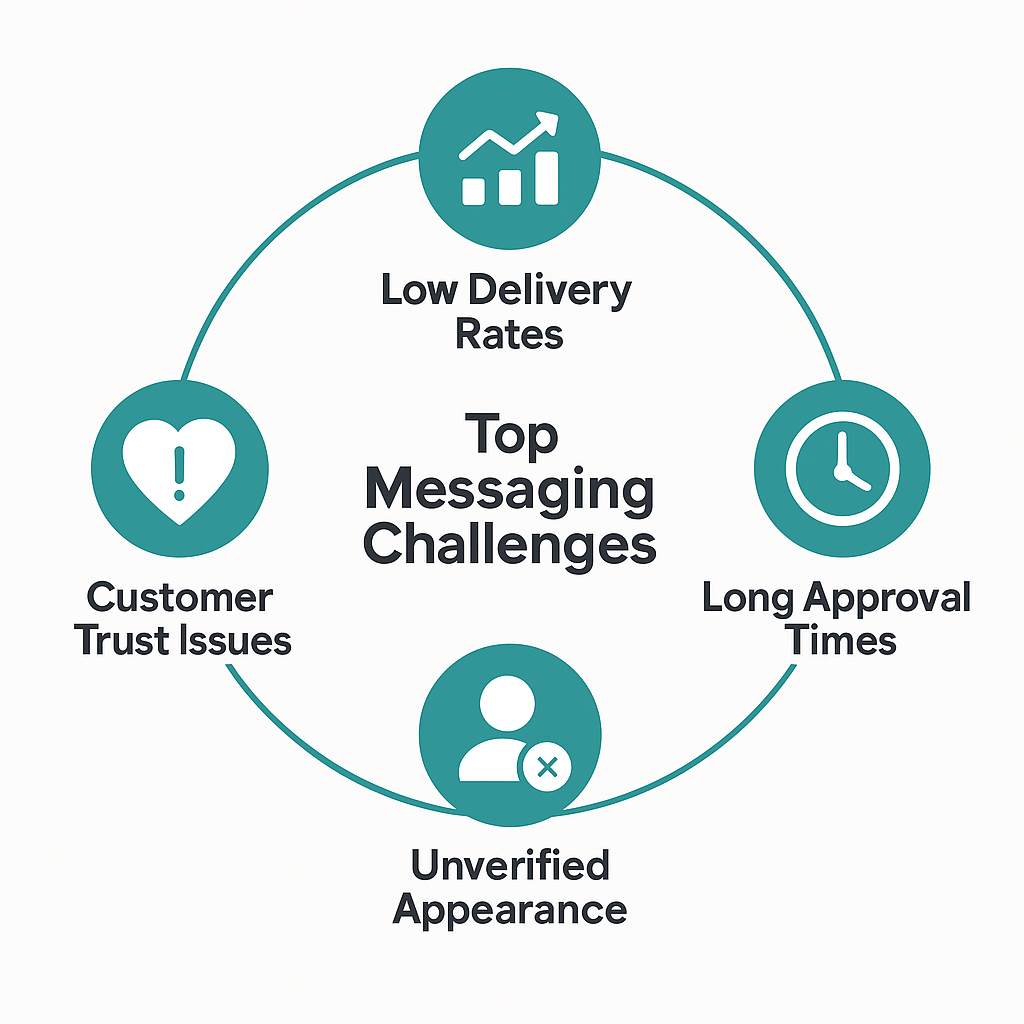
  • Message delivery failures across regions

  • Long delays in account approval

  • Unverified senders appearing as phone numbers

  • Customer distrust and low engagement

Today, I’m excited to share how we’ve solved these challenges through a strategic integration with Route Mobile — unlocking fast, verified, and scalable WhatsApp communication for businesses worldwide.

The Real Problems with Standard WhatsApp Business Providers

For growing businesses, small messaging issues can cause massive losses at scale.

Poor Message Delivery by Region


Region

Average Delivery Rate (Before)

Middle East

72%

Africa

68%

Asia

75%

These numbers mean that 25–30% of your customers never receive your messages.

Delays in Business Account Approvals

  • Standard WhatsApp setup: 2 to 4 weeks

  • Additional compliance reviews: +1 to 2 weeks

  • Total delay: Up to 6 weeks before your first campaign

The opportunity cost? Anywhere from $1,000 to $50,000 per week in lost business.

  • Lack of Brand Trust

    • Messages appear from unrecognized phone numbers

    • Customers question legitimacy

    • Verified businesses see 23% higher engagement rates..


Introducing Route Mobile: Enterprise-Grade Messaging Infrastructure

Route Mobile is not just another WhatsApp provider. It powers messaging infrastructure for some of the world’s largest enterprises.

Global Infrastructure Highlights

  • 20+ data centers across six continents

  • Direct integrations with carriers in over 240 countries

  • Redundant systems for 99.9% uptime and fast message delivery

Built for International Business

  • Local compliance experts in 40+ countries

  • Fast-track approval and template setup

  • Arabic language support and right-to-left message optimization

  • Regulatory compliance tailored by region

Real Results from Appgain Clients Using Route Mobile

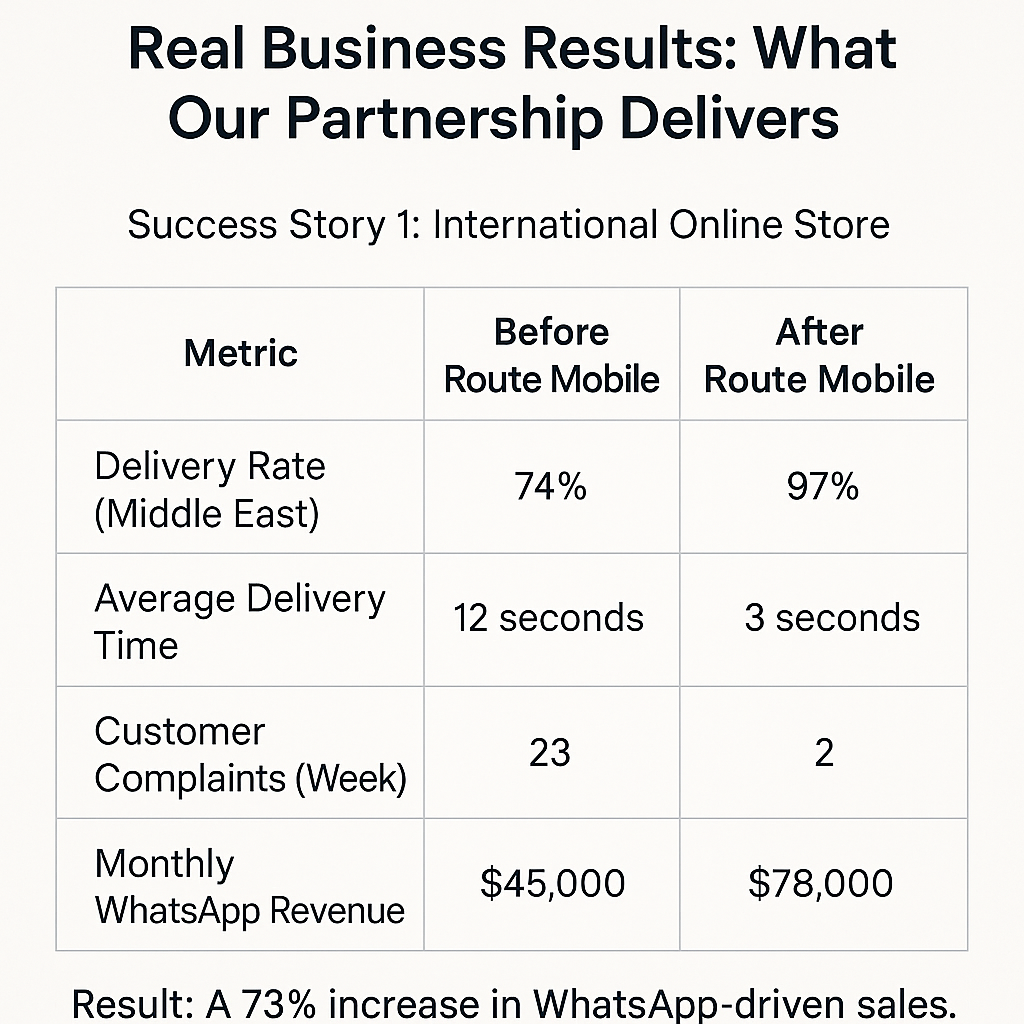
Case Study 1: International E-Commerce Brand

Metric

Before Route Mobile

After Route Mobile

Delivery Rate (Middle East)

74%

97%

Average Delivery Time

12 seconds

3 seconds

Customer Complaints (Weekly)

23

2

Monthly WhatsApp Revenue

$45,000

$78,000

Result: A 73% increase in WhatsApp-driven sales.
Case Study 2: Healthcare Provider (UAE, KSA, Egypt)

  • Approval Time: Reduced from 28 days to 7

  • Message Delivery: Improved from 71% to 96%

  • Patient No-Show Rate: Dropped from 31% to 18%

  • Staff Time on Follow-ups: Reduced by 73%

Annual savings: Over $127,000 in operational costs.
Case Study 3: Financial Services Firm

  • Message Appearance: Changed from random number to verified brand name

  • Customer Confusion: Dropped from 34% to 3%

  • Campaign Response Rate: Increased from 8.3% to 19.7%

  • Support Tickets About Message Validity: Reduced from 89 to 12

Result: 137% uplift in campaign performance.

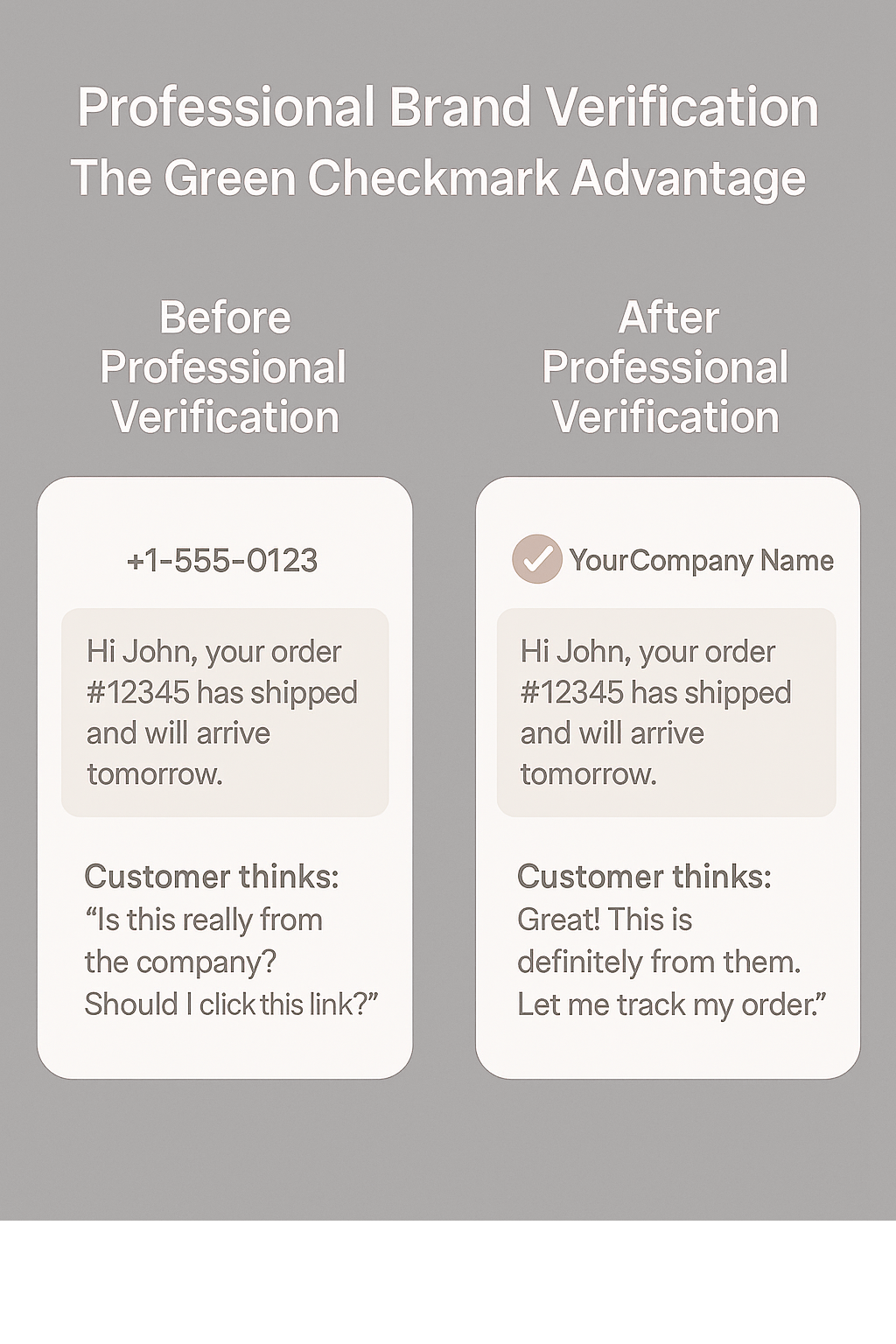
Why Brand Verification (Green Checkmark) Matters
Unverified WhatsApp messages often create hesitation. Verified accounts with official names and badges change how customers respond.

Before Verification:
+1-555-0123
Hi John, your order #12345 has shipped.

After Verification:
YourCompany (Verified)
Hi John, your order #12345 has shipped.

Measured Impact of Verification:

  • 67% increase in open rates

  • 43% increase in reply rates

  • 89% reduction in “Is this really you?” inquiries

  • 31% increase in sales conversions

  • 52% better click-through on promotional links

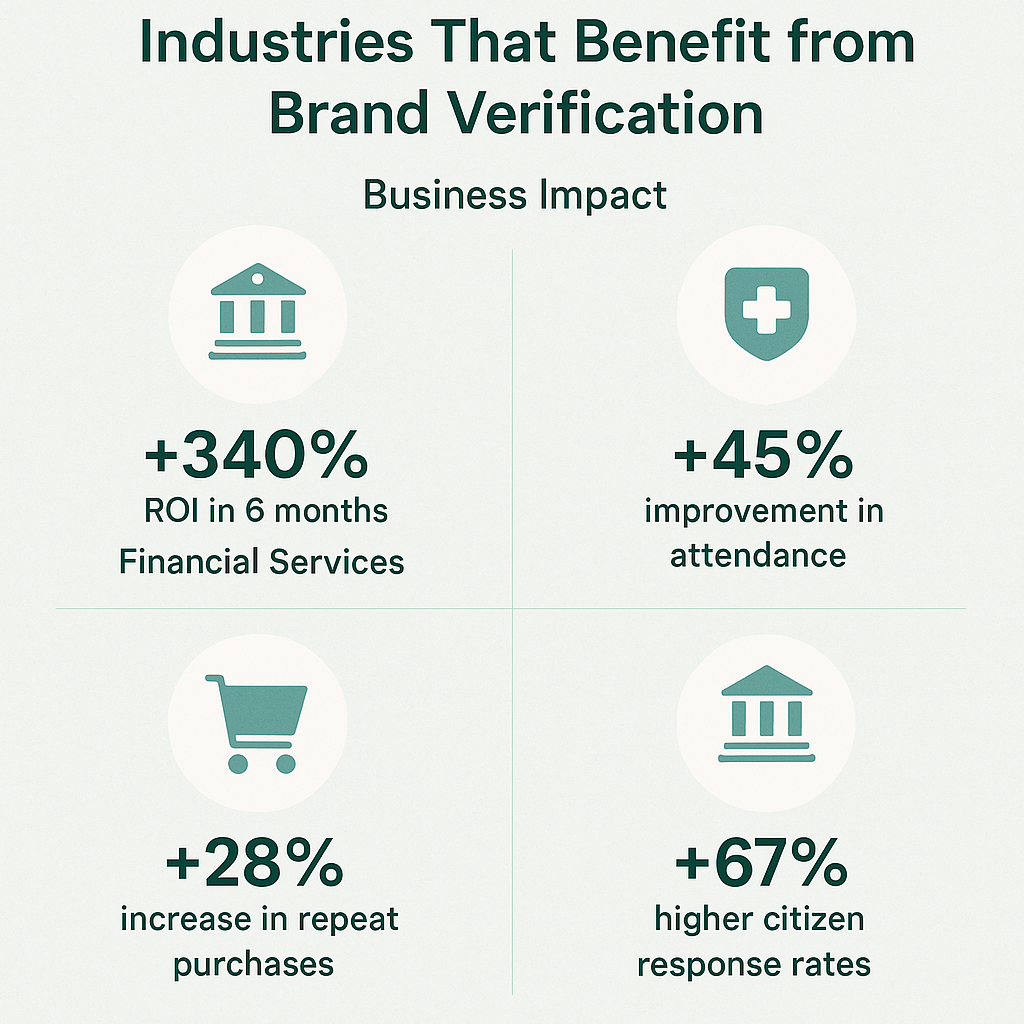
Which Businesses Benefit Most from WhatsApp Verification?

Different industries are seeing measurable returns from WhatsApp brand verification.

Here’s how verified messaging impacts key sectors:

Verified messaging improves ROI, engagement, and trust—across both private and public sectors.

Global Performance Metrics After Integration

Our partnership with Route Mobile delivers measurable performance improvements across key regions.

Here’s how businesses in the Middle East, Africa, and Asia are seeing better delivery rates, customer engagement, and onboarding speeds:


Migration Made Easy: Your Step-by-Step Guide

Phase 1: Assessment (Week 1)

  • Review current delivery, delays, and lost revenue

  • Identify high-impact regions and use cases

Phase 2: Setup and Testing (Week 2)

  • Set up Route Mobile account

  • Apply for professional verification

  • Test small message batches for delivery and speed

Phase 3: Gradual Migration (Weeks 3–4)

  • Shift 10–20% of traffic to Route Mobile

  • Monitor real-time results and compare

Phase 4: Full Implementation (Month 2)

  • Switch all messaging to Route Mobile

  • Train internal teams

  • Activate automation and analytics features

Cost vs. Return: The Financial Case

Estimated Costs:

  • Setup and Migration: $2,000 – $5,000 one-time

  • Monthly Messaging Upgrade: $200 – $800

  • Professional Verification: $500 setup + $100/month

ROI for Businesses:

Business with $50,000 Monthly Revenue:

  • Revenue lost to poor delivery: ~$12,500

  • Cost of Route Mobile + Verification: $500/month

  • Net monthly gain: $9,500

  • Annual ROI: 2,280%

Business with $200,000 Monthly Revenue:

  • Lost revenue saved: ~$40,000

  • Verification gains: +$8,000

  • Net monthly gain: $46,800

  • Annual ROI: 3,800%


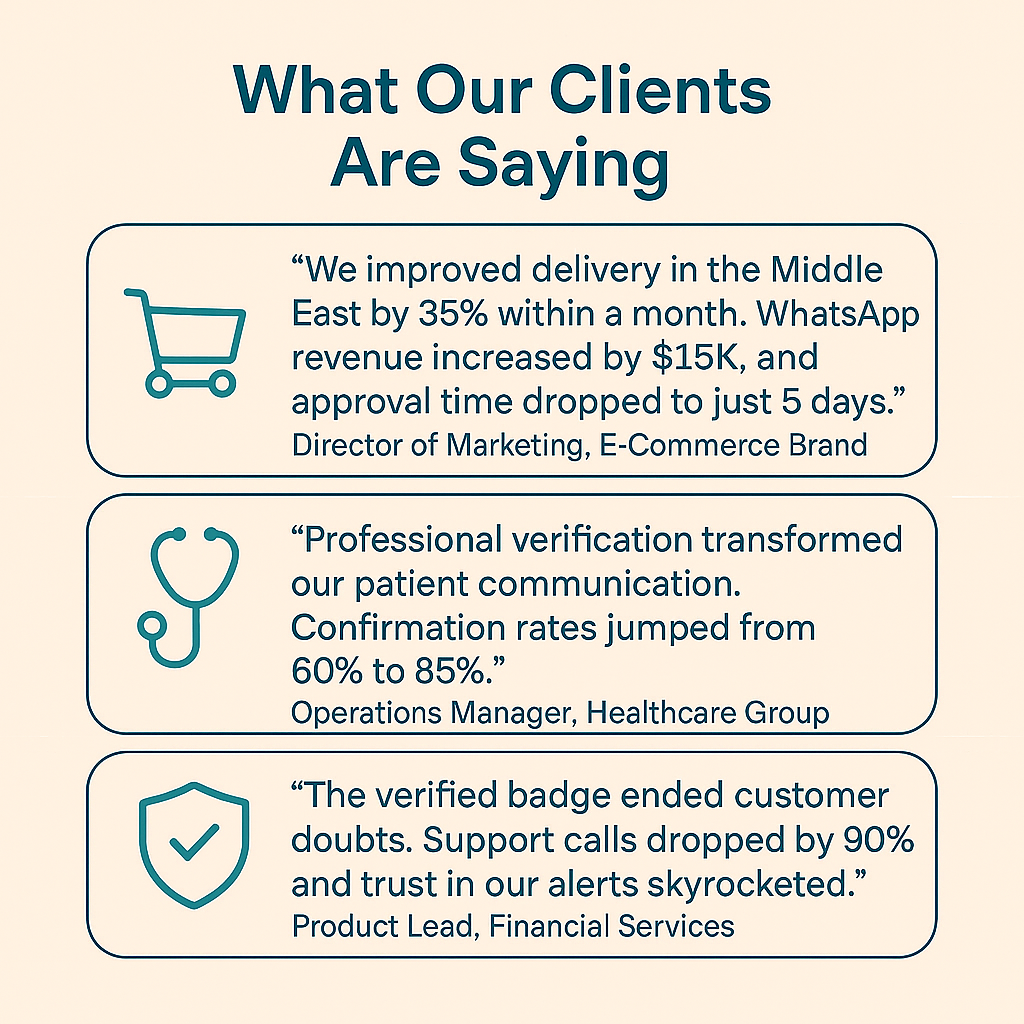
What Our Clients Are Saying

What Our Clients Are Saying
The following testimonials from real Appgain clients show the measurable impact of verified WhatsApp messaging.


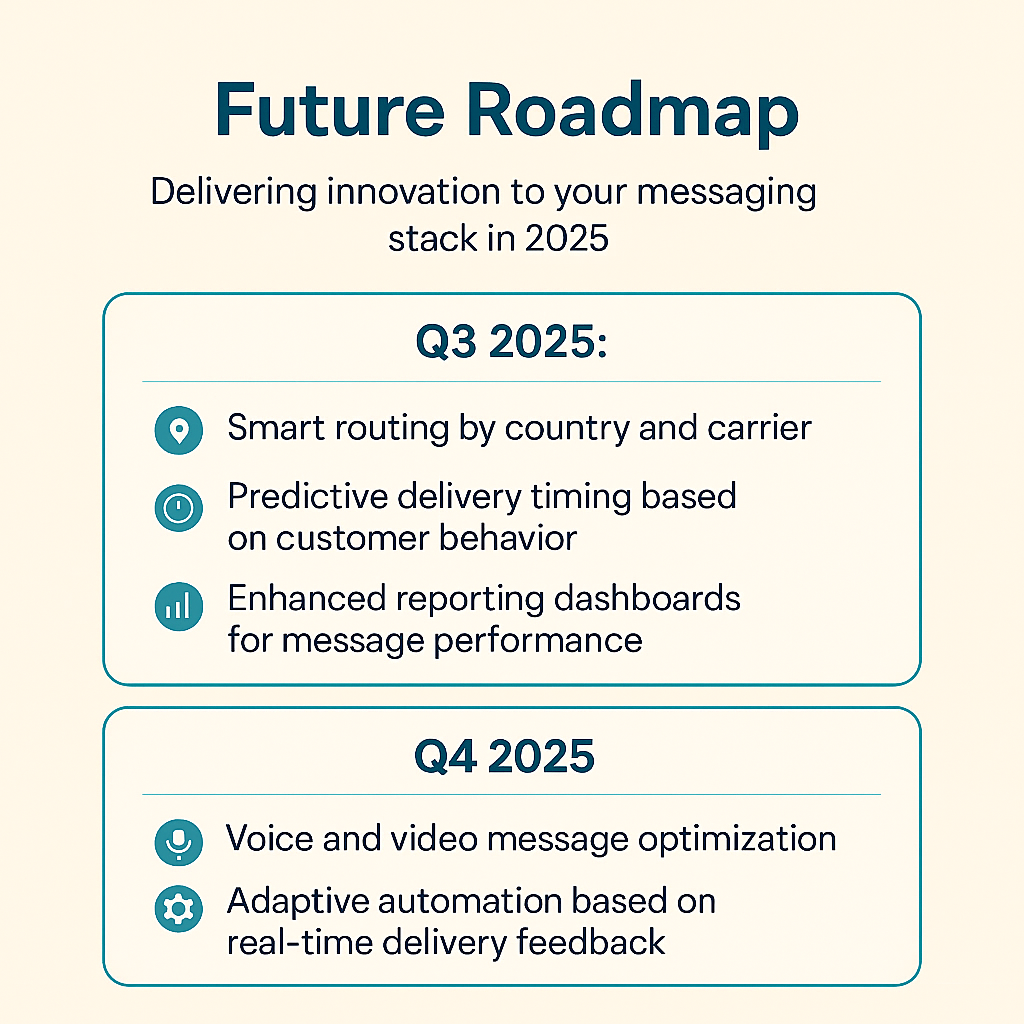
What’s Next: Future Roadmap
Here’s a visual snapshot of what’s coming in Q3 and Q4 2025 from Appgain + Route Mobile.

Ready to Elevate Your WhatsApp Business Strategy?

Appgain + Route Mobile offers you:

  • Reliable global message delivery

  • Verified brand presence with every message

  • Compliance-ready infrastructure

  • Seamless onboarding and support

Your next step:

  • Schedule a consultation

  • Request a custom demo

  • Speak with our team about professional verification

About the Author
Mohamed Shaheen is CEO and co-founder of Appgain, helping businesses grow through intelligent automation and customer communication solutions. Connect with him on LinkedIn for insights on WhatsApp marketing and CRM strategy.

Related Resources:

  • WhatsApp Business Strategy Guide

  • International Messaging Best Practices

  • How to Measure WhatsApp Marketing Success

Ready to Take Your WhatsApp Strategy to the Next Level?
Whether you’re an e-commerce brand, healthcare provider, or financial service—verified messaging can transform how you reach and retain customers.

-Faster approvals
-Higher delivery rates
-Trusted brand presence

Get started with Appgain + Route Mobile today.

Schedule a consultation
Request a custom demo
Speak to our team about professional verification


Bonus for Real Estate Professionals

Appgain has recently launched an integrated CRM solution tailored for the real estate sector — combining:

  • Odoo CRM

  • WhatsApp automation

  • Campaign tracking tools

  • Instant customer engagement

It’s built to help real estate businesses:

  • Close deals faster

  • Follow up smarter

  • Manage leads with ease — all from one unified platform.

Interested in real estate?
Discover Appgain’s CRM for Real Estate →

WhatsApp Marketing Made Simple: Your Complete Guide to WhatsApp Lite 1.0

How small businesses can start professional WhatsApp marketing in 30 minutes – no technical skills needed


Something that might surprise you is that 73% of small businesses want to use WhatsApp for customer communication, but only 23% do it. Why? Until now, setting up professional WhatsApp marketing has felt impossibly complicated.

That changes today.

After months of listening to frustrated business owners say “WhatsApp Business is too technical” and “I just want to send professional messages without hiring an expert,” we built something that makes WhatsApp marketing as easy as sending a regular text message.

Why We Created WhatsApp Lite (The Real Story)

Last month, I met Sarah, who runs a boutique in Austin. She told me she was losing customers to competitors using WhatsApp, but every time she tried setting it up, she got overwhelmed by technical requirements and gave up after hours of frustration.

Sarah’s story isn’t unique. We’ve talked to hundreds of business owners facing the same challenges:

  • Set up processes that require technical knowledge they don’t have

  • Approval delays that can take weeks

  • Fear of accidentally violating rules and getting banned

  • Features so complex they’re unusable for everyday business needs

WhatsApp Lite 1.0 eliminates every single one of these problems.

Real Results: How Maria Transformed Her Bakery Business

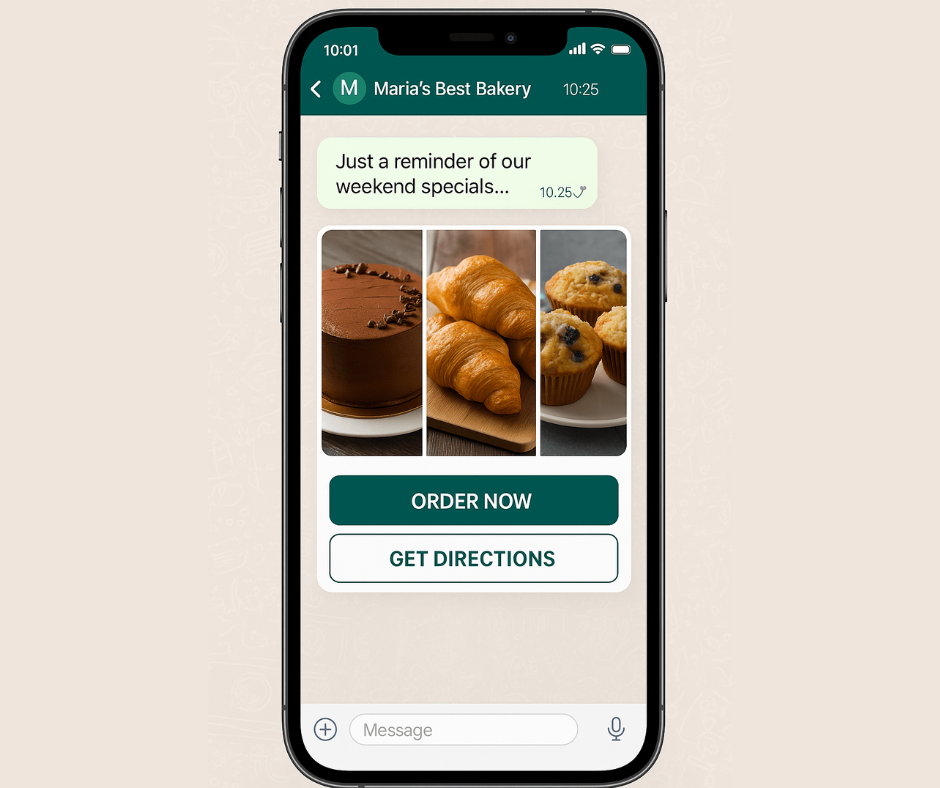
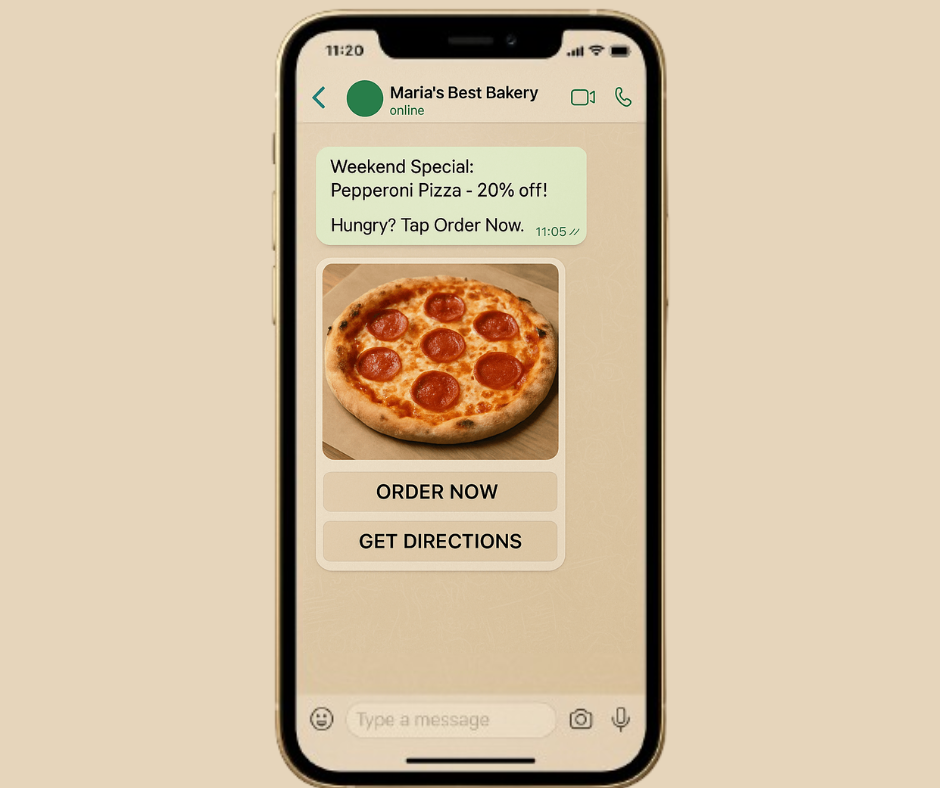
Let me show you exactly what’s possible. Yesterday, Maria from a local bakery in Miami went from never using WhatsApp for business to sending her first successful campaign in just 27 minutes. Here’s her complete journey:

Step 1: Quick Setup (5 minutes)

  • Signed up for WhatsApp Lite on our website

  • Connected her existing WhatsApp Business number

  • Verified her business information

  • Complete. No technical setup, no complicated configurations.

Step 2: Create First Campaign (12 minutes)

  • Selected our ready-made bakery template

  • Added mouth-watering photos of her weekend specials

  • Added simple “Order Now” and “Get Directions” buttons

  • Scheduled the message to go out Friday morning

  • The campaign is ready to launch.

Step 3: Amazing Results (immediate)

  • Sent messages to 150 regular customers

  • 89% of messages were delivered (much higher than email)

  • 34% of customers clicked to place orders

  • $1,200 in weekend sales directly from this one campaign

Total time invested: 27 minutes Return on investment: 4,400%

These aren’t inflated marketing numbers – this is exactly what happened with a real business owner yesterday.

WhatsApp Lite Features That Transform Your Customer Communication

1. Send 300 Professional Messages Every Day

Most small businesses send 50-100 WhatsApp messages per week. With 300 messages per day, you have plenty of room for:

  • Daily special announcements

  • Appointment confirmations

  • Order updates

  • Customer service responses

  • Special promotions


Smart Message Spacing: Our system automatically spaces out your messages throughout the day so WhatsApp never sees them as spam. This ensures that you stay safe while reaching all your customers.

Real customer story: “I sent Black Friday promotions to 280 customers. Every message was delivered perfectly, and I got zero spam complaints.” – Dave, Electronics Store Owner

2. Rich Media That Gets Attention Remember when business messaging meant boring text only? Those days are over with WhatsApp Lite.

What you can now send:

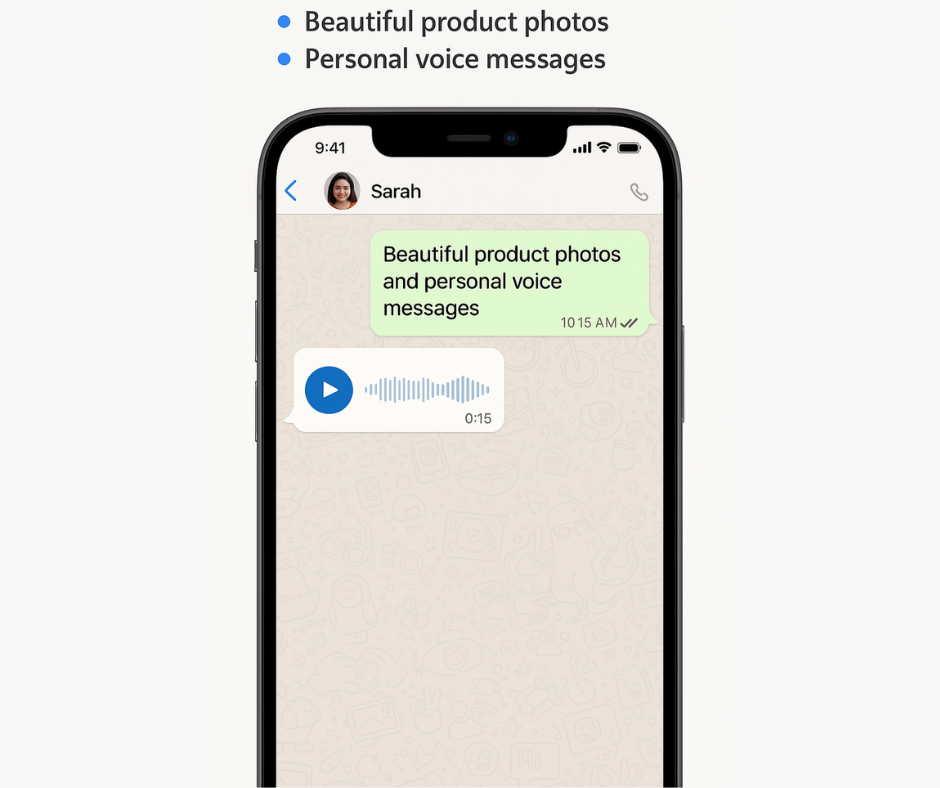
  • Beautiful product photos with instant “Buy Now” buttons

  • Personal voice messages (customers love hearing your actual voice)

  • Product demonstration videos that show items in action

  • Digital catalogs as PDF attachments

  • Voice confirmations for appointments and orders

Success story: A local gym owner started sending 30-second workout tip videos through WhatsApp. Member engagement went up 67%, and member retention improved by 23% in just two months.

3. One-Click Customer Responses This single feature has transformed how our customers handle everyday business conversations:

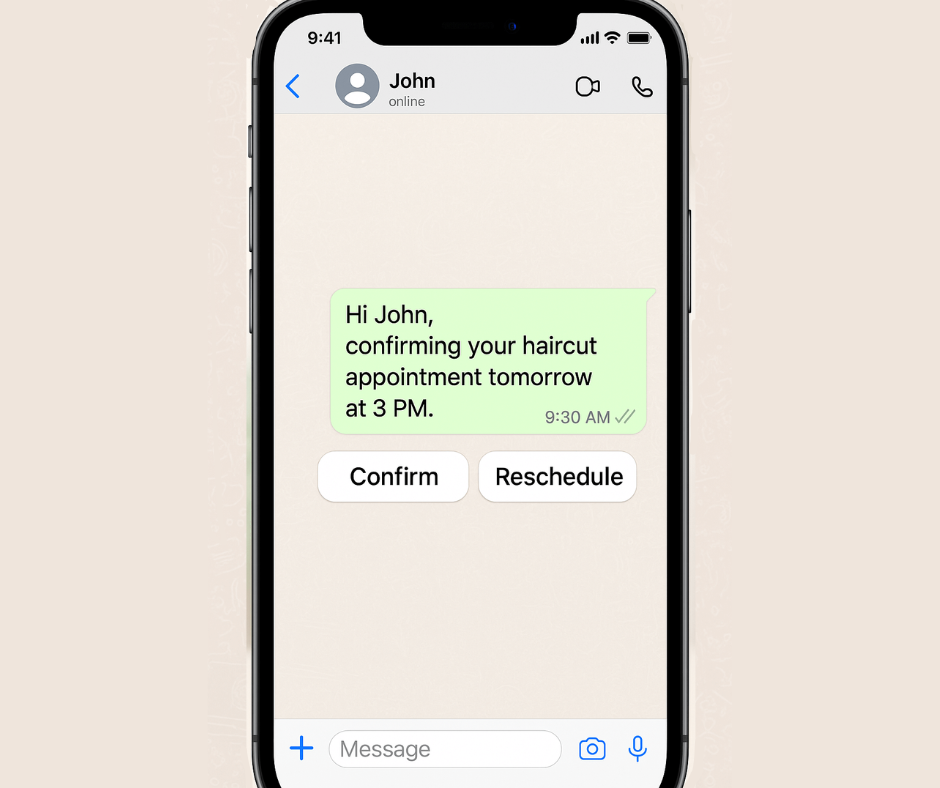
Appointment Confirmations:

  • Your message: “Hi John, confirming your haircut appointment tomorrow at 3 PM”

  • Customer sees: [Confirm] [Reschedule] buttons

  • Result: 94% response rate vs 34% with regular text messages

Order Updates:

  • Your message: “Your pizza order is ready for pickup!”

  • Customer sees: [On my way] [Need 10 more minutes] buttons

  • Result: Customers feel in control, you know exactly when to expect them

Quick Feedback:

  • Your message: “How was your dining experience tonight?”

  • Customer sees: [Excellent!] [Could be better] buttons

  • Result: 3x more customer feedback compared to traditional surveys

4. Smart Automation (Without the Complexity) Here’s where WhatsApp Lite becomes really powerful. You can set up smart responses and suggestions without any technical knowledge.

Popular automation our customers love:

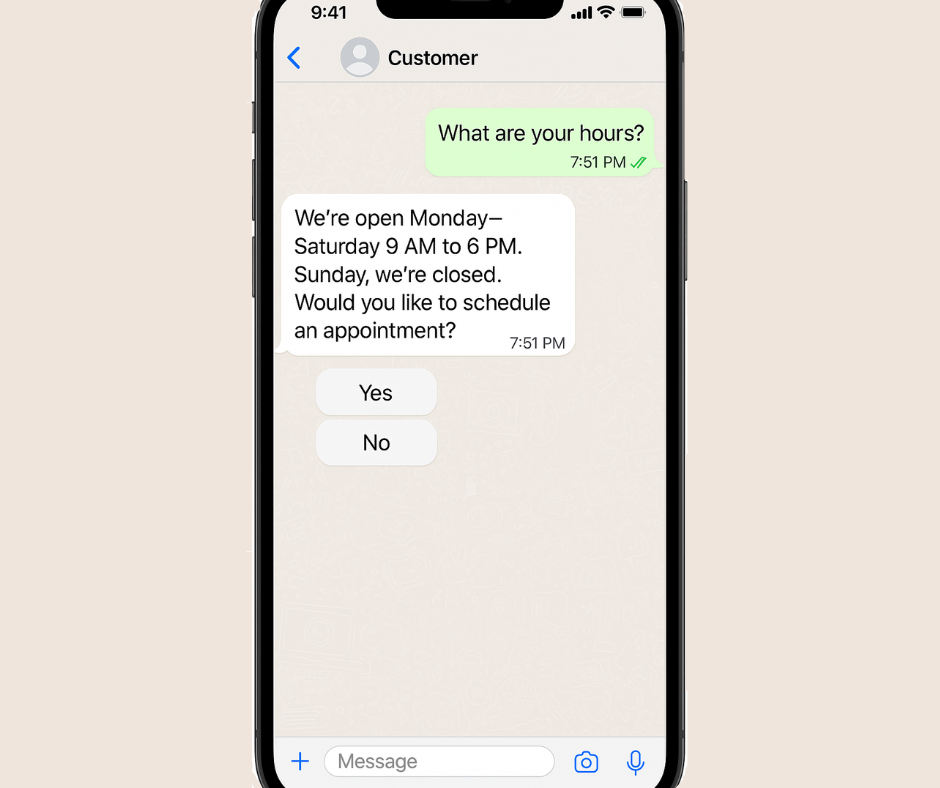
Smart Response Suggestions: When customers ask common questions, our system suggests the best responses based on your business type.

  • Customer: “What are your hours?”

  • System suggests: “We’re open Monday-Saturday 9 AM to 6 PM. Sunday, we’re closed. Would you like to schedule an appointment?”

Personalized Recommendations: Connect your product list, and our system suggests relevant items based on what customers bought before.

  • Previous purchase: Running shoes

  • System suggests: “John might be interested in our new athletic shirts – they’re 20% off this week!”

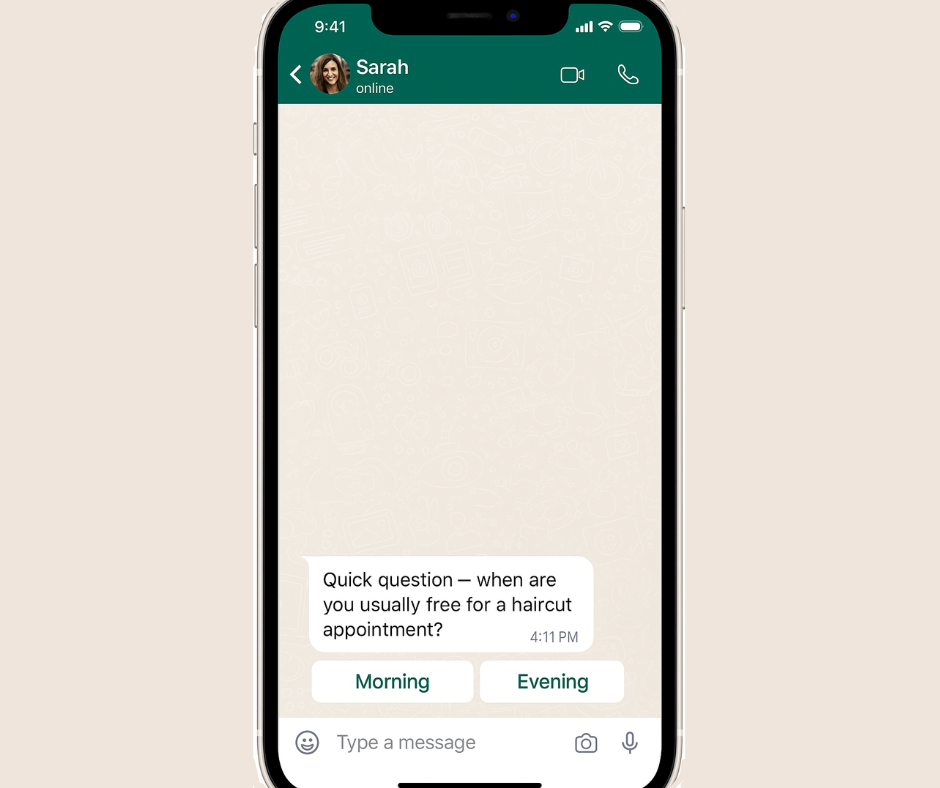
Perfect Timing: Our system learns when each customer usually responds and suggests the best times to contact them.

A message sent based on Sarah’s behavior, letting her choose the best time for an appointment — powered by WhatsApp Lite’s automation.

  • Sarah typically responds between 7-9 PM
  • System recommends: Send her messages at 7:30 PM for the best response

5. Account Protection (Your Safety Net)

This might be the most important feature, even though it works invisibly in the background.

What our protection system does:

  • Watches WhatsApp’s spam detection in real-time

  • Automatically slows down your campaigns if needed

  • Resumes normal sending when everything is safe

  • Keeps your account protected from unexpected bans

Why this matters: WhatsApp account bans happen quickly and without warning. Once banned, getting back can take weeks or might be impossible. Our system prevents this from ever happening.

Customer experience: “I was accidentally sending too many messages too fast. WhatsApp Lite automatically adjusted my campaign speed and saved my account. I didn’t even realize there was a problem until I checked later.” – Jennifer, Online Store Owner

Ready-to-Use Templates for Every Business Type

We’ve created proven message templates for the most common businesses:

Restaurants & Food Service

  • Daily specials with appetizing photos and “Order Now” buttons
  • Order confirmations with pickup time estimates

  • Table reservations with easy reschedule options

  • Customer feedback requests with simple response choices

  • Retail & Shopping
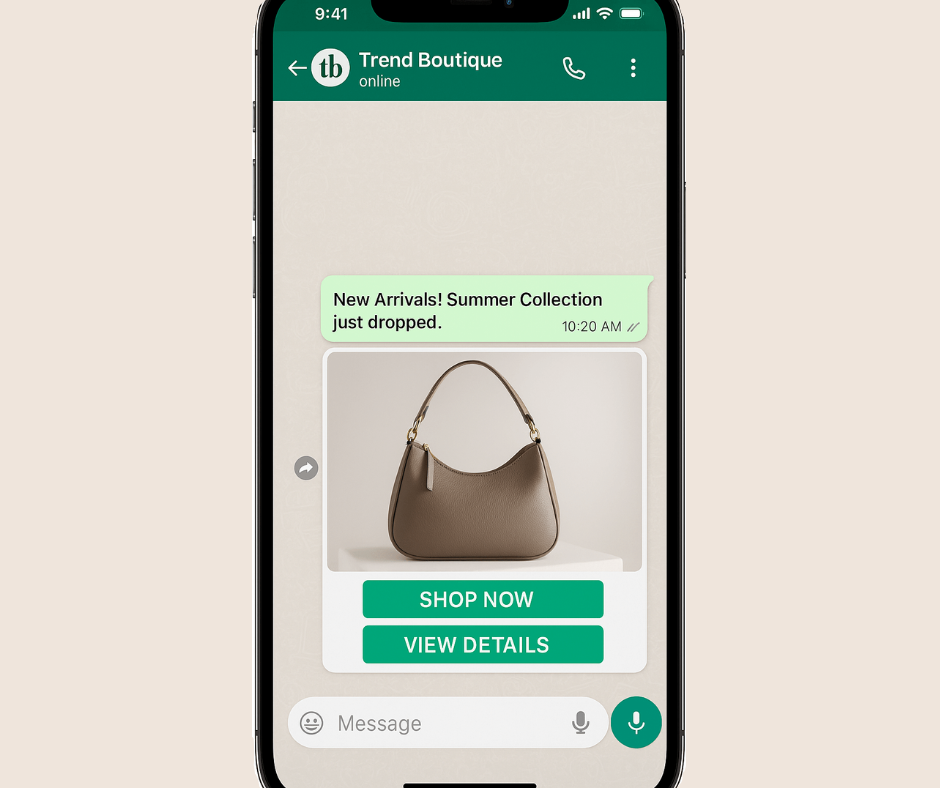
  • New arrivals announcements with “Shop Now” buttons
  • Cart reminder messages with product photos and discount offers
  • Shipping updates with tracking information

  • VIP customer offers based on purchase history

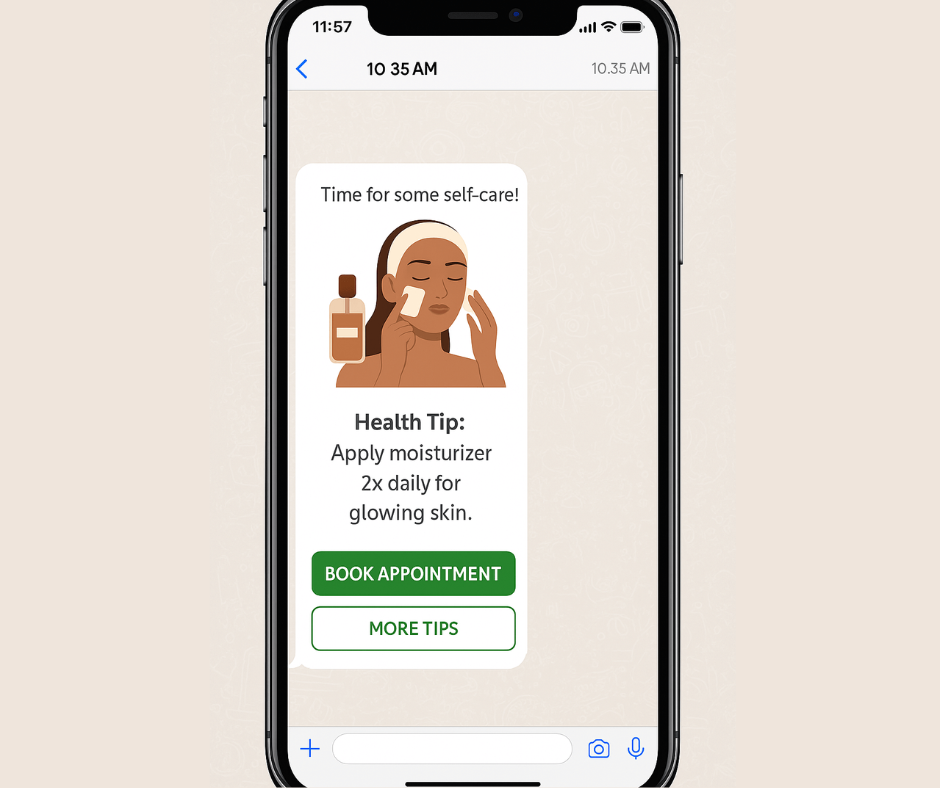
Health & Beauty

  • Appointment reminders with confirm/reschedule buttons

Health tips and advice with relevant images
  • Prescription ready notifications with pickup details
  • Follow-up care instructions with easy question options

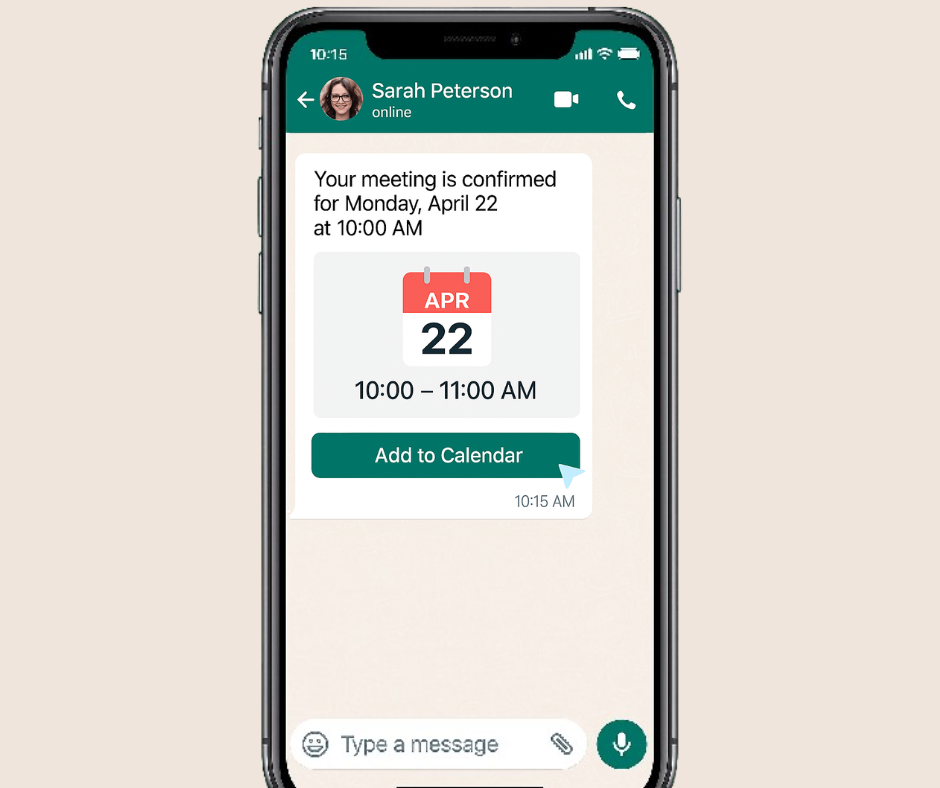
Professional Services

Meeting confirmations with calendar details
  • Service completion follow-ups with feedback requests
  • Educational content that shows your expertise

  • Referral requests with easy sharing options

Real Business Results (From Actual Customers)

Here are genuine results from businesses using WhatsApp Lite in their first 30 days:

Local Hair Salon (Austin, TX):

  • Before: Phone calls and text messages for appointments

  • After: WhatsApp appointment confirmations and reminders

  • Results: 31% fewer no-shows, $2,800 additional monthly revenue

Pet Supply Store (Phoenix, AZ):

  • Before: Email newsletters with 8% open rates

  • After: WhatsApp product updates with photos

  • Results: 67% engagement rate, 15% increase in monthly sales

Fitness Studio (Denver, CO):

  • Before: Generic class reminders via text

  • After: Personalized WhatsApp messages with fitness tips

  • Results: 23% better class attendance, 89% customer satisfaction

Auto Repair Shop (Chicago, IL):

  • Before: Phone calls for service updates

  • After: WhatsApp updates with photos of work progress

  • Results: Zero communication complaints, 34% increase in positive reviews

Your 30-Minute Setup Guide

Ready to join thousands of businesses already succeeding with WhatsApp Lite? Here’s your step-by-step plan:

Week 1: Get Started (30 minutes total)

Day 1 (15 minutes):

  1. Go to appgain.io/whatsapp-lite and sign up

  2. Connect your WhatsApp Business number

  3. Choose a template that matches your business

  4. Add your business logo and basic details

Day 3 (15 minutes):

  1. Create your first campaign using our template

  2. Add 10-20 customers to test with

  3. Send your first professional messages

  4. Check delivery and response rates

Week 2: Improve Results (45 minutes total)

Day 8 (30 minutes):

  1. Look at your first week’s results

  2. Adjust message timing based on when customers respond

  3. Add interactive buttons to get more engagement

  4. Plan your second campaign

Day 12 (15 minutes):

  1. Set up automatic responses for common questions

  2. Connect basic smart suggestions for your business type

  3. Plan your first month’s message calendar

Month 2 and Beyond: Grow Your Success

  • Add more advanced automation based on customer behavior

  • Connect with your existing customer management system

  • Try different message types and timing

  • Scale up to your full 300 daily message capacity

Pricing That Works for Small Business Budgets

We designed WhatsApp Lite pricing with real small business needs in mind:

Starter Plan: $49/month

  • 300 messages per day (9,000 per month)

  • All photo, video, and document features

  • Basic automation and smart suggestions

  • Email support with quick responses

  • Perfect for: Local businesses, service providers, small shops

Growth Plan: $99/month

  • Everything in Starter

  • Advanced automation features

  • Priority customer support

  • Custom template creation

  • Perfect for: Growing businesses, multiple locations, higher message volumes

Enterprise: Custom pricing

  • Everything in Growth

  • Custom integrations

  • Dedicated account manager

  • Advanced reporting

  • Perfect for: Larger businesses, franchises, complex needs

30-day money-back guarantee: Try WhatsApp Lite completely risk-free. If you’re not satisfied, we’ll refund every penny.

Frequently Asked Questions

Q: “Will this work with my current WhatsApp Business account?” A: Absolutely! WhatsApp Lite connects to your existing WhatsApp Business number. You keep all your current contacts and conversation history.

Q: “I’m not technical at all. Is this really simple?” A: Yes! Yesterday, 78-year-old Robert set up WhatsApp Lite for his antique store in 25 minutes. If he can do it, anyone can.

Q: “What if I need help setting up?” A: Every WhatsApp Lite customer gets free setup help. Our team will walk you through everything via video call if needed.

Q: “Can I change plans anytime?” A: Yes, with no penalties or long contracts. Change your plan instantly from your dashboard.

Q: “How quickly will I see results?” A: Most customers see better customer response rates immediately. Real business impact typically happens within 2-4 weeks of regular use.

Why WhatsApp Lite Works for Real Businesses

After talking to thousands of small business owners, we learned that most marketing tools are built for big companies with technical teams, not for real business owners who need to focus on running their business.

WhatsApp Lite is different because it’s built for real people running real businesses who need real results without complexity.

Why we’re confident this will work for you:

  • Every feature has been tested with actual small business owners

  • Our templates come from campaigns that generated real revenue

  • Our automation suggestions are based on successful businesses

  • Our support team understands small business challenges

Ready to Transform Your Customer Communication?

Thousands of small businesses are already using WhatsApp Lite to build stronger customer relationships and increase their revenue. The question isn’t whether this will work – it’s how much growth you’re missing by waiting.

What happens next:

  1. Sign up for your free trial (no credit card needed)

  2. Get a 15-minute guided setup with our friendly team

  3. Send your first campaign within 30 minutes

  4. See real results in your first week


Ready to get started? Start your free WhatsApp Lite trial →

Have questions? Chat with our team → (We respond within 2 hours)

Want to see it first? Watch a 5-minute demo →


Mohamed Shaheen is CEO and co-founder of Appgain, helping thousands of businesses improve customer relationships through simple marketing tools. Connect with Mohamed on LinkedIn or email him directly with questions about WhatsApp marketing.

Related Articles:

WhatsApp vs Email Marketing: Which Works Better for Small Business? appgain:your trusted odoo partner for scalable business solutio

What’s Next from Appgain?

While WhatsApp Lite is helping small businesses simplify and automate their customer communication, Appgain continues to innovate across industries.

Appgain has recently launched an integrated CRM solution tailored for the real estate sector — combining:

  • Odoo CRM

  • WhatsApp automation

  • Campaign tracking tools

  • And instant customer engagement

It’s designed to help real estate businesses close deals faster, follow up smarter, and manage leads with ease — all in one place.

Interested in real estate?
Discover Appgain’s CRM for Real Estate →