AI CRM Assistant Tricks: How to Get Better Answers and Faster Actions From Your CRM

Introduction

A new question comes up.

A manager wants to know how the pipeline looks.

A salesperson needs to find a customer before a call.

Someone wants to know which follow-ups are due today.

The answer already exists inside the CRM.

But before anyone can use it, one small decision needs to happen:

How do I ask for it?

In many businesses, that process is still surprisingly manual.

Open the CRM.

Find the right screen.

Choose the right filters.

Pick the date range.

Open the record.

Read the result.

The problem becomes more serious as the business grows.

More deals.

More contacts.

More tasks.

More pipelines.

More team members.

More conversations.

Suddenly, finding the right information becomes an operational challenge of its own.

This is where an AI CRM Assistant can make a significant difference.

But there is a catch.

Like any team member, an AI assistant gives better results when it is asked clearly.

Because having an assistant is only the beginning.

The next question is how well you use it.

What Is an AI CRM Assistant?

An AI CRM Assistant is an artificial intelligence interface connected to CRM data, business information, and operational tools.

Traditional CRM navigation relies on screens, reports, and filters.

For example:

Open Deals → Select Pipeline → Filter by Negotiation

or:

Open Tasks → Filter by Today

These steps are useful.

But real questions are often simpler than the path required to answer them.

An AI CRM Assistant lets users ask in natural language.

For example:

How many deals are currently in negotiation?

What tasks are due today?

Who has been most active on the sales team this week?

Find the contact for Ahmed.

This is different from a generic chatbot.

A generic AI model understands what a sales pipeline is.

An AI CRM Assistant connected to your workspace can answer what is happening in your sales pipeline right now.

Why the Way You Ask Matters

Businesses invest in CRM systems to organize customers, deals, tasks, and conversations.

But once the data is there, another process begins.

If the question is vague, several things can happen.

The assistant may return too much information.

It may interpret the request differently than intended.

It may need clarification.

An action may come back incomplete.

The user may give up and return to manual navigation.

Every extra round trip creates delay.

And while someone is rephrasing a question, the call may have already started.

The Manual CRM Navigation Problem

Imagine a team working with:

Contacts.

Companies.

Deals.

Tasks.

Tickets.

Conversations.

Reports.

Pipelines.

A sales manager needs a quick answer about the pipeline.

A salesperson needs a customer’s details before a call.

An account manager needs to know what is due today.

A team lead wants to see who is handling the most work.

When the CRM is small, employees can navigate it easily.

As it grows, the process becomes harder to repeat consistently.

Employees need to know which screen to open, which report to use, and which filters to apply.

The information exists.

But retrieving it still depends on understanding how the software is organized.

A Generic Question Isn’t Always Enough

One common approach is to ask AI short, open-ended questions.

“Open deals.”

“Show activity.”

“Check tasks.”

This feels fast.

But fast does not always mean useful.

Imagine a manager types: “Who has been active?”

Active when?

Active in what?

Calls, deals, messages, or tasks?

A vague question forces the assistant to guess.

A specific question does not.

How to Get Better Answers From an AI CRM Assistant

The exact questions depend on the business, but better results generally follow seven habits.

1. Ask a Business Question, Not a Navigation Question

Weak:

Open deals.

Better:

How many deals are currently in negotiation?

The first tells the AI where to go.

The second tells it what you need to know.

A connected assistant can work out the “where” by itself.

2. Add a Time Frame

Weak:

Who has been active?

Better:

Who has been most active on the sales team this week?

Time frames turn general curiosity into a precise question.

Today.

This week.

This month.

3. Name the Stage, the Person, or the Pipeline

The more specific the anchor, the less the AI has to guess.

For example:

Show me opportunities currently in negotiation.

Find the contact for Ahmed.

What tasks are due today?

Each one names the thing that matters.

A stage.

A person.

A date.

4. Separate Questions From Actions

Asking and doing are different requests.

A question looks like this:

What follow-ups need my attention?

An action looks like this:

Create a follow-up task with Ahmed tomorrow.

When giving an action, include the three things a task needs:

Who.

What.

When.

Leaving one out is a common reason an instruction comes back incomplete.

5. Ask One Thing at a Time, Then Build

A long, tangled request is harder to verify.

Start with:

How many deals do we have this month?

Then follow up:

Show me the ones in negotiation.

Short steps are easier to check.

And each answer gives you context for the next question.

6. Use It Before Meetings, Not Only After Problems

The best moment to ask is often before a conversation.

For example:

Show me the customer associated with this opportunity.

What tasks are due today?

A thirty-second question before a call can replace minutes of clicking through records.

7. Treat the Answer as a Starting Point

The AI gives you information quickly.

Your judgment decides what to do with it.

If an answer surprises you, open the underlying record.

The detailed CRM record remains the source of truth.

The assistant’s job is to get you there faster, not to replace it.

How an AI CRM Assistant Works

The exact workflow depends on the organization, but a connected assistant generally follows several stages.

1. Receive the Request

The user types a question or instruction in natural language.

For example:

“Who has been most active on the sales team this week?”

The first objective is to understand what the user needs.

2. Understand the Intent

The request may not be perfectly structured.

The user may simply write:

“Create a follow-up task with Ahmed tomorrow.”

That sentence already contains useful information.

AI can identify:

Type of request: Action

Task: Follow-up

Contact: Ahmed

Date: Tomorrow

Instead of requiring a form, the sentence itself becomes the instruction.

3. Retrieve the Right Context

Before answering, the assistant needs to look in the right place.

That may include:

Contacts.

Deals.

Tasks.

Pipelines.

Team activity.

Conversation information.

A generic AI model cannot do this.

An assistant connected to the workspace can.

4. Return a Useful Answer

Once the information is found, the assistant responds conversationally.

For example:

Question → CRM Context Retrieved → Answer Generated

The data has not changed.

The way the user reaches it has.

5. Take Action When Needed

Finding information is useful.

Acting on it is more valuable.

When the request contains an action, the connected system can execute the operation.

For example:

Create the task.

Link it to the contact.

Set the date.

Save it in the CRM.

The user stays in the same conversation.

Asking Questions About Your Sales Pipeline

Sales pipelines change constantly.

New opportunities appear.

Deals move between stages.

Customers stop responding.

Negotiations begin.

Opportunities close.

Managers need to understand these changes quickly.

Instead of rebuilding the pipeline through filters, they can start with the question:

How many deals do we have this month?

Show me deals currently in negotiation.

This is especially useful when someone needs a quick answer rather than a full report.

Finding Customer Information Faster

Customer information is one of the most frequently accessed parts of any CRM.

But as the database grows, finding the right customer can require several steps.

Search contacts.

Open the record.

Review activities.

Check related deals.

An AI assistant provides another way in.

Find the contact for Ahmed.

The objective is not to replace the customer profile.

It is to reduce the time needed to reach it.

Understanding Tasks and Follow-Ups

Tasks are only useful if employees know what needs attention.

A salesperson may have:

Calls to make.

Customers to follow up with.

Proposals to send.

Meetings to prepare for.

Instead of reviewing multiple task lists, they can ask:

What tasks are due today?

Which follow-ups need my attention?

The assistant becomes more than a search tool.

It becomes a way to understand what needs to happen next.

Understanding Team Activity

Managers frequently need visibility into team activity.

Who is active?

Who is handling the most work?

Where are opportunities moving?

Where might attention be needed?

Sometimes they don’t need an entire dashboard.

They need one answer.

Who has been most active this week?

Starting with the question can make operational data easier to access.

Why Context Is the Real Trick

All seven habits share one idea:

Specific questions get specific answers.

But there is a bigger factor underneath.

A generic AI model does not know what is happening in your pipeline.

An assistant that lives inside the workspace can answer questions about your actual contacts, deals, and tasks.

That is the difference between:

“What is a sales pipeline?”

and:

“What is happening in my sales pipeline right now?”

ConnectGain: An Assistant Inside the Workspace

With ConnectGain by Appgain, team members can use Ask ConnectGain, the AI assistant built directly into the ConnectGain workspace.

Instead of learning where every report lives, users can start with the question.

For example:

User Question

↓

Intent Identified

↓

Workspace Context Retrieved

↓

Answer Returned

↓

Action Executed When Requested

Teams can search contacts, review deals and tasks, and understand team activity without switching tools.

The conversation becomes another way to work with the CRM.

Combining AI With Your CRM Records

An AI CRM Assistant should not replace the CRM.

The strongest approach combines natural language with the structured records behind it.

AI may help with:

Understanding the question.

Finding the relevant information.

Summarizing the answer.

Identifying the requested action.

The CRM remains responsible for:

Customer records.

Deal history.

Task ownership.

Pipeline structure.

Source-of-truth data.

This creates a balance between convenience and control.

When Human Review Still Matters

Some requests should not be treated as final.

For example:

Surprising numbers.

Important customer decisions.

Actions affecting many records.

Anything that changes a customer commitment.

In these cases, users should check the underlying record before acting.

AI works best when people know where their judgment still matters.

How to Start With an AI CRM Assistant

Start by looking at the questions your team asks repeatedly.

Ask:

Which questions require the most clicks?

What do managers ask every week?

What do salespeople check before calls?

Which tasks are created repeatedly?

Which reports are opened only for one number?

Then begin with those.

You do not need dozens of use cases on day one.

Start with the questions your team already asks.

Then make them easier to answer.

Metrics Worth Watching

Once an AI assistant is in use, businesses can look at signals such as:

Time to find customer information.

Time to answer pipeline questions.

Number of tasks created from conversation.

Follow-up completion.

Manager reporting time.

Adoption across the team.

Questions that needed rephrasing.

The objective is not simply faster answers.

It is a smoother path from question to action.

The Future of CRM Interaction

CRM interaction is evolving from:

“Where do I find this?”

to:

“What do I want to know?”

AI can understand the request.

The CRM provides the data.

Automation executes the action.

The result is a closer connection between what people need and what the system can do.

Because the best CRM isn’t the one with the most screens.

And the best answer isn’t useful if it takes too long to reach.

Conclusion

Businesses invest heavily in collecting customer and sales information.

But how easily teams can use that information can be just as important as how it was captured.

Manual navigation, scattered reports, and vague questions can introduce friction into everyday work.

An AI CRM Assistant gives teams a smarter way to reach information and act on it.

By asking clear business questions, adding context, separating questions from actions, and verifying important answers, organizations can get more value from the same CRM data.

Because information isn’t truly useful when it exists in your CRM.

It’s useful when the right person can reach it at the right moment.

Ready to Talk to Your CRM?

ConnectGain by Appgain helps businesses connect customer conversations with AI assistance, CRM data, and workflow automation.

Ask questions in natural language, find customer information, review tasks and deals, and create follow-ups without unnecessary navigation.

The right question. The right answer. The right action.

Contact Us

📞 WhatsApp: +20 111 998 5526

🌐 Website: appgain.io

📧 Email: He***@*****in.io

About Appgain

Appgain is an Agentic AI company helping businesses turn customer conversations into intelligent, connected workflows.

Through ConnectGain, organizations can connect AI with customer communication channels, CRM systems, lead qualification, routing, voice, and business workflows—helping teams move from first contact to the right next action.

ConnectGain by Appgain

AI That Works Where Your Business Works.
 

Recruitment CRM: Mustagel Recruitment Success Story

For a recruitment and domestic worker services company, customer communication rarely ends after the first inquiry. Customers may ask about available services, return with additional questions, follow up on previous conversations, or need assistance at different stages of their journey.

For Mustagel Recruitment, based in Riyadh, managing these interactions required more than simply receiving customer messages.

The company adopted ConnectGain to create a more connected workflow between incoming conversations, team distribution, customer data, and ongoing WhatsApp follow-up.

The Challenge: Managing Conversations Beyond the First Message

Customer communication in recruitment services can involve multiple interactions over time.

A potential customer may contact the company today, ask about a service, leave the conversation, and return later. Another customer may be waiting for a response from the team, while someone else may require proactive follow-up.

As the number of conversations increases, the challenge becomes keeping track of what needs attention.

Which conversations haven’t been answered? Which customers are waiting for a reply? Which conversations require action from the team? And how can employees reconnect with customers who have already interacted with the company?

Mustagel needed a communication environment that could organize both incoming inquiries and ongoing customer engagement.

The Solution: A Unified Inbox for Customer Conversations

At the center of the Mustagel implementation is ConnectGain Inbox.

Conversations from multiple connected communication channels can be received and managed through one centralized Inbox, giving the team a shared workspace for customer communication.

Dedicated channel sections separate conversations according to their source, helping prevent messages from different channels from becoming mixed together.

Instead of managing communication around several separate inboxes, the team can work from one centralized environment.

Knowing Which Conversations Need Attention

Centralizing conversations is useful, but the team also needs to understand the status of those conversations.

ConnectGain provides multiple Inbox filters that help Mustagel identify where action is required.

These include:

Unread → Unanswered → Waiting for Client Reply → Waiting for Our Reply

Alongside other available conversation status filters.

This gives the team a more structured way to prioritize communication.

Instead of manually opening conversations to determine what happened last, employees can use conversation status to identify which customers require attention.

Automatic Conversation Distribution

Once a new inquiry enters the Inbox, ConnectGain can automatically distribute it among available team members.

Assignment is based on employees who are currently online.

The workflow becomes:

Customer Inquiry → Unified Inbox → Available Agent → Conversation Assigned → Customer Assisted

This reduces the need for manual conversation assignment and helps create clearer ownership across the team.

For Mustagel, that means incoming customer inquiries can move directly from the communication channel into an organized team workflow.

From Conversations to Customer Data

A customer conversation shouldn’t lose its value once the immediate interaction ends.

Mustagel uses ConnectGain Contacts Management to maintain information about customers who have previously interacted with the company.

Customer information and conversation history can remain available within the platform, creating a centralized customer database that the team can use for future communication.

This changes the relationship between conversations and customer data.

Instead of:

Conversation → End

the journey can become:

Conversation → Customer Contact → Future Follow-Up

Reconnecting With Existing Customers

Saved Contacts allow Agents to initiate new conversations with existing customers when required.

This is particularly useful when the relationship with the customer extends beyond a single interaction.

Rather than treating a returning customer as an entirely new inquiry, the team can work with customer information already maintained within the platform.

That creates greater continuity between previous communication and future follow-up.

Turning Customer Data Into WhatsApp Engagement

Mustagel also uses WhatsApp Campaigns within its ConnectGain workflow.

The team can send predefined WhatsApp messages to selected customers, supporting ongoing engagement and customer follow-up.

Because customer information is maintained within Contacts, the business can use its existing customer database as part of targeted WhatsApp communication.

This connects two sides of the customer relationship:

Inbound Communication: Customers contact Mustagel with inquiries.

Outbound Communication: Mustagel can reconnect with selected customers through WhatsApp Campaigns.

Instead of customer communication stopping when an Inbox conversation ends, ConnectGain helps create a path for continued engagement.

Connecting the Inbox With WhatsApp Follow-Up

This connection between conversations, Contacts, and Campaigns is one of the most important parts of the Mustagel workflow.

A customer may initially contact the company through a connected channel. The conversation enters the Unified Inbox and is handled by an available Agent.

The customer’s information remains available through Contacts.

Later, that data can support another customer conversation or a targeted WhatsApp Campaign.

The journey becomes:

Customer Inquiry → Unified Inbox → Agent Assignment → Conversation → Contact Saved → WhatsApp Follow-Up → Ongoing Engagement

This turns customer communication from a collection of isolated conversations into a more continuous workflow.

Roles and Permissions

As with any centralized customer platform, access control is important.

Mustagel’s ConnectGain Dashboard includes an Admin role and multiple Agent users.

The Admin can define and manage permissions for each Agent, including access to customer conversations within the Inbox, WhatsApp and other connected communication channels, customer Deals, and different areas and functionalities within the Dashboard.

This gives Mustagel centralized customer data and communication while maintaining control over which employees can access different areas of the platform.

Giving Teams Structure Without Losing Control

Centralizing conversations, Contacts, and Campaigns creates operational value, but different employees may have different responsibilities.

Role-based permissions allow Mustagel to align platform access with those responsibilities.

Agents can receive access to the functionality required for their work, while the Admin retains control over the broader ConnectGain environment.

This creates a balance between team collaboration and controlled customer data access.

The Business Value

The Mustagel implementation brings several customer communication activities into a more connected environment.

The company gains a Unified Inbox for customer conversations, automatic distribution among available employees, conversation status filters, centralized Contacts Management, targeted WhatsApp Campaigns, and role-based access control.

For the team, this creates a clearer way to understand which conversations need attention and who is responsible for handling them.

For ongoing customer engagement, it creates a connection between previous conversations and future WhatsApp follow-up.

From Customer Messages to a Continuous Engagement Workflow

The biggest change is not simply centralizing messages.

It is connecting different stages of customer communication.

Instead of:

Incoming Message → Agent Response → Conversation Ends

Mustagel can operate through a broader workflow:

Incoming Message → Unified Inbox → Prioritized Conversation → Agent Assignment → Contact Data → Follow-Up Campaign → Continued Customer Engagement

This gives the company a more structured foundation for managing customer relationships over time.

Conclusion

For Mustagel Recruitment, customer communication extends beyond answering the first inquiry.

Customers may require follow-up, return after previous conversations, or need additional communication as their journey continues.

With ConnectGain, Mustagel can centralize conversations, automatically distribute inquiries among available team members, use Inbox filters to identify conversations requiring attention, maintain customer information through Contacts, and reconnect with selected customers using WhatsApp Campaigns.

The result is a connected communication model:

Receive the inquiry. Organize the conversation. Keep the customer context. Follow up when it matters.

For Mustagel Recruitment, ConnectGain turns customer communication from isolated messages into a more continuous customer engagement workflow.

Ready to Connect Customer Conversations With Follow-Up?

With ConnectGain by Appgain, businesses can manage more than incoming customer messages.

Connect your conversations with customer data, team assignment, WhatsApp Campaigns, and ongoing follow-up—all within a more centralized customer communication workflow.

Turn every conversation into customer context—and every customer relationship into an opportunity for smarter follow-up.

Contact Us

📞 WhatsApp: +20 111 998 5526
🌐 Website: appgain.io
📧 Email: He***@*****in.io

About Appgain

Appgain is an Agentic AI company helping businesses turn customer conversations into intelligent business workflows.

Through ConnectGain, organizations can connect AI with CRM, WhatsApp, voice, social messaging, customer data, and automation—helping teams move from customer conversations to real business actions.

ConnectGain by Appgain

AI That Works Where Your Business Works.
 

How to Use ChatGPT to Write WhatsApp Messages That Don’t Get Flagged as Spam

WhatsApp is one of the most effective channels for business communication, yet it enforces strict policies. When companies ignore these rules, their messages may be flagged as spam or their business numbers may face restrictions. Because of that, marketers need a clear method for creating safe, user-friendly WhatsApp messages.

In this guide, you will learn how to use ChatGPT to write compliant WhatsApp messages, how WhatsApp’s spam detection works, and how to test and improve your campaigns with Appgain’s WhatsApp API.


Why WhatsApp Flags Messages

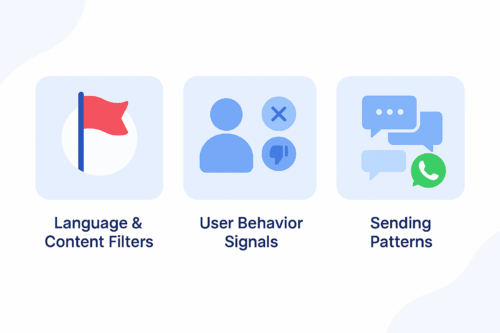
A clean blue infographic illustrating three reasons WhatsApp flags messages: language and content filters, user behavior signals, and sending patterns.
A simple infographic showing the main factors that cause WhatsApp messages to be flagged as spam.

WhatsApp protects users from unwanted or irrelevant content. Its detection system relies on three main components.

1. Language and Content Filters

WhatsApp automatically flags messages that include aggressive sales language, misleading claims, or repetitive promotional formatting.

2. User Behavior Signals

If users frequently block your number, report your messages, or never engage, WhatsApp lowers your sender quality score.

3. Sending Patterns

Sending the same unpersonalized message to large audiences or sending at a high frequency increases the risk of being flagged.


How ChatGPT Helps You Stay Compliant

ChatGPT allows marketers to generate message variations, personalize content, and avoid risky language. When used effectively, it helps you:

  • Avoid spam-triggering words

  • Maintain a conversational and friendly tone

  • Personalize messages at scale

  • Generate safe, compliant WhatsApp templates

Instead of guessing what may cause a message to be flagged, you can use ChatGPT to create structured, user-focused messages based on WhatsApp’s best practices.


Best Practices for Writing WhatsApp Messages

To improve compliance and engagement, follow these principles.

Focus on Value, Not Promotion

Avoid overly pushy sales messages.

Instead of:
“Buy now and get 50% off!”

Try:
“We thought you might like these new arrivals.”

Keep the Tone Conversational

Write naturally and avoid robotic or formal text.

Personalize Whenever Possible

Reference the user’s name, interest, or purchase history to reduce block rates.

Use Soft CTAs

Avoid commands such as “Act now.”
Use gentle guidance like “Would you like to explore the latest items?”


ChatGPT Prompt Examples for Safe WhatsApp Messaging

Use the prompt ideas below to generate compliant message templates:

Cart Reminder

“Write a friendly reminder for a user who left items in their cart. Keep the tone conversational and avoid strong promotional language.”

Personalized Follow-Up

“Create a message for a returning customer based on their last purchase. Offer something relevant without pressure.”

Re-Engagement Prompt

“Write a soft re-engagement message for a customer who has not interacted in 30 days.”

Order Confirmation with Suggestion

“Write an order confirmation message that includes a light suggestion for a related product.”

Limited-Time Announcement

“Create a short message inviting the user to view a relevant campaign without using pushy phrases.”


Testing and Improving with Appgain’s WhatsApp API

Once your messages are ready, you can test their performance using Appgain’s WhatsApp API.

Step 1: Send via WhatsApp API

Deliver personalized messages using templates, dynamic fields, and buttons.

Step 2: Monitor Message Performance

Track key metrics such as delivery rate, read rate, clicks, and opt-outs.

Step 3: Iterate Based on Feedback

If a message performs poorly, adjust the tone or content using ChatGPT and test a new version. Continuous iteration leads to stronger results.


Final Thoughts

Writing WhatsApp messages that avoid spam filters isn’t just a compliance task — it’s the foundation of building conversations that users actually want to receive. When your messaging feels natural, thoughtful, and personal, it earns trust instead of triggering blocks.

With Appgain, you’re not simply sending WhatsApp campaigns.
You’re shaping a messaging experience that respects the user, follows WhatsApp’s rules, and delivers measurable business impact.