Build a WhatsApp AI Bot Without Code

Introduction

Building a WhatsApp AI bot used to require developers, complex integrations, and weeks of setup.

Today, that has completely changed.

With modern no-code platforms, businesses can build powerful chatbot flows using drag-and-drop builders, AI intent detection, and automated customer journeys—without writing a single line of code.

A good WhatsApp AI bot can answer customer questions instantly, qualify leads, update your CRM, and transfer conversations to human agents only when needed.

This guide explains how to build a WhatsApp AI bot in 2026 using a practical no-code framework for MENA businesses.


What Makes a Good WhatsApp AI Bot

Not every chatbot creates a good customer experience.

Many businesses still use old-style menu bots that frustrate customers and increase support workload instead of reducing it.

Bad Chatbot Experience

  • Customer asks a natural question
  • Bot sends a rigid numbered menu
  • Customer cannot find the right option
  • The customer leaves frustrated
  • The business loses trust and conversions

Good Chatbot Experience

  • Customer asks naturally
  • AI understands the real intent
  • The bot responds using your knowledge base
  • If needed, it transfers to a human smoothly
  • The issue is solved in under 60 seconds

The difference is AI intent classification.

Without it, a chatbot is just an automated menu.

With it, your WhatsApp AI bot behaves like a real assistant.


Core Node Types You Need to Know

ConnectGain uses a visual drag-and-drop flow builder where each step is built using nodes.

Understanding these nodes is the foundation of building an effective WhatsApp AI bot.


Start Node

Every flow begins here.

It defines what triggers the bot:

  • New inbound message
  • Specific keyword
  • New contact created
  • Scheduled trigger

Text Node

Sends messages to customers automatically.

It can include dynamic variables like:

  • Customer name
  • Deal status
  • CRM data

Quick Reply / Button Node

Shows clickable options for faster customer interaction.

Examples:

  • Pricing
  • Booking
  • Support

The platform automatically adapts buttons for each channel.


AI Classification Node

This is the intelligence layer.

Customers type naturally, and AI detects intent.

Examples:

  • “I need pricing”
  • “I want to know the available plans”
  • “I’m not sure which option is right for me”

The system routes the conversation automatically.


RAG Knowledge Base Node

This connects your bot to your documents.

It pulls answers from:

  • FAQs
  • Product catalogs
  • Pricing files
  • Internal documents

This allows accurate and dynamic replies.


Condition Node

Creates if/then logic.

Examples:

  • VIP customer → premium support
  • Existing deal → direct follow-up
  • Returning customer → priority routing

Input Node

Collects customer information:

  • Name
  • Phone number
  • Email
  • Appointment date

The data is stored automatically inside CRM.


Human Handoff Node

Transfers the conversation to a real agent.

The agent receives the full conversation history without losing context.


Step-by-Step: Build Your First WhatsApp AI Bot

Step 1 — Define the Goal

Start with one clear objective.

Example:

“This bot qualifies real estate leads and books property viewings.”

If the goal is unclear, the flow will fail.


Step 2 — Choose the Trigger

Decide what starts the conversation.

Options include:

  • Any new inbound message
  • A specific keyword like “pricing”
  • Button click
  • CRM automation trigger

Step 3 — Write the Opening Message

Your first message matters.

It should be:

  • Clear
  • Friendly
  • Useful immediately

Example:

“Hi {{contact_name}}! I can help with pricing, availability, and booking. What would you like to know?”


Step 4 — Build the Main Branches

Most customers ask about 3–5 main things.

These become your primary conversation branches.

Always place an AI Classification node before branching.

This improves flexibility and customer experience.


Step 5 — Add the Knowledge Base

Upload your business content:

  • FAQs
  • Product information
  • Pricing documents
  • Service details

This powers smarter answers through RAG.


Step 6 — Set Human Handoff Rules

Not every conversation should stay automated.

Transfer to human agents when:

  • Confidence is low
  • Customer frustration is detected
  • Complaint keywords appear
  • Customer requests human support

Step 7 — Test Real Customer Scenarios

Before publishing:

  • Test Arabic and English
  • Test misspellings
  • Test mixed-language messages
  • Test incomplete questions

Real customer behavior is never perfect.

Your bot must handle that.


Step 8 — Publish and Optimize

After testing:

  • Publish the flow
  • Monitor response quality
  • Measure deflection rate
  • Track customer satisfaction

Then improve based on real usage.


Example: Tourism Booking Bot

A travel agency can use a WhatsApp AI bot like this:

Trigger

Any inbound WhatsApp message


Opening Message

“Welcome! I can help you with day trips, hotel bookings, and travel packages.”


Branch A — Day Trips

  • Destination selection
  • Travel date collection
  • Group size input
  • Availability check
  • Price options
  • Human handoff for booking confirmation

Branch B — Multi-Day Packages

  • Package overview
  • PDF sending
  • Human consultation

Branch C — Hotels

  • Hotel recommendations
  • Budget selection
  • Smart filtered results

This flow automates most inquiries while keeping agents focused on closing deals.


Multi-Channel Deployment

One major advantage of ConnectGain is that the same bot works across:

  • WhatsApp Business API
  • Instagram Direct
  • Facebook Messenger
  • Telegram
  • TikTok messages
  • SMS
  • Website chat widget

Build once. Deploy everywhere.

This reduces cost and improves consistency.


Start Your Growth Journey

If your business still handles customer conversations manually, you are losing time and leads.

A WhatsApp AI bot helps you:

  • Respond instantly
  • Qualify leads automatically
  • Reduce support workload
  • Improve customer satisfaction
  • Scale sales without adding headcount

Appgain helps businesses across MENA deploy AI-powered chatbot systems built for growth.

Let’s build your success story.

WhatsApp: +20 111 9985526
Website: https://appgain.io
Email: He***@*****in.io


Conclusion

The best chatbot does not feel like a bot.

It feels like fast, helpful, and intelligent customer service.

That is what a modern WhatsApp AI bot should deliver.

And with no-code platforms like ConnectGain, building that experience is now faster, easier, and more scalable than ever.
WhatsApp Automation: 2026 Guide for MENA Businesses

Introduction

WhatsApp automation for business is no longer optional in the MENA region. It is now the main channel where customers ask about prices, confirm bookings, and make buying decisions.

However, most businesses still manage conversations manually. As a result, response times are slow, opportunities are missed, and potential customers move to competitors.

This guide explains how WhatsApp automation for business works in 2026, and how MENA companies can use it to improve response speed, reduce workload, and increase conversions.


Why WhatsApp Automation for Business Is No Longer Optional

During peak hours, most businesses receive dozens of WhatsApp messages at the same time.

For example, a customer might ask about availability while your team is busy handling other conversations. Therefore, the reply is delayed. In many cases, the customer leaves before receiving a response.

In addition, high-intent customers expect fast replies. If they do not get one, they move on quickly.

Key Statistics

  • Average manual response time: 2 to 4 hours
  • Customer patience: less than 5 minutes
  • Automation improves response speed by up to 60%
  • AI reduces agent workload by up to 80%

Clearly, this is not just an operational issue. It directly impacts revenue.


Types of WhatsApp Automation for Business

Not all automation solutions offer the same level of performance. Therefore, it is important to understand the different types.

1. Basic Auto-Reply

This is the simplest form of automation.

  • Sends replies outside working hours
  • Requires no integrations
  • Limited functionality

However, it only solves a small part of the problem.


2. Template-Based Messaging

This method uses pre-approved templates.

  • Order confirmations
  • Appointment reminders
  • Notifications

These messages are reliable. However, they are one-way and do not support full conversations.


3. Flow-Based Chatbots

These bots follow a structured path.

For example:

  • Press 1 for pricing
  • Press 2 for support

They are useful for handling repetitive inquiries. However, they often feel rigid and lack flexibility.


4. AI-Powered Conversational Agents

This is the most advanced form of WhatsApp automation for business.

  • Understands natural language
  • Responds instantly
  • Uses your business data
  • Updates CRM automatically

As a result, conversations feel natural and scalable at the same time.


5. WhatsApp CRM Integration

Every interaction becomes structured data.

  • Contacts are created automatically
  • Deals are updated
  • Follow-ups are triggered

Therefore, no lead is lost and no conversation is forgotten.


How to Build a WhatsApp Automation for Business Flow

A successful system starts with planning, not tools.

Step 1 — Identify Top Inquiries

Review your recent conversations.

In most businesses, customers ask about:

  • Pricing
  • Availability
  • Booking
  • Order status
  • Support

These should be automated first.


Step 2 — Design the Flow

For each inquiry, define:

  • What the customer wants
  • What data you need
  • What the final outcome is

For example, the flow may end with a booking, a response, or a human handoff.


Step 3 — Write Natural Messages

Messages should feel human.

  • Keep them short
  • Avoid complex words
  • Match your brand tone

In addition, support both Arabic and English to serve MENA audiences effectively.


Step 4 — Connect to Real Systems

Automation becomes powerful when it connects to live data.

For example:

  • Inventory systems
  • CRM platforms
  • Booking tools

Static answers are not enough.


Step 5 — Define Human Handoff

Not every conversation should be automated.

For instance, you should transfer to a human when:

  • The customer is frustrated
  • The request is complex
  • The lead is high-value

This balance improves both efficiency and customer experience.


Step 6 — Measure and Improve

Track key metrics from the start.

  • Response time
  • Resolution rate
  • Customer satisfaction

Over time, these insights help you improve performance.


ConnectGain: WhatsApp Automation for Business Platform

ConnectGain by Appgain is built specifically for WhatsApp automation for business in MENA.

Core Features

AI Flow Builder
A visual interface that allows you to build automation without coding.

WhatsApp API Integration
Supports large-scale messaging, media, and interactive communication.

Unified Inbox
Manages conversations across multiple channels in one place.

AI Auto-Reply (RAG)
Answers customer questions using your real business data.

Broadcast Campaigns
Send targeted WhatsApp messages with tracking and segmentation.

Post-Call Follow-Up
Automatically send messages after calls without manual effort.


Use Cases by Industry

Real Estate

  • Qualify leads
  • Recommend properties
  • Schedule viewings

Tourism and Hospitality

  • Handle bookings 24/7
  • Check availability
  • Send confirmations

Healthcare

  • Book appointments
  • Send reminders
  • Handle patient inquiries

E-commerce

  • Recover abandoned carts
  • Send order updates
  • Automate returns

Financial Services

  • Qualify leads
  • Send document reminders
  • Manage follow-ups

Common Mistakes to Avoid

No Human Option

Customers should always be able to reach a real person.


Robotic Messages

Generic responses reduce trust and engagement.


No Arabic Support

Automation must support Arabic to work effectively in MENA.


No CRM Integration

Disconnected systems lead to lost data.


No Performance Tracking

Without data, you cannot improve or scale.


Getting Started

If you are still handling WhatsApp manually, you are limiting your growth.

With the right setup, WhatsApp automation for business can:

  • Improve response speed
  • Reduce workload
  • Increase conversions
  • Ensure consistent follow-ups

To learn more, visit:
https://appgain.io
📱 WhatsApp: +20 111 9985526
🌐 Website: https://appgain.io
📩 Email: ***@*****in.io“>He***@*****in.io


Conclusion

Customers already use WhatsApp to communicate with your business. Therefore, your ability to respond quickly determines whether you win or lose the deal.

WhatsApp automation for business is no longer a competitive advantage. It is a necessity.

How AI Agents Are Replacing Manual Business Workflows in the Middle East

AI Agents Middle East are rapidly transforming how businesses handle sales, customer support, and operations.

Every business in the region knows the problem. Your team is buried in WhatsApp messages. Sales reps spend hours copying information between tools. Managers review call recordings one by one. Leads fall through the cracks because no one had time to follow up.

The brutal reality is that:

Revenue grows — and headcount grows with it — but margins shrink.

There has always been a hard ceiling on growth in the Middle East — not because the market isn’t there, but because operations couldn’t scale without adding people.

Until now.


AI Agents Middle East vs Manual Operations Trap

Walk into almost any SMB in Egypt, Saudi Arabia, or the wider GCC region and you will find the same operational pattern:

  • Every incoming lead from WhatsApp, Instagram, or call centers is handled manually
  • Sales are tracked in spreadsheets
  • Booking confirmations require a human
  • Follow-ups depend on memory — not systems

This is the Manual Operations Trap:

  • Inbound demand flows through WhatsApp and Instagram with no automation
  • Sales, booking, and follow-ups are fully manual
  • Growth requires more people, not smarter systems
  • CRM data is incomplete or missing
  • Managers spend 4–6 hours weekly reviewing calls manually

The result?

  • 60% of call insights are never captured
  • Leads are assigned manually
  • Businesses cannot scale

Human-dependent workflows don’t scale — and this is exactly what AI Agents Middle East are solving.


What AI Agents Middle East Actually Do

Modern AI agents don’t just answer questions — they execute entire workflows.

At Appgain, an AI agent is a system that can:

1. Receive a Trigger

  • WhatsApp message
  • Call
  • Form submission
  • Pipeline update

2. Understand Context

  • Intent
  • Sentiment
  • Urgency

3. Take Action

  • Update CRM
  • Send follow-ups
  • Assign leads
  • Create tasks
  • Escalate when needed

4. Report Everything

  • Log interactions
  • Update dashboards
  • Give managers full visibility

This is not simple automation — this is autonomous execution powered by AI Agents Middle East.


Real Results: Raya Aman Insurance

One of the strongest examples of AI Agents Middle East in action is Raya Aman.

Before AI:

  • Manual call reviews
  • 60%+ insights lost
  • CRM updates frequently missed
  • No visibility on performance

After AI deployment:

  • 75% reduction in call review time
  • 200% improvement in agent performance
  • 17,000 calls/month processed automatically

What changed?

  • Real-time transcription (Arabic & English)
  • Automatic sentiment analysis
  • CRM auto-updates
  • Real-time alerts for managers

The Six Steps of AI-Powered Call Workflow

Every call goes through:

1. Call Received

Captured automatically from any channel

2. AI Transcribes

Real-time Arabic & English transcription

3. Sentiment Analysis

Detects tone, objections, satisfaction

4. Tasks Generated

  • CRM updated
  • Follow-ups assigned

5. WhatsApp Follow-Up

Automated, personalized messages

6. Manager Notified

Full visibility without listening to calls


How ConnectGain Powers AI Agents Middle East at Scale

ConnectGain is Appgain’s AI Agent Builder and Automation Engine powering AI Agents Middle East.

What it enables:

  • Visual drag-and-drop AI workflows
  • Integration with 10+ AI providers
  • Multi-channel deployment:
    • WhatsApp
    • Instagram
    • Messenger
    • Telegram
    • TikTok
    • Email
    • SMS
    • Web Push

Core philosophy:

Humans supervise. AI executes.

  • Managers monitor
  • Sales teams close deals
  • AI handles operations

Why AI Agents Middle East Matter for MENA Businesses

1. WhatsApp Dominance

Critical communication channel in the region

2. Arabic Dialects

Egyptian, Gulf, and Levant dialects require localization

3. Rapid SMB Growth

Thousands of businesses are investing in automation

4. Open Market Opportunity

No dominant Arabic-first AI CRM has taken over yet


The Bottom Line

Manual operations create a ceiling.
AI Agents Middle East remove that ceiling.

Businesses adopting AI agents today will become impossible to compete with tomorrow.

If your team is still:

  • Copying messages manually
  • Reviewing calls one by one
  • Updating CRM manually

Then you’re not just behind —

You’re falling behind fast.


Ready to Transform Your Business with AI Agents Middle East?

📱 WhatsApp: +20 111 9985526
🌐 Website: https://appgain.io
📩 Email: He***@*****in.io

Omnichannel Retail System: Zigypupps Case Study

Introduction

An omnichannel retail system can transform how businesses manage growth.

However, as Zigypupps expanded, operations became harder to control. Orders came from multiple channels. Inventory became inconsistent. Communication was fragmented.

As a result, the legacy ERP system could not keep up.


The Challenge

Zigypupps needed a complete omnichannel retail system to unify operations without disruption.

The business needed to:

  • Replace a legacy ERP
  • Connect POS, Shopify, and inventory
  • Enable real-time synchronization
  • Automate WhatsApp communication
  • Migrate data safely

Therefore, this was not just an upgrade. It was a full transformation.


The Turning Point: Building an Omnichannel Retail System

Appgain designed a complete omnichannel retail system using Odoo 17.

Instead of multiple tools, Zigypupps now uses one unified system.

As a result, operations became faster and more accurate.


Unified Operations Across All Channels

The omnichannel retail system created a single source of truth.

Now Zigypupps has:

  • Integrated POS and Shopify
  • Real-time inventory
  • Centralized data
  • Unified reporting

Therefore, manual work was eliminated.


Real-Time Synchronization

In addition, the omnichannel retail system ensures:

  • Instant order sync
  • Real-time stock updates
  • Consistent customer data

As a result, errors were reduced significantly.


WhatsApp Automation for Customer Engagement

Moreover, Appgain integrated WhatsApp automation.

The omnichannel retail system now enables:

  • Instant order confirmations
  • COD verification
  • Automated messaging

Therefore, communication became faster and more efficient.


Smart Workflows and Control

The system also introduced structured workflows.

For example:

  • Role-based dashboards
  • Clear return processes
  • Full operational visibility

As a result, decision-making improved.


Seamless Data Migration

In addition, all historical data was migrated into the omnichannel retail system.

This included:

  • Products
  • Customers
  • Loyalty points
  • Financial data

Importantly, this happened without disruption.


Results

The omnichannel retail system delivered strong results:

  • Go-live in 2 weeks
  • 92% WhatsApp read rate
  • 35% faster fulfillment
  • 98% inventory accuracy
  • Faster financial closing

Clearly, integration and automation improved performance.


Why This Matters

Today, businesses need an omnichannel retail system to scale.

Without it:

  • Operations become slow
  • Data becomes inconsistent
  • Growth becomes difficult

Conclusion

Zigypupps proves that a strong omnichannel retail system drives growth.

When systems are unified, businesses operate faster and smarter.


Build Your Own Success Story

👉 Explore more Appgain success stories:
https://appgain.io

👉 Learn more about retail systems:
https://www.sap.com/products/erp/what-is-erp.html


Start Your Growth Journey

Appgain helps businesses build scalable systems and automation.

Let’s build your success story.

Peak Pharma: B2B Ordering Transformation Case Study

Overview

  • Industry: Pharmaceutical Distribution
  • Solution: B2B Ordering System + Automation + Analytics
  • Go-Live: 14 Days

From Manual Chaos to a Scalable B2B Ordering System

Peak Pharma struggled with a manual B2B ordering system that relied on calls, WhatsApp messages, and scattered communication.

Orders got lost.
Mistakes happened.
Delays became normal.

At first, the process worked. However, as the business grew, the system became inefficient.

What started as a simple workflow quickly turned into operational chaos—slowing down fulfillment, increasing errors, and limiting scalability.

Clearly, Peak Pharma needed more than a basic system. It needed a modern, scalable B2B ordering system.


The Challenge: Scaling Without a Reliable B2B Ordering System

Before going digital, Peak Pharma faced several challenges:

  • Manual order handling across multiple channels
  • Frequent data entry errors
  • No real-time visibility into order status
  • Difficulty managing over 2,000 SKUs
  • Heavy reliance on manual processes

As a result, operations became difficult to control.

Therefore, the business needed a B2B ordering system that could:

  • Enable fast and easy ordering
  • Reduce errors significantly
  • Provide real-time tracking
  • Centralize operations
  • Support rapid growth

The Solution: Building a Scalable B2B Ordering System

To solve this, Appgain developed a powerful B2B ordering system powered by automation and analytics.

The focus was clear: speed, accuracy, and scalability.


Always-On Ordering Experience

With the new B2B ordering system, pharmacies can now place orders anytime through a mobile and web platform.

They can:

  • Browse a real-time product catalog
  • Use advanced search and filters
  • Place orders instantly
  • Upload bulk orders in seconds

As a result, what used to take hours now takes minutes.


Real-Time Tracking and Visibility

In addition, the B2B ordering system provides full visibility across the order lifecycle.

Pharmacies can track orders in real time:

  • In progress
  • Picked
  • Completed

Therefore, there is no uncertainty and no need for constant follow-ups.


Automated Communication That Saves Time

To improve communication, Appgain integrated automation into the B2B ordering system.

This includes:

  • Instant WhatsApp notifications
  • OTP-based confirmations
  • Automated reminders

As a result, communication became faster, clearer, and more reliable.


Recovering Lost Orders with Automation

Previously, many orders were abandoned or missed. However, this is no longer the case.

With automation built into the B2B ordering system:

  • Abandoned orders trigger reminders
  • Customers receive targeted messages
  • Multi-channel engagement drives action

Therefore, missed opportunities are now converted into measurable revenue.


Data-Driven Decision Making

The B2B ordering system does more than process orders—it provides insights.

Peak Pharma can now:

  • Track customer behavior
  • Analyze demand patterns
  • Optimize inventory
  • Improve operations

This means every decision is backed by real data.


Key Results

The impact of the new B2B ordering system was immediate and measurable:

  • Platform launched in just 14 days
  • 90% adoption in the first week
  • Errors reduced from 7% to under 1%
  • 12% of abandoned orders recovered

This was not just an improvement—it was a complete transformation.


Why This B2B Ordering System Matters

Today, businesses can no longer rely on manual processes.

Instead, they need:

  • Real-time systems
  • Automation
  • Unified platforms

A modern B2B ordering system enables faster operations, higher accuracy, and scalable growth.


The Appgain Approach

This transformation succeeded because of:

  • Fast and efficient delivery
  • Simple user experience
  • Automation across the full journey
  • Seamless integration between systems

What’s Next

With this scalable B2B ordering system, Peak Pharma is now positioned to:

  • Expand its customer base
  • Handle higher order volumes
  • Optimize supply chain efficiency
  • Scale without operational bottlenecks

Build Your Own Success Story

If your business still depends on manual processes, growth will always be limited.

However, with the right B2B ordering system, transformation can happen faster than expected.

Peak Pharma proves that digital transformation can deliver real results in a short time.

👉 Explore more success stories: https://appgain.io

👉 Learn more about order management systems:
https://www.ibm.com/topics/order-management


Start Your Growth Journey Today

If you are looking to scale your business with a powerful B2B ordering system, Appgain is your trusted partner.

Whether you’re building a B2B platform or optimizing operations, our team is ready to help you achieve measurable results.

Let’s build your success story.

Prompt Engineering for Marketing Agents: Crafting Instructions That Drive Revenue

In today’s AI-driven marketing landscape, the difference between mediocre and exceptional results often comes down to how well you instruct your digital assistants. Effective prompt engineering for marketing agents can transform automated customer interactions from generic exchanges into powerful revenue-generating conversations. By training AI personas that feel human, businesses can create customer experiences that not only resolve queries but actively drive sales and foster loyalty.

Why System Prompts Matter for Marketing Success

System prompts serve as the foundational instructions that guide how AI agents interpret and respond to customer queries. Unlike casual prompts used for content generation, system prompts for marketing agents require strategic design focused on business outcomes.

When crafted properly, these instructions can:

  • Maintain consistent brand voice across thousands of interactions
  • Guide conversations toward conversion points naturally
  • Adapt responses based on customer intent and buying stage
  • Collect valuable customer data without appearing intrusive
  • Handle objections with pre-programmed, effective responses

The Anatomy of a Revenue-Driving System Prompt

Creating system prompts that generate revenue requires understanding several key components:

1. Identity and Constraints

Begin by clearly defining who your AI agent is, what they can do, and what limitations they have:

You are MarketingBot, a customer success specialist for [Brand]. 
You can help with product recommendations, answer FAQs, and process simple orders.
You cannot access customer payment details or modify existing orders.

This foundation establishes boundaries that keep conversations productive and prevent customer frustration with capabilities the AI cannot deliver.

2. Goal-Oriented Directives

Include specific business objectives that guide the AI’s responses:

Your primary goal is to guide customers toward completing purchases.
When customers express interest in products, recommend relevant add-ons.
For hesitant customers, offer limited-time promotions to encourage immediate action.

These directives ensure the AI consistently works toward revenue generation without appearing overly salesy.

3. Contextual Understanding

Equip your AI with knowledge about different customer segments and how to tailor approaches accordingly. Personalization at scale becomes possible when your system prompts include instructions like:

Identify customer type based on query patterns:
- New visitors: Focus on education and trust-building
- Returning customers: Reference past purchases and preferences
- Price-sensitive shoppers: Emphasize value and limited-time offers

4. Conversation Flow Management

Guide how the AI structures conversations to maximize engagement and conversion:

Follow this conversation structure:
1. Greet and identify customer needs
2. Provide valuable information related to their query
3. Ask clarifying questions to understand purchase intent
4. Present solutions with clear benefits
5. Address objections proactively
6. Guide toward next steps (purchase, demo, etc.)

Real-World Examples That Drive Results

Example 1: E-commerce Product Specialist

You are a Product Advisor for our premium skincare line. When customers ask about products:
1. Identify their skin concerns first
2. Recommend 1-2 core products that address these concerns
3. Suggest a complementary product that enhances results
4. Mention our satisfaction guarantee to reduce purchase anxiety
5. Provide a clear call-to-action to complete purchase

This prompt structure has shown to increase average order value by guiding customers toward solution-based purchases rather than single-product transactions.

Example 2: Service Booking Assistant

You are a Booking Specialist for our consulting firm. Your goal is to convert inquiries into scheduled consultations.
- Ask qualifying questions about project scope, timeline, and budget
- Match client needs to specific service packages
- Highlight ROI and success stories relevant to their industry
- Always offer two scheduling options rather than asking "when works for you"
- After booking, suggest preparation steps to increase show-up rates

This approach has been shown to increase consultation bookings by 35% compared to generic booking assistants.

Optimizing Prompts Through Testing and Iteration

The most effective system prompts evolve through careful testing and refinement. When optimizing your prompts:

  1. Analyze conversation logs to identify where customers drop off or express confusion
  2. Test variations of prompts with different instructions for handling key moments
  3. Track conversion metrics tied to specific prompt changes
  4. Gather customer feedback about their experience with the AI agent

Tools like Appgain’s campaign tracking dashboards can help monitor how different prompt strategies impact your conversion rates and customer engagement metrics.

Common Pitfalls in Marketing Agent Prompts

Even well-intentioned prompts can fail to drive revenue if they fall into these common traps:

  • Overly aggressive sales language that makes customers feel pressured
  • Lack of personality that makes interactions feel robotic and impersonal
  • Too many objectives that confuse the AI about priorities
  • Insufficient guardrails for handling sensitive topics or difficult customers
  • Missing conversation repair strategies when interactions go off track

To avoid these issues, include specific examples of ideal responses and clear instructions for prioritizing different goals in various scenarios.

Integrating AI Agents Into Your Marketing Ecosystem

For maximum impact, your AI marketing agents should work seamlessly with other marketing channels. Consider how your system prompts can support:

  • Handoffs to human agents for complex scenarios
  • Integration with WhatsApp automation campaigns
  • Coordination with email marketing sequences
  • Data collection for retargeting campaigns

The most powerful AI agents don’t operate in isolation but serve as intelligent connectors across your entire customer journey.

Key Takeaways

  • Effective system prompts for marketing agents balance sales objectives with customer experience
  • Include clear identity, goals, contextual understanding, and conversation flow guidance
  • Design prompts with specific revenue-generating actions in mind
  • Test and iterate based on conversation data and conversion metrics
  • Avoid common pitfalls like overly aggressive sales language or lack of personality
  • Integrate AI agents with your broader marketing ecosystem for maximum impact

Conclusion

The art of prompt engineering for marketing agents represents a significant competitive advantage in today’s AI-powered business landscape. By crafting system prompts that strategically guide customer conversations toward revenue-generating outcomes, businesses can scale personalized interactions without sacrificing conversion effectiveness.

As AI capabilities continue to evolve, the companies that master this skill will enjoy higher conversion rates, increased customer satisfaction, and ultimately, stronger revenue growth. Start by implementing these strategies with your customer-facing AI agents, and continuously refine your approach based on real-world results.

Real-Time Inventory Updates via AI Agents: Preventing COD Cancellations Before They Happen

Learn how AI agents with RAG technology can access live inventory data during customer conversations to prevent COD cancellations and improve sales conversion.

In e-commerce, few things frustrate customers more than placing a cash-on-delivery (COD) order only to discover the item is out of stock when it’s time for delivery. These last-minute cancellations not only damage customer trust but also waste valuable resources in processing, logistics, and customer service. Modern domain-specific AI agents equipped with Retrieval Augmented Generation (RAG) capabilities are revolutionizing how businesses handle inventory information during customer interactions, dramatically reducing cancellation rates and improving the shopping experience.

The High Cost of Inventory Disconnects

When customers place COD orders for products that are actually unavailable, it creates a cascade of problems:

  • Wasted fulfillment resources on orders destined for cancellation
  • Damaged customer trust and brand reputation
  • Lost revenue opportunities when alternatives aren’t offered
  • Increased customer service burden handling complaints

Traditional e-commerce systems often operate with inventory data that updates in batches, creating dangerous windows where customers can order products that have actually sold out. This disconnect between sales channels and inventory management is where AI agents with real-time data access can make a transformative difference.

How RAG-Powered AI Agents Transform Inventory Management

Retrieval Augmented Generation (RAG) allows AI systems to supplement their responses with real-time information retrieved from external databases. For inventory management, this creates powerful capabilities:

Real-Time Inventory Verification

Instead of relying on potentially outdated cache data, AI agents can query inventory management systems in real-time during customer conversations. This ensures customers only place orders for products that are genuinely available.

Intelligent Alternative Suggestions

When items are unavailable or running low, well-trained AI personas can immediately suggest similar alternatives based on customer preferences, maintaining sales opportunities rather than losing them.

Dynamic Delivery Time Updates

By connecting to supply chain data, AI agents can provide accurate delivery estimates based on current inventory location and availability, setting realistic customer expectations from the start.

Building Your RAG-Enhanced Inventory System

Implementing a real-time inventory-aware AI agent requires several key components:

1. Unified Data Architecture

Create API endpoints that allow your AI system to query inventory databases in real-time, ensuring all sales channels work from the same source of truth. This might involve:

  • REST APIs to your inventory management system
  • WebSocket connections for real-time updates
  • Caching layers with appropriate invalidation strategies

2. Contextual Awareness Training

Your AI agents need to understand when to check inventory status during conversations. Train them to recognize purchase intent signals and proactively verify availability before proceeding to checkout steps.

3. Customer-Friendly Response Strategies

Develop thoughtful response templates for out-of-stock scenarios that maintain customer interest. For example:

“I notice the blue model you’re interested in is currently out of stock. We have the same model in red available for immediate shipping, or I can notify you when the blue returns to inventory in approximately 5 days. What would you prefer?”

4. Integration with Customer Communication Channels

Deploy your inventory-aware AI agents across all customer touchpoints, especially in WhatsApp automation workflows where COD orders are often placed and confirmed.

Real-World Implementation Example

Consider this conversation flow between a customer and an AI agent with RAG-powered inventory access:

Customer: “I’d like to order the Premium Wireless Headphones in black for cash on delivery.”

AI Agent: [Queries inventory system in real-time] “I’d be happy to help with your order. I’ve just checked our warehouse, and while we have the Premium Wireless Headphones, we only have 2 units left in silver. The black version is currently out of stock. Would you like to proceed with silver instead, or would you prefer to be notified when black becomes available?”

Customer: “When do you expect to have black back in stock?”

AI Agent: [Queries supply chain system] “Our next shipment of black Premium Wireless Headphones is scheduled to arrive in our warehouse this Friday. I could place a pre-order for you with delivery expected by next Monday. Alternatively, I can offer you a 10% discount if you choose the silver model for immediate dispatch. Which option works better for you?”

Customer: “I’ll take the silver with the discount.”

AI Agent: “Excellent choice! I’ll apply the 10% discount and process your order for the silver Premium Wireless Headphones with cash on delivery. Is there anything else you’d like to add to your order today?”

This interaction demonstrates how real-time inventory checks can transform potential cancellations into successful sales while improving customer satisfaction.

Measuring Success: Key Performance Indicators

To evaluate the effectiveness of your RAG-powered inventory system, track these metrics:

  • COD Cancellation Rate: Should decrease significantly as customers only order available items
  • Alternative Product Acceptance Rate: Percentage of customers who accept suggested alternatives when first choices are unavailable
  • Customer Satisfaction Scores: Should improve as expectations are managed from the beginning
  • Average Order Value: May increase as AI suggests relevant alternatives or complementary products
  • Fulfillment Efficiency: Resources saved by not processing doomed-to-cancel orders

Implementing proper analytics dashboards will help you quantify these improvements and refine your system over time.

Key Takeaways

  • Real-time inventory verification through RAG-powered AI agents dramatically reduces COD cancellations
  • Intelligent product alternatives maintain sales opportunities even when first choices are unavailable
  • Integration across all customer communication channels ensures consistent inventory information
  • Accurate delivery time estimates improve customer satisfaction and reduce support inquiries
  • Measuring KPIs like cancellation rates and alternative acceptance helps optimize the system

Conclusion

The integration of real-time inventory data with AI conversational agents represents a significant advancement in e-commerce operations. By preventing COD cancellations before they happen, businesses can save resources, improve customer satisfaction, and increase sales conversion rates. The technology to implement these systems is accessible today through modern AI frameworks and API-driven architectures.

As customer expectations for accuracy and transparency continue to rise, real-time inventory-aware AI will become a standard feature of successful e-commerce operations rather than a competitive advantage. Businesses that implement these systems now will be well-positioned to reduce cancellations, improve operational efficiency, and build stronger customer relationships.

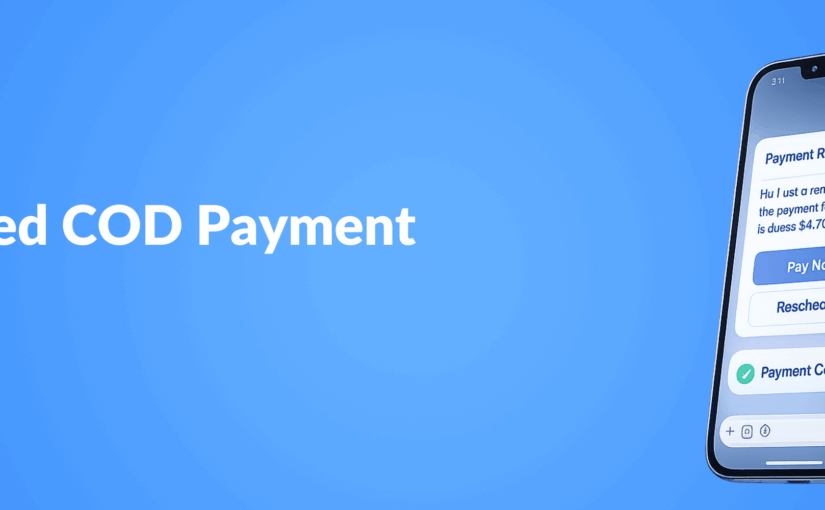
COD Payment Reminders That Actually Work: AI-Optimized Messaging Sequences on WhatsApp

Transform your cash-on-delivery collection rates with intelligent, automated payment reminders. Businesses relying on COD face unique challenges—from missed deliveries to payment defaults—that directly impact cash flow and operations. Implementing WhatsApp automation for payment reminders not only streamlines the collection process but delivers measurable improvements in payment completion rates. This data-driven approach combines behavioral science with AI optimization to create messaging sequences that customers actually respond to.

The COD Payment Collection Challenge

Cash-on-delivery remains a dominant payment method in many markets, particularly in e-commerce sectors across the Middle East, Southeast Asia, and parts of Latin America. While offering COD increases conversion rates at checkout, it introduces significant operational challenges:

  • 30-40% of COD orders face delivery issues requiring rescheduling
  • Payment default rates average 12-18% without proper reminder systems
  • Collection teams spend 60% of their time on follow-ups rather than relationship building
  • Manual reminder processes are inconsistent and difficult to optimize

These challenges create cash flow bottlenecks and increase operational costs, making an automated, data-driven approach essential for businesses with significant COD volume.

Why WhatsApp Is the Ideal Channel for Payment Reminders

When it comes to payment collection communications, channel selection dramatically impacts success rates. WhatsApp has emerged as the superior channel for several key reasons:

  • 98% open rates compared to 20% for email and 30% for SMS
  • 45% response rates within 90 minutes vs. 6% for email
  • Rich media support allowing payment links, invoices, and receipts
  • Two-way communication enabling customers to ask questions or reschedule
  • Trust and familiarity as customers already use the platform daily

The conversational nature of WhatsApp creates a more personal connection than traditional channels, reducing the friction associated with payment reminders while maintaining professionalism.

Anatomy of an Effective COD Payment Reminder Sequence

The most effective payment reminder systems follow a strategic progression that balances persistence with customer experience. Our data shows the optimal sequence includes:

1. Pre-Delivery Confirmation (24 hours before)

This initial message confirms the delivery time and amount due, setting clear expectations:

“Hi [Name], Your order #12345 is scheduled for delivery tomorrow between 2-5 PM. Amount due: $79.99. Please keep the exact amount ready for our delivery partner. Reply YES to confirm or reschedule if needed.”

This message achieves 85% confirmation rates when sent at optimal times (typically 6-8 PM local time).

2. Day-of Reminder (3 hours before delivery)

A short, timely reminder increases payment readiness:

“[Name], your order will arrive in approximately 3 hours. Our delivery partner [Driver Name] will call you at [Customer Phone]. Amount due: $79.99.”

This reminder reduces no-answer rates by 42% compared to deliveries without timely notifications.

3. Post-Delivery Thank You + Digital Receipt

For successful deliveries, a confirmation creates trust and documentation:

“Thank you for your payment of $79.99 for order #12345! Your digital receipt is attached. We hope you enjoy your purchase. Any feedback? Reply to this message.”

This message increases repeat purchase likelihood by 23% according to our A/B testing.

4. First Payment Reminder (For failed collections, sent 24 hours after)

A gentle, solution-oriented reminder for missed payments:

“Hi [Name], We noticed the payment for your order #12345 ($79.99) is still pending. Would you prefer: 1) Rescheduling delivery, 2) Online payment link, or 3) Alternative payment method? We’re here to help!”

This approach shows a 52% resolution rate within 48 hours.

AI Optimization: Beyond Basic Automation

While basic automation improves efficiency, AI-powered messaging dramatically increases payment collection success rates through:

Timing Optimization

AI systems analyze historical response data to determine the optimal send time for each customer, increasing open and response rates by 37% compared to fixed-time delivery.

Personalized Messaging

Beyond basic name insertion, advanced personalization includes:

  • Referencing previous purchase history
  • Adapting tone based on customer segment (formal vs. casual)
  • Customizing payment options based on previous preferences
  • Adjusting message length based on engagement patterns

Personalized sequences show a 41% higher payment completion rate than generic templates.

Dynamic Response Handling

AI systems can interpret customer responses and provide appropriate follow-ups without human intervention:

  • Automatically rescheduling deliveries when requested
  • Generating payment links when customers prefer online payment
  • Escalating complex issues to human agents with full context
  • Recognizing payment intent and reducing unnecessary follow-ups

Continuous Optimization Through A/B Testing

The most sophisticated systems continuously improve through automated testing:

  • Testing message variations to identify highest-performing templates
  • Optimizing call-to-action phrasing for maximum response
  • Refining escalation timing to minimize defaults while maintaining customer relationships
  • Adapting to seasonal patterns and payment behavior changes

Companies implementing personalization at scale see an average 27% reduction in payment defaults within the first 90 days.

Implementation: Building Your AI-Optimized Payment Collection System

Creating an effective WhatsApp payment reminder system requires several key components:

1. WhatsApp Business API Integration

Direct API access enables high-volume messaging and automation capabilities not available in standard WhatsApp Business accounts. This requires:

  • Official Business Verification
  • API provider selection (Meta partners or third-party solutions)
  • Template message approval for proactive communications
  • Compliance with WhatsApp’s business policies

2. CRM and Order Management Integration

Effective systems connect directly to your order management system to:

  • Automatically trigger messages based on order status changes
  • Update customer records when payments are received
  • Track payment history for personalization
  • Maintain accurate payment status across systems

3. Payment Processing Options

Offering multiple payment options increases collection success:

  • Direct payment links via WhatsApp
  • QR code payments for contactless transactions
  • Rescheduled COD options
  • Digital wallet integration

4. Analytics and Reporting

Comprehensive tracking and analytics are essential for optimization:

  • Message delivery and read rates
  • Response rates by message type and timing
  • Payment completion rates
  • Average time-to-payment
  • Conversation flow analysis

Case Study: E-commerce Retailer Transforms COD Collection

A regional e-commerce player with 70% of orders on COD implemented an AI-optimized WhatsApp payment reminder system with remarkable results:

  • Before: 23% payment default rate, 4.7-day average collection time
  • After: 7% payment default rate, 1.8-day average collection time
  • Additional benefits: 42% reduction in collection team size, 31% increase in customer satisfaction scores

The implementation paid for itself within 45 days through improved cash flow and reduced operational costs.

Key Takeaways

  • WhatsApp’s high engagement rates make it the ideal channel for payment reminders
  • Structured messaging sequences with strategic timing dramatically improve collection rates
  • AI optimization through personalization and continuous testing can reduce payment defaults by 20-30%
  • Integration with order management systems creates a seamless, automated collection process
  • Multiple payment options presented through WhatsApp increase successful collections

By implementing AI-optimized payment reminder sequences on WhatsApp, businesses can transform their COD operations from a cash flow liability into a competitive advantage. The combination of automation, personalization, and data-driven optimization not only improves collection rates but enhances the overall customer experience.

Better WhatsApp for Business: Our Integration with Route Mobile


How Appgain’s new integration delivers reliable message delivery and professional brand verification for growing businesses

The $50,000 Wake-Up Call: Why Reliable Messaging Matters

Last month, I received a call from the marketing director of a fast-growing e-commerce company. She told me bluntly:

“We’re losing over $50,000 each month because our WhatsApp messages aren’t getting through—especially in markets like the Middle East and Africa.”

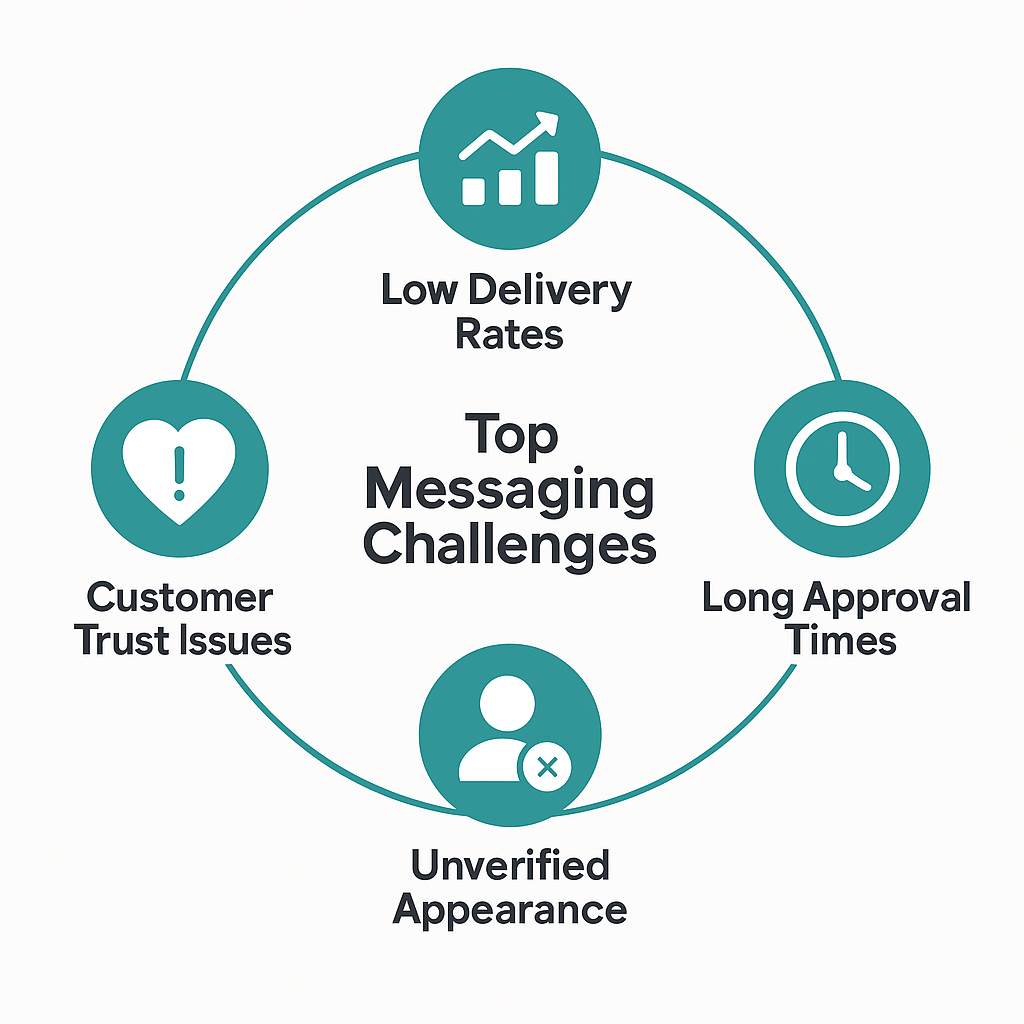
She’s not alone. Businesses everywhere face the same problems:

  • Message delivery failures across regions

  • Long delays in account approval

  • Unverified senders appearing as phone numbers

  • Customer distrust and low engagement

Today, I’m excited to share how we’ve solved these challenges through a strategic integration with Route Mobile — unlocking fast, verified, and scalable WhatsApp communication for businesses worldwide.

The Real Problems with Standard WhatsApp Business Providers

For growing businesses, small messaging issues can cause massive losses at scale.

Poor Message Delivery by Region


Region

Average Delivery Rate (Before)

Middle East

72%

Africa

68%

Asia

75%

These numbers mean that 25–30% of your customers never receive your messages.

Delays in Business Account Approvals

  • Standard WhatsApp setup: 2 to 4 weeks

  • Additional compliance reviews: +1 to 2 weeks

  • Total delay: Up to 6 weeks before your first campaign

The opportunity cost? Anywhere from $1,000 to $50,000 per week in lost business.

  • Lack of Brand Trust

    • Messages appear from unrecognized phone numbers

    • Customers question legitimacy

    • Verified businesses see 23% higher engagement rates..


Introducing Route Mobile: Enterprise-Grade Messaging Infrastructure

Route Mobile is not just another WhatsApp provider. It powers messaging infrastructure for some of the world’s largest enterprises.

Global Infrastructure Highlights

  • 20+ data centers across six continents

  • Direct integrations with carriers in over 240 countries

  • Redundant systems for 99.9% uptime and fast message delivery

Built for International Business

  • Local compliance experts in 40+ countries

  • Fast-track approval and template setup

  • Arabic language support and right-to-left message optimization

  • Regulatory compliance tailored by region

Real Results from Appgain Clients Using Route Mobile

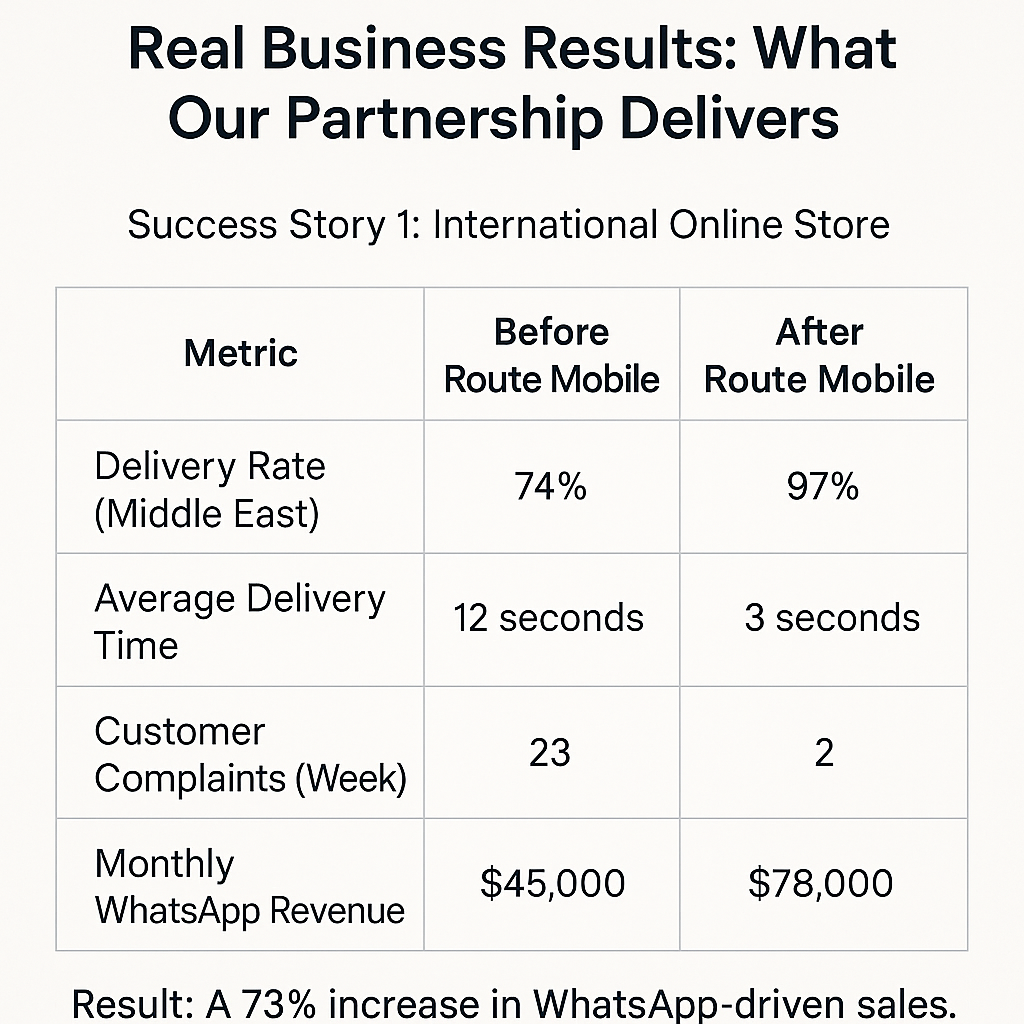
Case Study 1: International E-Commerce Brand

Metric

Before Route Mobile

After Route Mobile

Delivery Rate (Middle East)

74%

97%

Average Delivery Time

12 seconds

3 seconds

Customer Complaints (Weekly)

23

2

Monthly WhatsApp Revenue

$45,000

$78,000

Result: A 73% increase in WhatsApp-driven sales.
Case Study 2: Healthcare Provider (UAE, KSA, Egypt)

  • Approval Time: Reduced from 28 days to 7

  • Message Delivery: Improved from 71% to 96%

  • Patient No-Show Rate: Dropped from 31% to 18%

  • Staff Time on Follow-ups: Reduced by 73%

Annual savings: Over $127,000 in operational costs.
Case Study 3: Financial Services Firm

  • Message Appearance: Changed from random number to verified brand name

  • Customer Confusion: Dropped from 34% to 3%

  • Campaign Response Rate: Increased from 8.3% to 19.7%

  • Support Tickets About Message Validity: Reduced from 89 to 12

Result: 137% uplift in campaign performance.

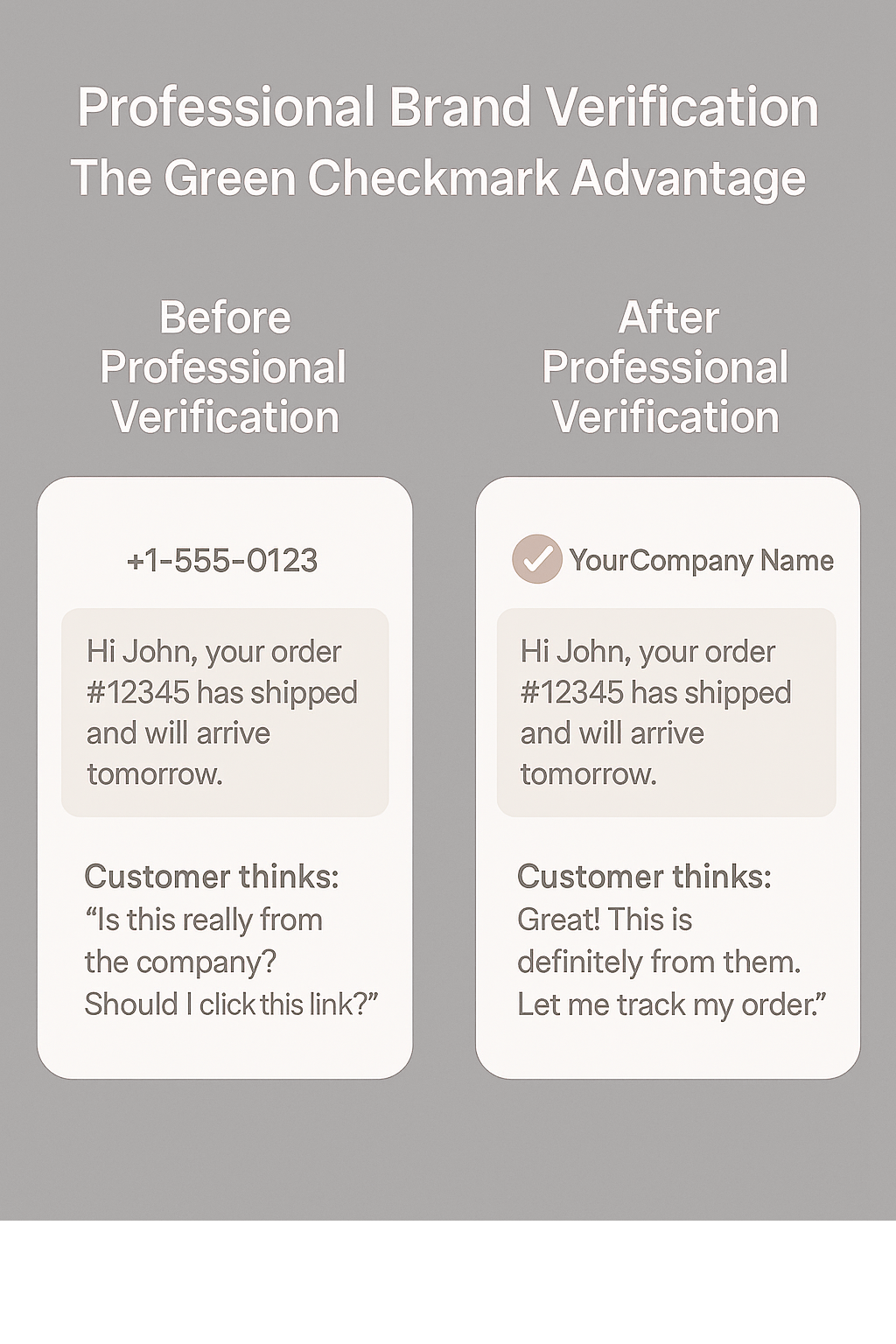
Why Brand Verification (Green Checkmark) Matters
Unverified WhatsApp messages often create hesitation. Verified accounts with official names and badges change how customers respond.

Before Verification:
+1-555-0123
Hi John, your order #12345 has shipped.

After Verification:
YourCompany (Verified)
Hi John, your order #12345 has shipped.

Measured Impact of Verification:

  • 67% increase in open rates

  • 43% increase in reply rates

  • 89% reduction in “Is this really you?” inquiries

  • 31% increase in sales conversions

  • 52% better click-through on promotional links

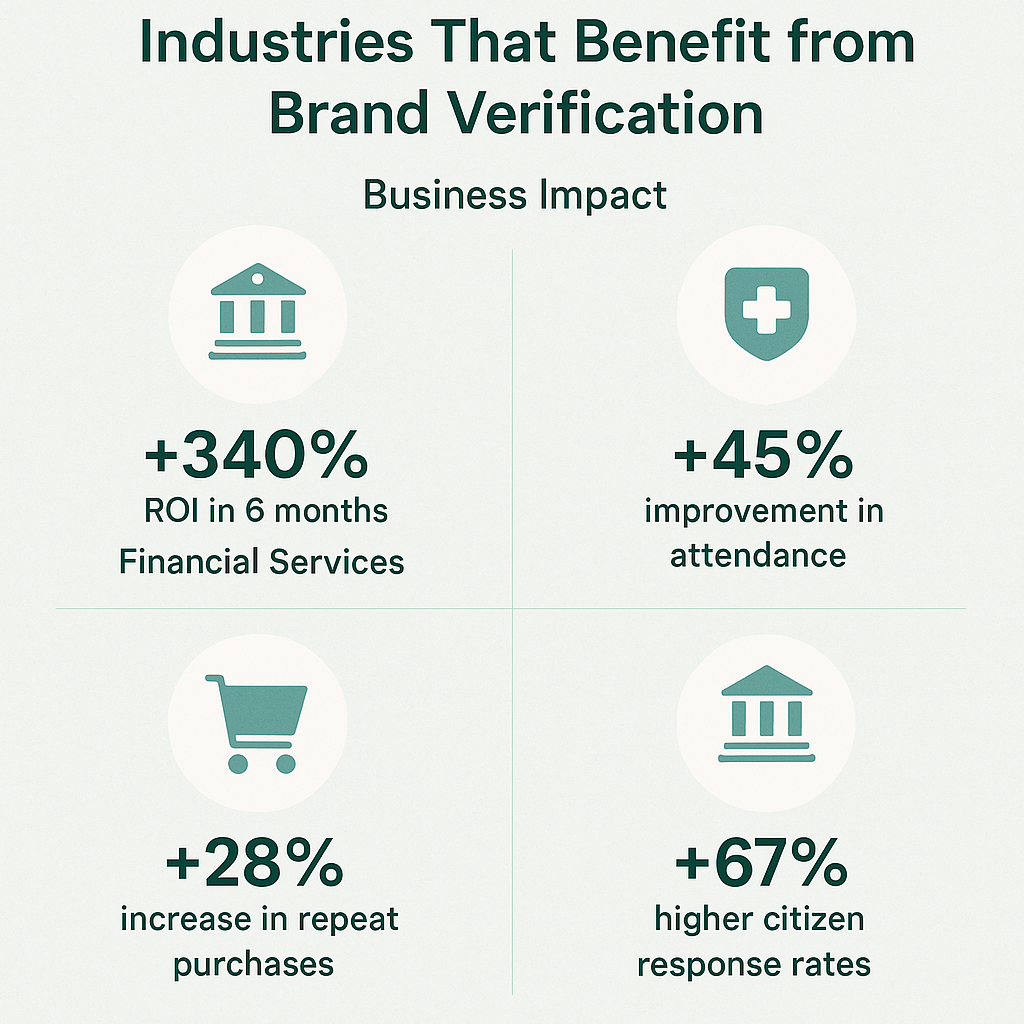
Which Businesses Benefit Most from WhatsApp Verification?

Different industries are seeing measurable returns from WhatsApp brand verification.

Here’s how verified messaging impacts key sectors:

Verified messaging improves ROI, engagement, and trust—across both private and public sectors.

Global Performance Metrics After Integration

Our partnership with Route Mobile delivers measurable performance improvements across key regions.

Here’s how businesses in the Middle East, Africa, and Asia are seeing better delivery rates, customer engagement, and onboarding speeds:


Migration Made Easy: Your Step-by-Step Guide

Phase 1: Assessment (Week 1)

  • Review current delivery, delays, and lost revenue

  • Identify high-impact regions and use cases

Phase 2: Setup and Testing (Week 2)

  • Set up Route Mobile account

  • Apply for professional verification

  • Test small message batches for delivery and speed

Phase 3: Gradual Migration (Weeks 3–4)

  • Shift 10–20% of traffic to Route Mobile

  • Monitor real-time results and compare

Phase 4: Full Implementation (Month 2)

  • Switch all messaging to Route Mobile

  • Train internal teams

  • Activate automation and analytics features

Cost vs. Return: The Financial Case

Estimated Costs:

  • Setup and Migration: $2,000 – $5,000 one-time

  • Monthly Messaging Upgrade: $200 – $800

  • Professional Verification: $500 setup + $100/month

ROI for Businesses:

Business with $50,000 Monthly Revenue:

  • Revenue lost to poor delivery: ~$12,500

  • Cost of Route Mobile + Verification: $500/month

  • Net monthly gain: $9,500

  • Annual ROI: 2,280%

Business with $200,000 Monthly Revenue:

  • Lost revenue saved: ~$40,000

  • Verification gains: +$8,000

  • Net monthly gain: $46,800

  • Annual ROI: 3,800%


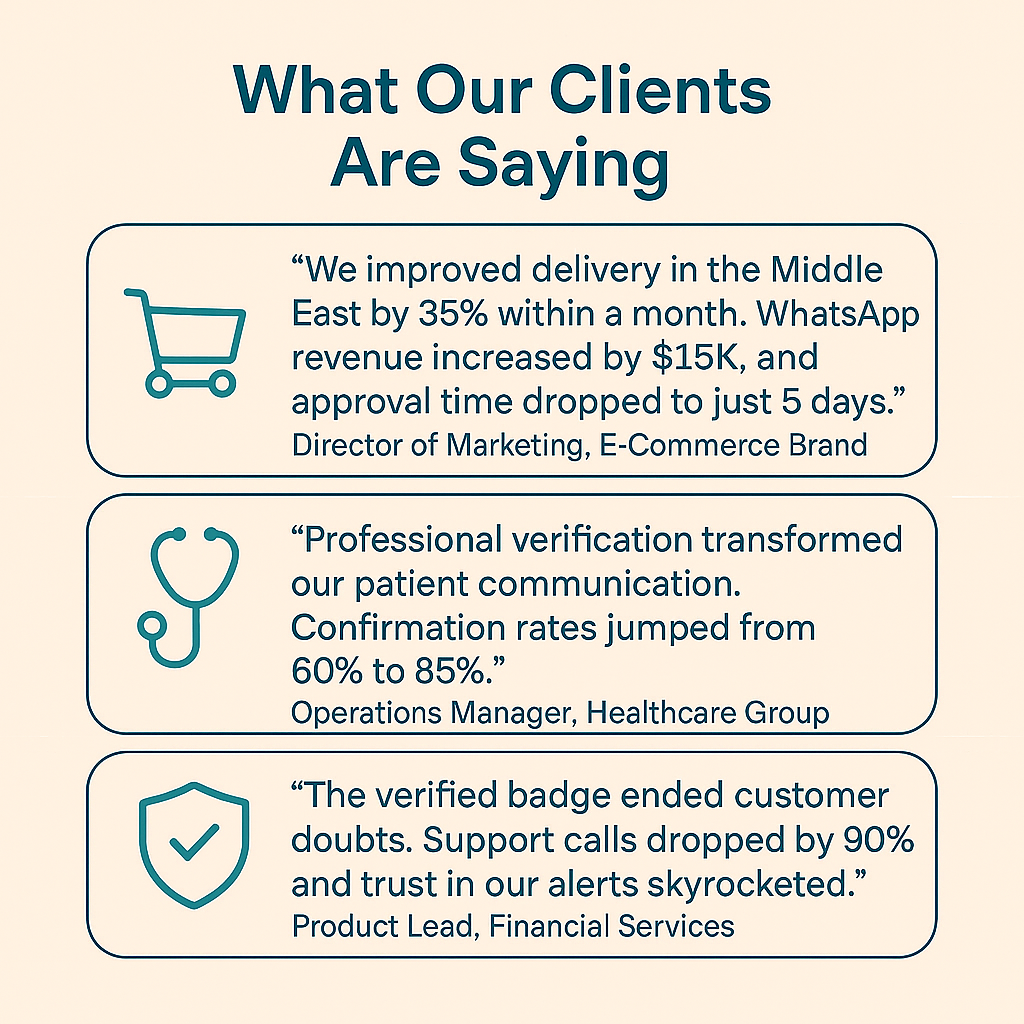
What Our Clients Are Saying

What Our Clients Are Saying
The following testimonials from real Appgain clients show the measurable impact of verified WhatsApp messaging.


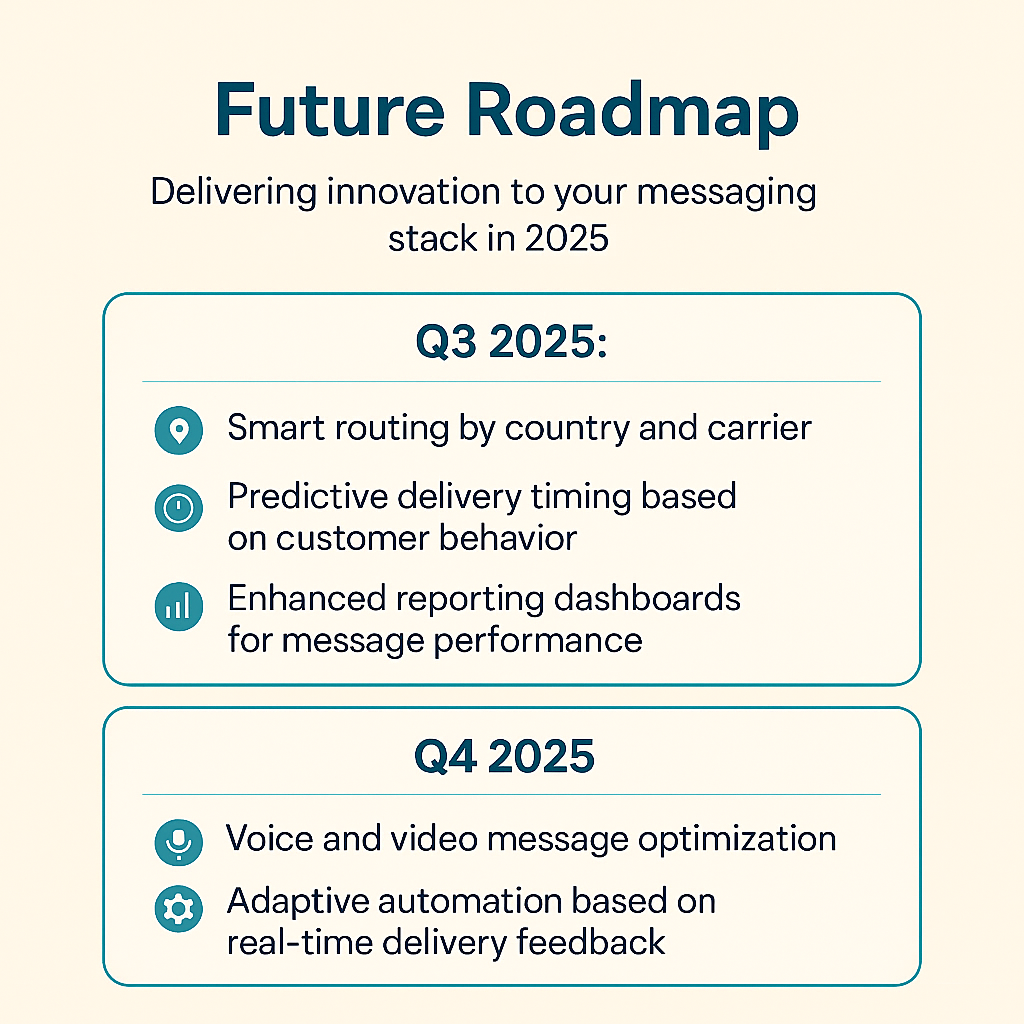
What’s Next: Future Roadmap
Here’s a visual snapshot of what’s coming in Q3 and Q4 2025 from Appgain + Route Mobile.

Ready to Elevate Your WhatsApp Business Strategy?

Appgain + Route Mobile offers you:

  • Reliable global message delivery

  • Verified brand presence with every message

  • Compliance-ready infrastructure

  • Seamless onboarding and support

Your next step:

  • Schedule a consultation

  • Request a custom demo

  • Speak with our team about professional verification

About the Author
Mohamed Shaheen is CEO and co-founder of Appgain, helping businesses grow through intelligent automation and customer communication solutions. Connect with him on LinkedIn for insights on WhatsApp marketing and CRM strategy.

Related Resources:

  • WhatsApp Business Strategy Guide

  • International Messaging Best Practices

  • How to Measure WhatsApp Marketing Success

Ready to Take Your WhatsApp Strategy to the Next Level?
Whether you’re an e-commerce brand, healthcare provider, or financial service—verified messaging can transform how you reach and retain customers.

-Faster approvals
-Higher delivery rates
-Trusted brand presence

Get started with Appgain + Route Mobile today.

Schedule a consultation
Request a custom demo
Speak to our team about professional verification


Bonus for Real Estate Professionals

Appgain has recently launched an integrated CRM solution tailored for the real estate sector — combining:

  • Odoo CRM

  • WhatsApp automation

  • Campaign tracking tools

  • Instant customer engagement

It’s built to help real estate businesses:

  • Close deals faster

  • Follow up smarter

  • Manage leads with ease — all from one unified platform.

Interested in real estate?
Discover Appgain’s CRM for Real Estate →

WhatsApp Marketing Made Simple: Your Complete Guide to WhatsApp Lite 1.0

How small businesses can start professional WhatsApp marketing in 30 minutes – no technical skills needed


Something that might surprise you is that 73% of small businesses want to use WhatsApp for customer communication, but only 23% do it. Why? Until now, setting up professional WhatsApp marketing has felt impossibly complicated.

That changes today.

After months of listening to frustrated business owners say “WhatsApp Business is too technical” and “I just want to send professional messages without hiring an expert,” we built something that makes WhatsApp marketing as easy as sending a regular text message.

Why We Created WhatsApp Lite (The Real Story)

Last month, I met Sarah, who runs a boutique in Austin. She told me she was losing customers to competitors using WhatsApp, but every time she tried setting it up, she got overwhelmed by technical requirements and gave up after hours of frustration.

Sarah’s story isn’t unique. We’ve talked to hundreds of business owners facing the same challenges:

  • Set up processes that require technical knowledge they don’t have

  • Approval delays that can take weeks

  • Fear of accidentally violating rules and getting banned

  • Features so complex they’re unusable for everyday business needs

WhatsApp Lite 1.0 eliminates every single one of these problems.

Real Results: How Maria Transformed Her Bakery Business

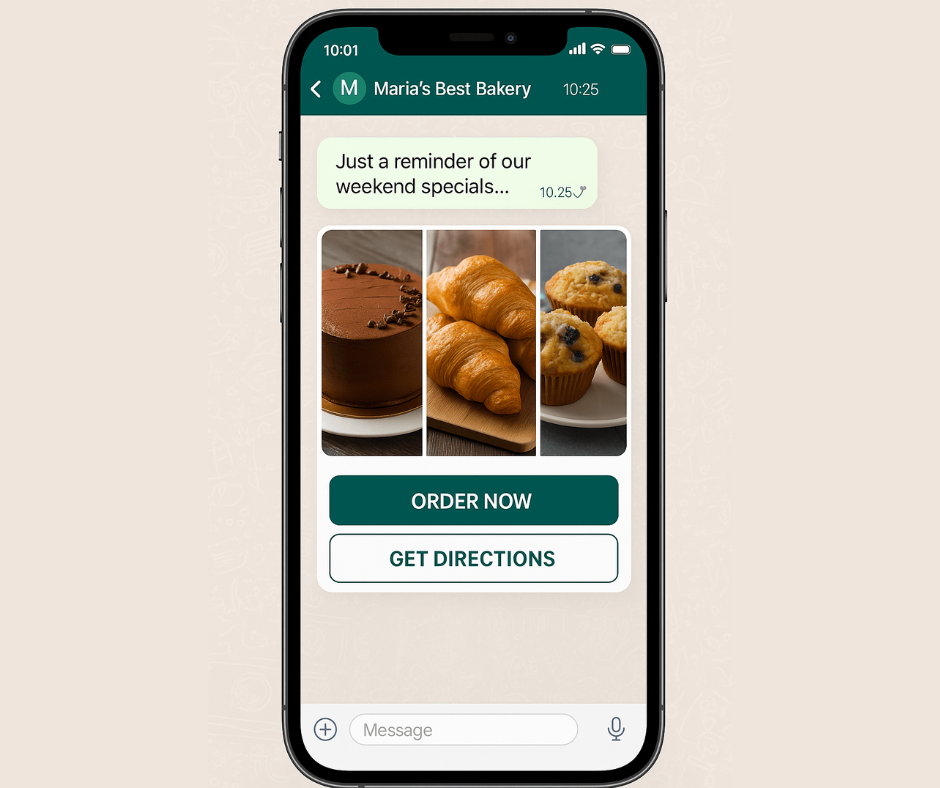
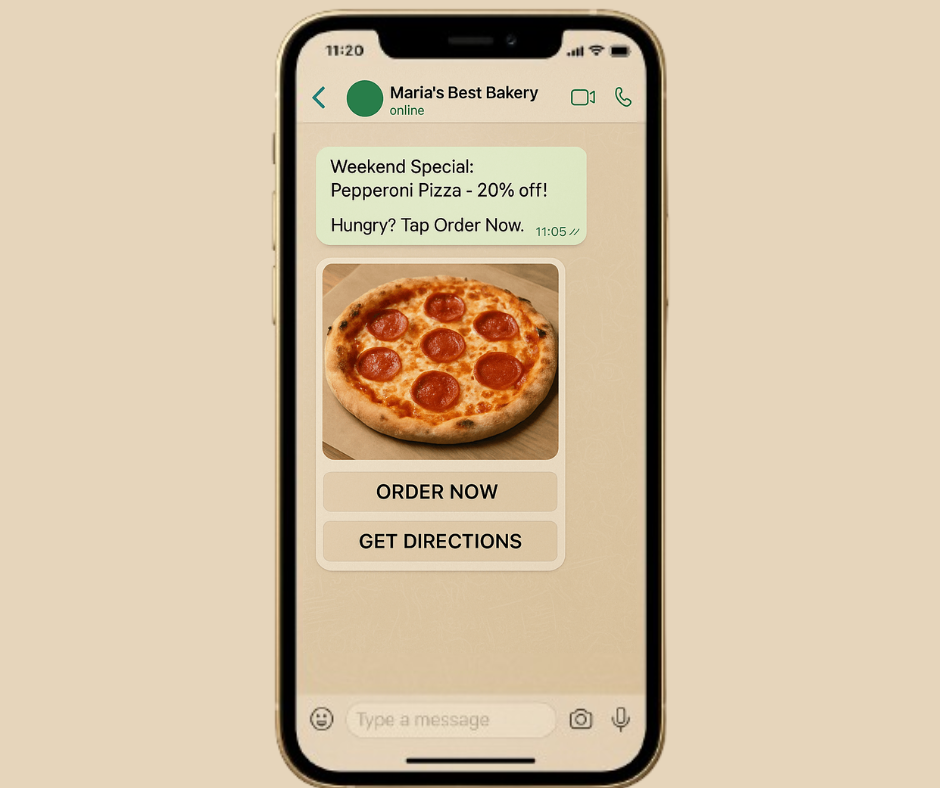
Let me show you exactly what’s possible. Yesterday, Maria from a local bakery in Miami went from never using WhatsApp for business to sending her first successful campaign in just 27 minutes. Here’s her complete journey:

Step 1: Quick Setup (5 minutes)

  • Signed up for WhatsApp Lite on our website

  • Connected her existing WhatsApp Business number

  • Verified her business information

  • Complete. No technical setup, no complicated configurations.

Step 2: Create First Campaign (12 minutes)

  • Selected our ready-made bakery template

  • Added mouth-watering photos of her weekend specials

  • Added simple “Order Now” and “Get Directions” buttons

  • Scheduled the message to go out Friday morning

  • The campaign is ready to launch.

Step 3: Amazing Results (immediate)

  • Sent messages to 150 regular customers

  • 89% of messages were delivered (much higher than email)

  • 34% of customers clicked to place orders

  • $1,200 in weekend sales directly from this one campaign

Total time invested: 27 minutes Return on investment: 4,400%

These aren’t inflated marketing numbers – this is exactly what happened with a real business owner yesterday.

WhatsApp Lite Features That Transform Your Customer Communication

1. Send 300 Professional Messages Every Day

Most small businesses send 50-100 WhatsApp messages per week. With 300 messages per day, you have plenty of room for:

  • Daily special announcements

  • Appointment confirmations

  • Order updates

  • Customer service responses

  • Special promotions


Smart Message Spacing: Our system automatically spaces out your messages throughout the day so WhatsApp never sees them as spam. This ensures that you stay safe while reaching all your customers.

Real customer story: “I sent Black Friday promotions to 280 customers. Every message was delivered perfectly, and I got zero spam complaints.” – Dave, Electronics Store Owner

2. Rich Media That Gets Attention Remember when business messaging meant boring text only? Those days are over with WhatsApp Lite.

What you can now send:

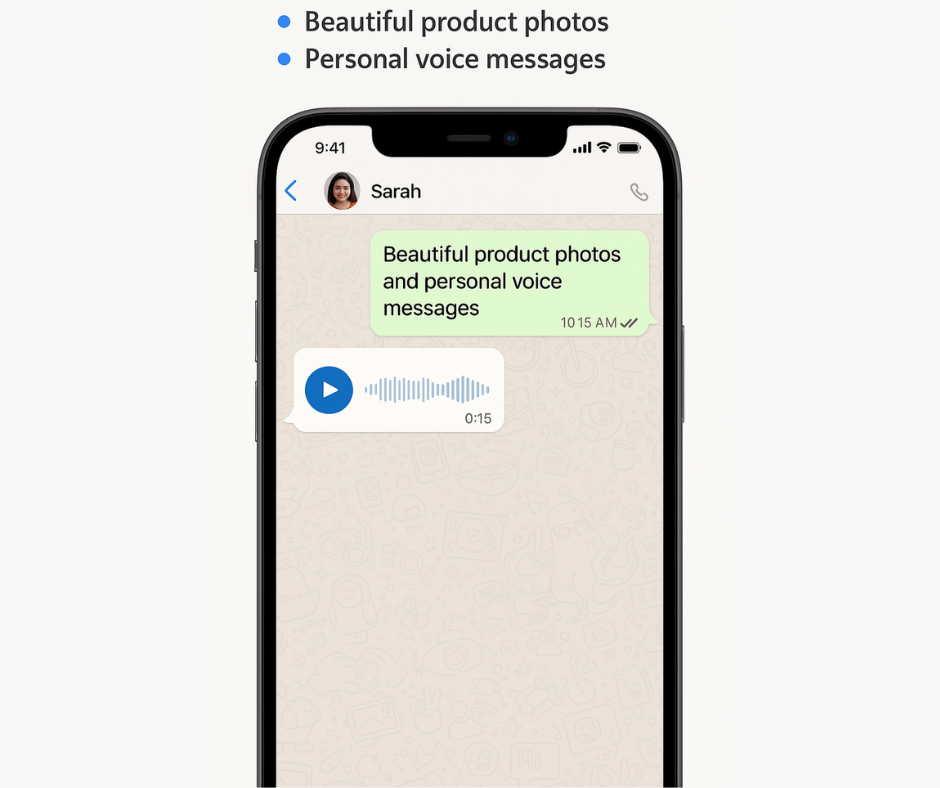
  • Beautiful product photos with instant “Buy Now” buttons

  • Personal voice messages (customers love hearing your actual voice)

  • Product demonstration videos that show items in action

  • Digital catalogs as PDF attachments

  • Voice confirmations for appointments and orders

Success story: A local gym owner started sending 30-second workout tip videos through WhatsApp. Member engagement went up 67%, and member retention improved by 23% in just two months.

3. One-Click Customer Responses This single feature has transformed how our customers handle everyday business conversations:

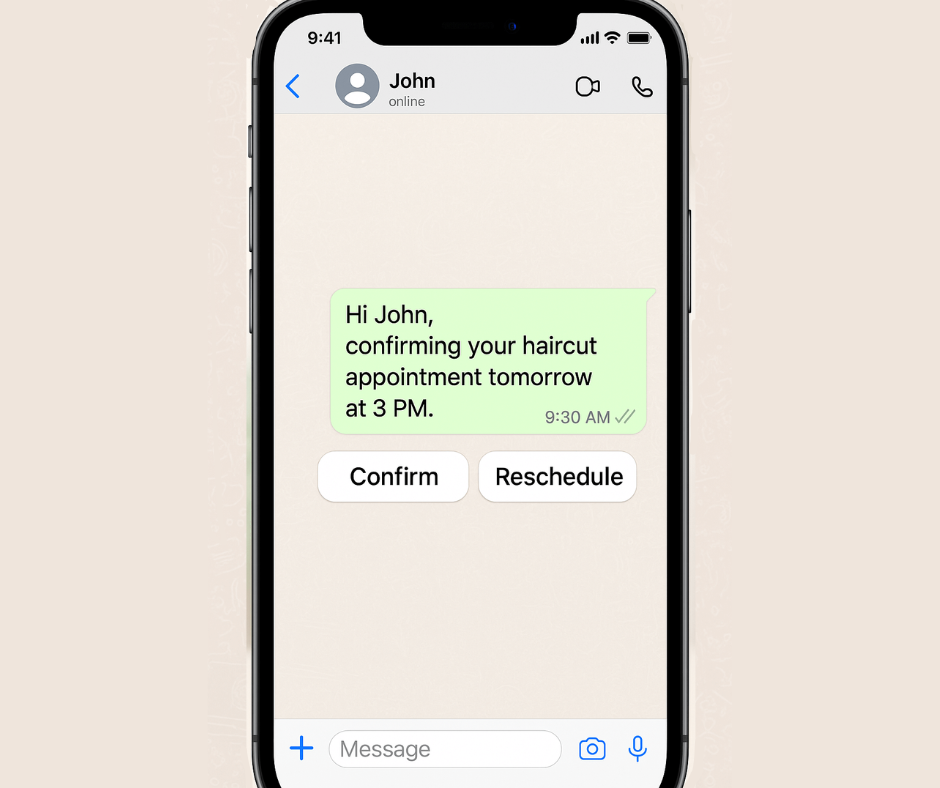
Appointment Confirmations:

  • Your message: “Hi John, confirming your haircut appointment tomorrow at 3 PM”

  • Customer sees: [Confirm] [Reschedule] buttons

  • Result: 94% response rate vs 34% with regular text messages

Order Updates:

  • Your message: “Your pizza order is ready for pickup!”

  • Customer sees: [On my way] [Need 10 more minutes] buttons

  • Result: Customers feel in control, you know exactly when to expect them

Quick Feedback:

  • Your message: “How was your dining experience tonight?”

  • Customer sees: [Excellent!] [Could be better] buttons

  • Result: 3x more customer feedback compared to traditional surveys

4. Smart Automation (Without the Complexity) Here’s where WhatsApp Lite becomes really powerful. You can set up smart responses and suggestions without any technical knowledge.

Popular automation our customers love:

Smart Response Suggestions: When customers ask common questions, our system suggests the best responses based on your business type.

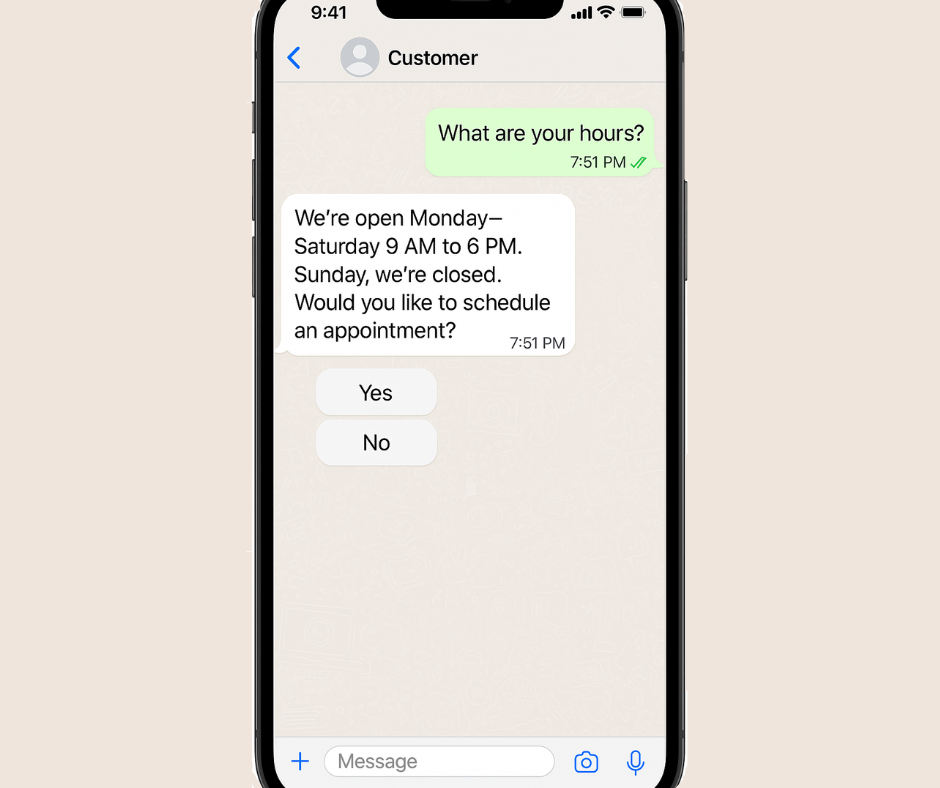
  • Customer: “What are your hours?”

  • System suggests: “We’re open Monday-Saturday 9 AM to 6 PM. Sunday, we’re closed. Would you like to schedule an appointment?”

Personalized Recommendations: Connect your product list, and our system suggests relevant items based on what customers bought before.

  • Previous purchase: Running shoes

  • System suggests: “John might be interested in our new athletic shirts – they’re 20% off this week!”

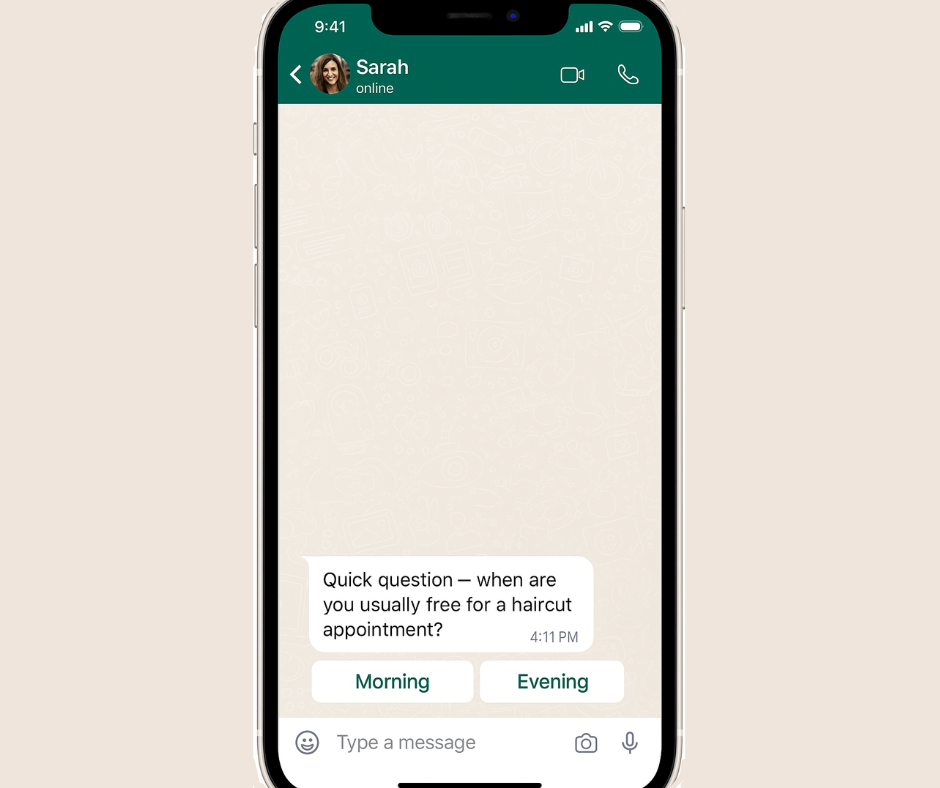
Perfect Timing: Our system learns when each customer usually responds and suggests the best times to contact them.

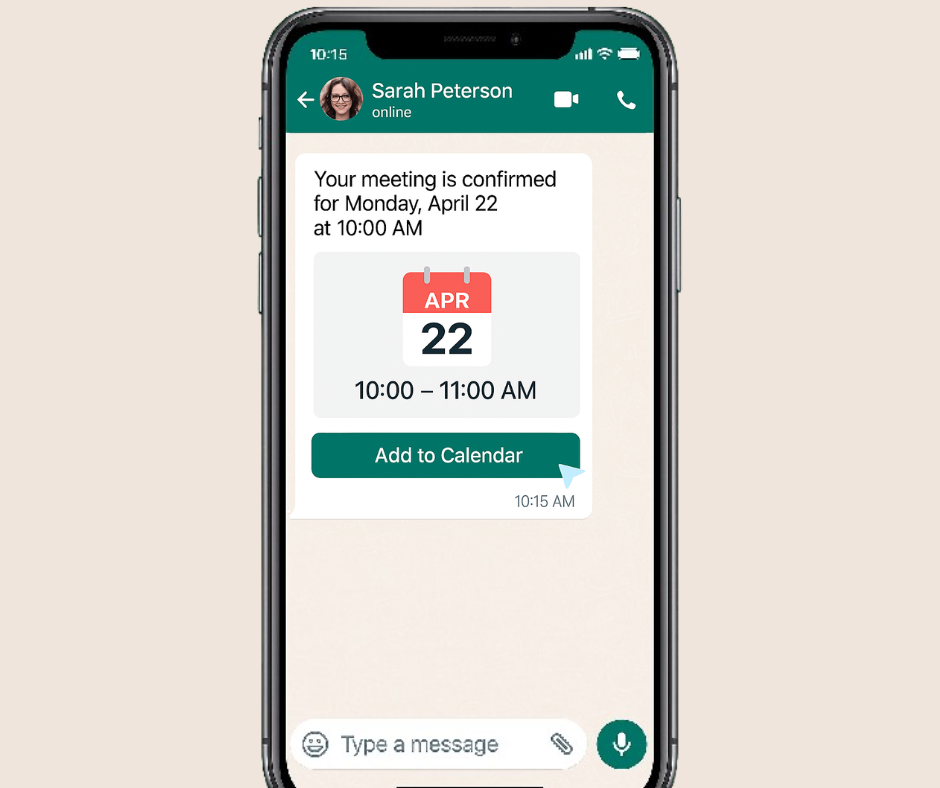
A message sent based on Sarah’s behavior, letting her choose the best time for an appointment — powered by WhatsApp Lite’s automation.

  • Sarah typically responds between 7-9 PM
  • System recommends: Send her messages at 7:30 PM for the best response

5. Account Protection (Your Safety Net)

This might be the most important feature, even though it works invisibly in the background.

What our protection system does:

  • Watches WhatsApp’s spam detection in real-time

  • Automatically slows down your campaigns if needed

  • Resumes normal sending when everything is safe

  • Keeps your account protected from unexpected bans

Why this matters: WhatsApp account bans happen quickly and without warning. Once banned, getting back can take weeks or might be impossible. Our system prevents this from ever happening.

Customer experience: “I was accidentally sending too many messages too fast. WhatsApp Lite automatically adjusted my campaign speed and saved my account. I didn’t even realize there was a problem until I checked later.” – Jennifer, Online Store Owner

Ready-to-Use Templates for Every Business Type

We’ve created proven message templates for the most common businesses:

Restaurants & Food Service

  • Daily specials with appetizing photos and “Order Now” buttons
  • Order confirmations with pickup time estimates

  • Table reservations with easy reschedule options

  • Customer feedback requests with simple response choices

  • Retail & Shopping
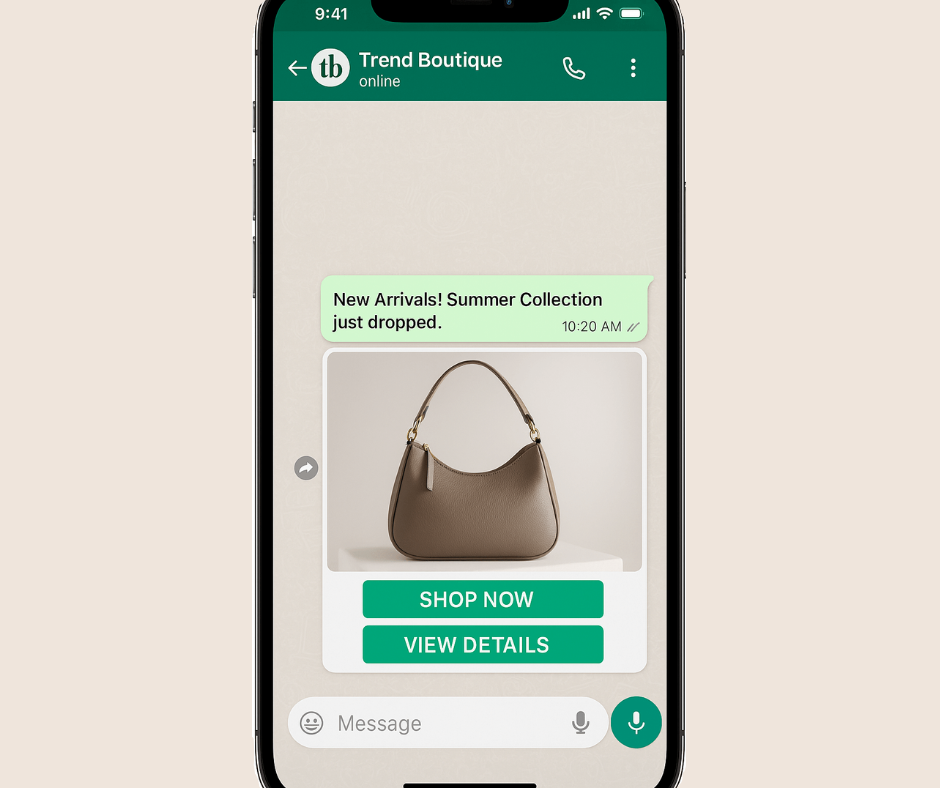
  • New arrivals announcements with “Shop Now” buttons
  • Cart reminder messages with product photos and discount offers
  • Shipping updates with tracking information

  • VIP customer offers based on purchase history

Health & Beauty

  • Appointment reminders with confirm/reschedule buttons

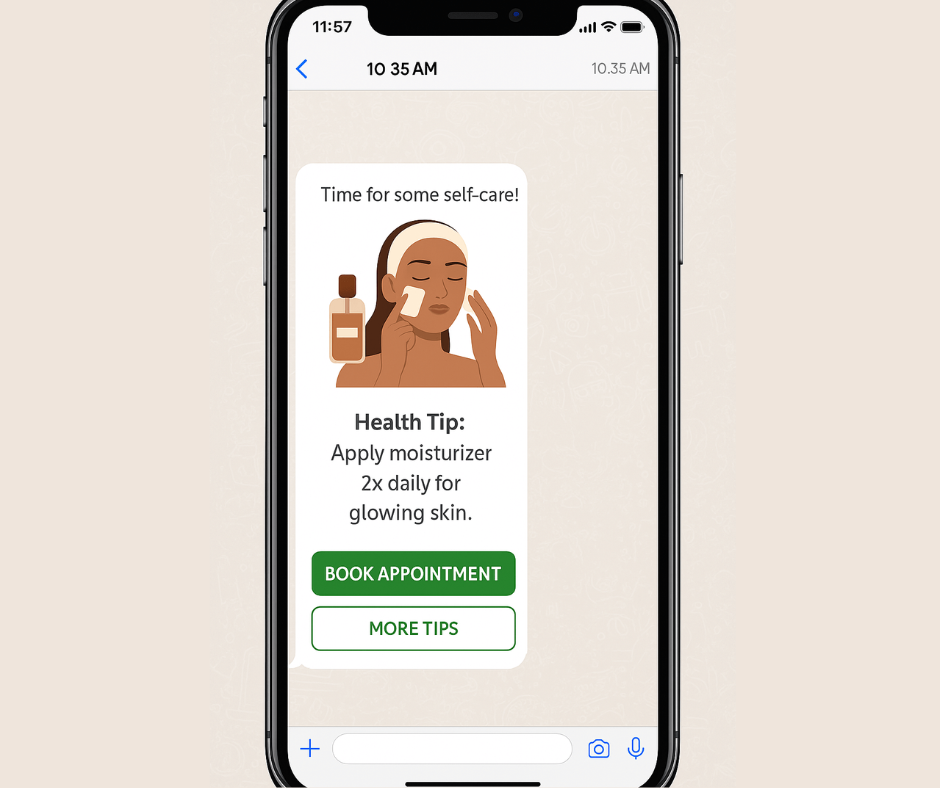
Health tips and advice with relevant images
  • Prescription ready notifications with pickup details
  • Follow-up care instructions with easy question options

Professional Services

Meeting confirmations with calendar details
  • Service completion follow-ups with feedback requests
  • Educational content that shows your expertise

  • Referral requests with easy sharing options

Real Business Results (From Actual Customers)

Here are genuine results from businesses using WhatsApp Lite in their first 30 days:

Local Hair Salon (Austin, TX):

  • Before: Phone calls and text messages for appointments

  • After: WhatsApp appointment confirmations and reminders

  • Results: 31% fewer no-shows, $2,800 additional monthly revenue

Pet Supply Store (Phoenix, AZ):

  • Before: Email newsletters with 8% open rates

  • After: WhatsApp product updates with photos

  • Results: 67% engagement rate, 15% increase in monthly sales

Fitness Studio (Denver, CO):

  • Before: Generic class reminders via text

  • After: Personalized WhatsApp messages with fitness tips

  • Results: 23% better class attendance, 89% customer satisfaction

Auto Repair Shop (Chicago, IL):

  • Before: Phone calls for service updates

  • After: WhatsApp updates with photos of work progress

  • Results: Zero communication complaints, 34% increase in positive reviews

Your 30-Minute Setup Guide

Ready to join thousands of businesses already succeeding with WhatsApp Lite? Here’s your step-by-step plan:

Week 1: Get Started (30 minutes total)

Day 1 (15 minutes):

  1. Go to appgain.io/whatsapp-lite and sign up

  2. Connect your WhatsApp Business number

  3. Choose a template that matches your business

  4. Add your business logo and basic details

Day 3 (15 minutes):

  1. Create your first campaign using our template

  2. Add 10-20 customers to test with

  3. Send your first professional messages

  4. Check delivery and response rates

Week 2: Improve Results (45 minutes total)

Day 8 (30 minutes):

  1. Look at your first week’s results

  2. Adjust message timing based on when customers respond

  3. Add interactive buttons to get more engagement

  4. Plan your second campaign

Day 12 (15 minutes):

  1. Set up automatic responses for common questions

  2. Connect basic smart suggestions for your business type

  3. Plan your first month’s message calendar

Month 2 and Beyond: Grow Your Success

  • Add more advanced automation based on customer behavior

  • Connect with your existing customer management system

  • Try different message types and timing

  • Scale up to your full 300 daily message capacity

Pricing That Works for Small Business Budgets

We designed WhatsApp Lite pricing with real small business needs in mind:

Starter Plan: $49/month

  • 300 messages per day (9,000 per month)

  • All photo, video, and document features

  • Basic automation and smart suggestions

  • Email support with quick responses

  • Perfect for: Local businesses, service providers, small shops

Growth Plan: $99/month

  • Everything in Starter

  • Advanced automation features

  • Priority customer support

  • Custom template creation

  • Perfect for: Growing businesses, multiple locations, higher message volumes

Enterprise: Custom pricing

  • Everything in Growth

  • Custom integrations

  • Dedicated account manager

  • Advanced reporting

  • Perfect for: Larger businesses, franchises, complex needs

30-day money-back guarantee: Try WhatsApp Lite completely risk-free. If you’re not satisfied, we’ll refund every penny.

Frequently Asked Questions

Q: “Will this work with my current WhatsApp Business account?” A: Absolutely! WhatsApp Lite connects to your existing WhatsApp Business number. You keep all your current contacts and conversation history.

Q: “I’m not technical at all. Is this really simple?” A: Yes! Yesterday, 78-year-old Robert set up WhatsApp Lite for his antique store in 25 minutes. If he can do it, anyone can.

Q: “What if I need help setting up?” A: Every WhatsApp Lite customer gets free setup help. Our team will walk you through everything via video call if needed.

Q: “Can I change plans anytime?” A: Yes, with no penalties or long contracts. Change your plan instantly from your dashboard.

Q: “How quickly will I see results?” A: Most customers see better customer response rates immediately. Real business impact typically happens within 2-4 weeks of regular use.

Why WhatsApp Lite Works for Real Businesses

After talking to thousands of small business owners, we learned that most marketing tools are built for big companies with technical teams, not for real business owners who need to focus on running their business.

WhatsApp Lite is different because it’s built for real people running real businesses who need real results without complexity.

Why we’re confident this will work for you:

  • Every feature has been tested with actual small business owners

  • Our templates come from campaigns that generated real revenue

  • Our automation suggestions are based on successful businesses

  • Our support team understands small business challenges

Ready to Transform Your Customer Communication?

Thousands of small businesses are already using WhatsApp Lite to build stronger customer relationships and increase their revenue. The question isn’t whether this will work – it’s how much growth you’re missing by waiting.

What happens next:

  1. Sign up for your free trial (no credit card needed)

  2. Get a 15-minute guided setup with our friendly team

  3. Send your first campaign within 30 minutes

  4. See real results in your first week


Ready to get started? Start your free WhatsApp Lite trial →

Have questions? Chat with our team → (We respond within 2 hours)

Want to see it first? Watch a 5-minute demo →


Mohamed Shaheen is CEO and co-founder of Appgain, helping thousands of businesses improve customer relationships through simple marketing tools. Connect with Mohamed on LinkedIn or email him directly with questions about WhatsApp marketing.

Related Articles:

WhatsApp vs Email Marketing: Which Works Better for Small Business? appgain:your trusted odoo partner for scalable business solutio

What’s Next from Appgain?

While WhatsApp Lite is helping small businesses simplify and automate their customer communication, Appgain continues to innovate across industries.

Appgain has recently launched an integrated CRM solution tailored for the real estate sector — combining:

  • Odoo CRM

  • WhatsApp automation

  • Campaign tracking tools

  • And instant customer engagement

It’s designed to help real estate businesses close deals faster, follow up smarter, and manage leads with ease — all in one place.

Interested in real estate?
Discover Appgain’s CRM for Real Estate →