AI Knowledge Base: How Businesses Can Give AI the Right Answers Every Time

Introduction

AI can answer almost anything.

But that doesn’t mean it knows your business.

It may understand general concepts.

It may know how sales works.

It may recognize customer service questions.

It may generate polished responses.

But ask it something specific to your company:

“Which plan includes WhatsApp automation?”

“What is our refund policy?”

“Which products are available in Saudi Arabia?”

“How does our onboarding process work?”

“Can this customer upgrade without changing their contract?”

Now the problem becomes clear.

Generic AI doesn’t automatically know:

Your pricing.

Your policies.

Your products.

Your processes.

Your documentation.

Your internal rules.

Your customer history.

If AI doesn’t have access to trusted business information, it has two options:

Give a generic answer.

Or give the wrong one.

For businesses, neither is good enough.

This is why the AI Knowledge Base is becoming one of the most important foundations of business AI.

It gives AI access to the information that actually matters inside your organization—so responses become more relevant, more consistent, and more useful.

What Is an AI Knowledge Base?

An AI Knowledge Base is a structured source of company information that AI systems can search and use when responding to customers or employees.

It may contain:

Product documentation.

Pricing.

FAQs.

Policies.

Internal procedures.

Service information.

Training materials.

Technical documents.

Support articles.

Onboarding guides.

Sales enablement content.

Instead of relying only on the AI model’s general knowledge, the system retrieves relevant company information before generating an answer.

This allows AI to respond based on your actual business data.

Why General AI Isn’t Enough for Business

Large language models are incredibly capable.

But they are trained on broad information.

They do not automatically know the latest details of your organization.

For example, imagine a customer asks:

“Do you support Instagram messaging on the Professional plan?”

A generic AI model may know what Instagram messaging is.

But unless it has access to your product documentation and pricing structure, it cannot reliably answer the question.

The same applies to:

Contract terms.

Shipping policies.

Implementation timelines.

Feature availability.

Customer eligibility.

Internal workflows.

The more business-specific the question becomes, the more important trusted data becomes.

The Risk of AI Hallucinations

One of the biggest concerns businesses have with AI is incorrect information.

AI models can sometimes produce answers that sound confident even when the information is inaccurate or incomplete.

For a casual conversation, that may be inconvenient.

For a business, it can become expensive.

Imagine AI incorrectly telling a customer:

A feature is available when it isn’t.

A refund is guaranteed when policy says otherwise.

A product is in stock when it isn’t.

A contract includes something it doesn’t.

A delivery date is confirmed when it hasn’t been.

These mistakes can damage trust quickly.

The objective isn’t simply to make AI sound intelligent.

It’s to make AI reliably informed.

How an AI Knowledge Base Works

A typical AI Knowledge Base workflow looks like this:

Customer asks a question

AI identifies what information is needed

Knowledge Base is searched

Relevant information is retrieved

AI generates the answer

Customer receives a business-specific response

Instead of generating an answer only from the language model’s memory, AI grounds its response in trusted company information.

What Is RAG?

One of the most common technologies behind modern AI Knowledge Bases is called Retrieval-Augmented Generation, or RAG.

The concept is relatively simple.

Before generating a response, the AI retrieves relevant information from an external knowledge source.

That information is then used as context for the answer.

For example:

Customer asks:

“What is your cancellation policy?”

Without RAG:

The AI attempts to answer using general knowledge.

With RAG:

The AI searches your company’s actual cancellation policy.

It retrieves the relevant section.

Then generates a response based on that information.

The difference is important.

The AI isn’t expected to memorize your business.

It knows where to find the answer.

AI Knowledge Base vs. Traditional FAQ

Businesses have used FAQs for years.

They are useful, but limited.

Traditional FAQs depend on customers finding the right question themselves.

An AI Knowledge Base works differently.

Customers can ask naturally.

For example, the documentation may contain:

“Subscriptions may be cancelled with 30 days’ written notice.”

The customer may ask:

“Can I stop my plan next month?”

AI can understand that both refer to the same concept.

It retrieves the relevant policy and explains it conversationally.

This makes business knowledge easier to access.

One Source of Truth

Many companies suffer from a problem that has nothing to do with AI.

Different employees have different versions of the same information.

Sales says one thing.

Support says another.

A PDF says something else.

An old WhatsApp message contains outdated pricing.

A spreadsheet has the latest information.

This creates confusion for both employees and customers.

A well-maintained AI Knowledge Base can become a single source of truth.

Instead of relying on memory or scattered documents, employees and AI systems access the same approved information.

That creates more consistent communication.

How Businesses Can Use an AI Knowledge Base

The use cases extend far beyond customer support.

Customer Support

AI can answer common questions using verified company documentation.

For example:

How do I reset my account?

What is your refund policy?

How long does delivery take?

What documents do I need?

Sales

AI can help sales teams access accurate product information during customer conversations.

For example:

Which plan fits this customer?

Does this feature require an upgrade?

Which integrations are supported?

What is included in implementation?

Salespeople spend less time searching documents and more time speaking with customers.

AI Voice Agents

Voice Agents also need business knowledge.

A customer calling by phone may ask questions about:

Pricing.

Availability.

Appointments.

Services.

Policies.

Products.

An AI Voice Agent connected to a trusted Knowledge Base can retrieve the correct information during the conversation.

Without that connection, Voice AI is simply speaking intelligently without necessarily knowing the business.

Employee Support

AI Knowledge Bases can also work internally.

Employees frequently ask repetitive questions:

How do I submit this request?

What is the approval process?

Where is the latest product documentation?

What information should I collect from this customer?

Which policy applies?

Instead of searching internal drives or asking colleagues repeatedly, employees can ask an AI assistant.

Faster Employee Onboarding

New employees often spend their first weeks learning where information lives.

Which folder?

Which document?

Which Slack message?

Which colleague should they ask?

An AI Knowledge Base changes that experience.

New employees can ask questions naturally and receive answers based on company documentation.

This doesn’t eliminate training.

But it makes knowledge easier to access during the learning process.

Building an Effective AI Knowledge Base

Creating a folder full of documents is not enough.

The quality of the AI depends heavily on the quality of the knowledge it can access.

Several principles matter.

1. Use Trusted Sources

Knowledge should come from approved business sources.

Avoid connecting AI to random internal information without knowing whether it is current or accurate.

2. Remove Outdated Information

Old documentation can be worse than missing documentation.

If an old pricing file and a new pricing file both exist, AI may receive conflicting information.

Businesses need clear ownership of what information remains active.

3. Organize Information Clearly

Documents should be structured logically.

For example:

Products.

Pricing.

Policies.

Sales.

Support.

Implementation.

Technical Documentation.

Internal Procedures.

Good organization improves both human and AI access.

4. Keep Information Updated

A Knowledge Base is not a one-time project.

Products change.

Pricing changes.

Policies change.

Processes evolve.

The Knowledge Base must evolve with them.

5. Define Access Permissions

Not every piece of information should be available to everyone.

Some information may be customer-facing.

Other information may be internal.

Some may be restricted to specific departments.

AI systems need permissions that respect those boundaries.

Public Knowledge vs. Private Knowledge

Businesses often have multiple types of information.

Public Knowledge

Information customers are allowed to receive.

Examples:

Products.

Features.

Pricing.

FAQs.

Policies.

Documentation.

Internal Knowledge

Information designed for employees.

Examples:

Internal processes.

Sales playbooks.

Escalation procedures.

Approval rules.

Operational guidelines.

Customer-Specific Knowledge

Information related to one customer.

Examples:

Account information.

Previous purchases.

Open opportunities.

Support history.

Contract status.

A mature AI system needs to understand which information can be used in which situation.

Why Permissions Matter

Imagine a customer asks:

“What’s the lowest price you can offer?”

The Knowledge Base may contain an internal document with discount thresholds.

That doesn’t mean the AI should reveal it.

The ability to retrieve information must be combined with appropriate access control.

This is especially important for:

Pricing.

Contracts.

Internal strategy.

Employee data.

Financial information.

Private customer records.

Security isn’t separate from AI Knowledge Management.

It’s part of it.

Knowledge Base Quality Affects AI Quality

Businesses sometimes focus heavily on choosing the best AI model.

But model capability is only part of the equation.

A powerful model connected to poor information will still give poor business answers.

Think of it this way:

Better AI Model + Bad Knowledge = Bad Business Response

Strong AI + Trusted Knowledge = Useful Business AI

That means one of the most important AI investments a company can make is improving the quality of its own information.

From Knowledge Retrieval to Action

Finding the right answer is only the first step.

Modern AI can use knowledge to determine what should happen next.

For example, a customer asks:

“My subscription ends next month. Can I upgrade now?”

AI retrieves:

The upgrade policy.

The customer’s current plan.

The customer’s contract details.

Then it may:

Explain the available options.

Recommend the correct upgrade.

Create an opportunity.

Notify the account manager.

Schedule a follow-up.

The Knowledge Base informs the decision.

Automation executes the action.

This is where knowledge becomes operational.

Knowledge Is the Foundation of Agentic AI

Agentic AI can perform actions.

But good actions require good information.

An AI agent cannot reliably qualify leads if it doesn’t understand:

Products.

Ideal customer profiles.

Qualification rules.

Pricing.

Available plans.

An AI support agent cannot resolve customer problems if it doesn’t understand:

Policies.

Troubleshooting procedures.

Product documentation.

Escalation rules.

The smarter the business knowledge layer becomes, the more useful AI agents become.

ConnectGain: Connecting AI With Business Knowledge

With ConnectGain by Appgain, businesses can connect AI-powered customer conversations with trusted knowledge sources.

Instead of allowing AI to respond using generic information alone, teams can provide relevant company knowledge that supports more accurate, contextual conversations.

A workflow may look like:

Customer Question

Intent Understood

Knowledge Retrieved

Relevant Answer Generated

Customer Context Checked

Next Action Triggered

This can support customer conversations across channels such as:

WhatsApp.

Web Chat.

Voice.

Email.

Other connected customer communication channels.

The objective isn’t simply to make AI know more.

It’s to make AI know what your business knows.

What Happens When Knowledge Is Connected Across Teams?

One of the most powerful effects of an AI Knowledge Base is consistency.

Sales accesses the same product information as support.

AI Voice Agents use the same policies as chat assistants.

New employees receive the same approved answers as experienced employees.

Customers receive more consistent information across channels.

This helps organizations reduce dependence on individual memory.

Knowledge becomes an organizational asset rather than something stored in people’s heads.

How to Start Building an AI Knowledge Base

Businesses don’t need to upload every document immediately.

Start with the information customers and employees request most often.

A practical first Knowledge Base may include:

Product overview.

Pricing.

Frequently asked questions.

Support policies.

Implementation information.

Sales documentation.

Customer service procedures.

Then evaluate:

Which questions still cannot be answered?

Where does information conflict?

Which documents become outdated most often?

What should be restricted?

The Knowledge Base can improve gradually over time.

Common AI Knowledge Base Mistakes

Uploading Everything

More information does not automatically mean better answers.

Quality matters more than volume.

Ignoring Old Documents

Conflicting information creates unreliable responses.

No Ownership

Someone must be responsible for maintaining important knowledge.

Weak Permissions

Private information needs appropriate access controls.

Treating Knowledge as Static

Business knowledge changes continuously.

The system needs to change with it.

The Future of Business Knowledge

For years, companies stored knowledge in documents.

Then they stored it in wikis.

Then internal search became more powerful.

AI is changing the interface again.

Employees and customers no longer need to know where the information is located.

They can simply ask.

AI finds the relevant information.

Explains it clearly.

Uses context.

And increasingly, takes the next appropriate action.

The Knowledge Base becomes more than a library.

It becomes part of the business operating system.

Conclusion

AI does not become valuable to a business simply because it can generate fluent answers.

It becomes valuable when those answers are based on reliable, relevant, and current business knowledge.

An AI Knowledge Base gives organizations a way to connect artificial intelligence with the information that defines how their business actually works.

Products.

Pricing.

Policies.

Processes.

Customer context.

Internal expertise.

When AI has access to the right knowledge, conversations become more accurate, employees spend less time searching, and customer experiences become more consistent.

The future of business AI will not be built only on smarter models.

It will be built on better knowledge.

Ready to Give Your AI the Knowledge It Needs?

ConnectGain by Appgain helps businesses connect AI-powered customer conversations with trusted business knowledge, CRM context, and automated workflows.

Give your AI access to the information your team already relies on—so it can answer more accurately, support customers more consistently, and help trigger the right next action.

Better knowledge creates better

AI. Better AI creates better customer experiences.

Contact Us

📞 WhatsApp: +20 111 998 5526
🌐 Website: appgain.io
📧 Email: He***@*****in.io

About Appgain

Appgain is an Agentic AI company helping businesses connect artificial intelligence with customer conversations, business knowledge, CRM systems, and workflows.

Through ConnectGain, organizations can build AI-powered customer experiences grounded in their own business information—helping AI understand context, provide better answers, and support real business actions.

ConnectGain by Appgain

AI That Works Where Your Business Works.
 

RAG vs Traditional Chatbots: Why Context-Aware AI Agents Convert 3x Better

The evolution of AI chatbots has reached a critical inflection point with Retrieval-Augmented Generation (RAG) systems delivering dramatically better results than their traditional counterparts. These context-aware AI agents are proving to be game-changers, with businesses implementing human-like AI personas reporting conversion rates up to three times higher than those using conventional rule-based chatbots. This performance gap isn’t just marginal—it represents a fundamental shift in how businesses can leverage AI for customer engagement.

Understanding the Fundamental Difference

Traditional chatbots operate on predefined rules and decision trees. They follow rigid pathways programmed by developers, recognizing specific keywords or phrases to trigger predetermined responses. While efficient for handling straightforward queries, these systems quickly reach their limits when conversations become nuanced or deviate from expected patterns.

RAG chatbots, by contrast, combine the power of large language models with the ability to retrieve and reference specific information. This architecture allows them to:

  • Access and incorporate relevant data in real-time
  • Maintain context throughout complex conversations
  • Provide accurate, data-backed responses
  • Learn and improve from interactions

The Technical Architecture That Makes RAG Superior

RAG systems employ a sophisticated two-stage process that fundamentally transforms chatbot capabilities:

1. Retrieval Component

When a user query arrives, the RAG system first searches through its knowledge base to find relevant information. This knowledge base can include:

  • Company documentation
  • Product specifications
  • Previous customer interactions
  • Up-to-date market information

The retrieval mechanism uses semantic search rather than simple keyword matching, understanding the intent behind queries to pull truly relevant information.

2. Generation Component

Once relevant information is retrieved, the large language model generates a response that incorporates this specific knowledge while maintaining conversational fluency. This approach combines the factual accuracy of retrieved information with the natural language capabilities of modern AI models.

This architecture enables sophisticated AI agent infrastructure that can handle complex customer journeys that would confound traditional systems.

Why RAG Chatbots Achieve 3x Higher Conversion Rates

The dramatic improvement in conversion rates isn’t coincidental—it’s the direct result of several key advantages:

Contextual Understanding Drives Personalization

RAG chatbots maintain conversation history and context, allowing them to provide truly personalized experiences. Rather than treating each interaction as isolated, they build a comprehensive understanding of customer needs throughout the conversation.

This contextual awareness enables them to offer solutions that precisely match customer requirements, significantly increasing the likelihood of conversion. The ability to personalize at scale creates experiences that feel tailored to each individual customer.

Reduced Friction in the Customer Journey

Traditional chatbots often force customers into rigid conversational paths, creating frustration when their queries don’t fit predefined patterns. RAG systems adapt to the customer’s communication style and needs, dramatically reducing friction points that lead to abandonment.

By maintaining context throughout interactions, these systems eliminate the need for customers to repeat information or navigate complicated menu trees, creating a smoother path to conversion.

Enhanced Problem-Solving Capabilities

When customers encounter obstacles in their journey, traditional chatbots frequently hit dead ends, unable to address unique scenarios. RAG chatbots can:

  • Understand complex, multi-part questions
  • Provide nuanced answers that address specific concerns
  • Offer creative solutions by combining different knowledge sources
  • Handle exceptions without defaulting to human escalation

This problem-solving capability keeps customers engaged in the conversion funnel rather than abandoning due to unresolved issues.

Data-Driven Recommendations

RAG chatbots leverage their access to comprehensive knowledge bases to make highly relevant product or service recommendations. Unlike traditional systems that might offer generic suggestions based on simple rules, RAG chatbots can:

  • Analyze stated and implied customer needs
  • Match these needs with specific product features
  • Provide evidence-based comparisons between options
  • Anticipate objections and proactively address them

This data-driven approach leads to recommendations that customers perceive as genuinely helpful rather than pushy sales tactics.

Real-World Implementation Challenges

Despite their clear advantages, implementing RAG chatbots comes with challenges:

Knowledge Base Management

The effectiveness of a RAG system depends heavily on the quality and organization of its knowledge base. Companies must invest in:

  • Comprehensive documentation of products, services, and policies
  • Regular updates to ensure information remains current
  • Proper structuring of information for efficient retrieval
  • Quality control processes to prevent inaccuracies

Integration Complexity

RAG systems require more sophisticated integration with existing business systems compared to traditional chatbots. Companies need to connect their RAG implementation with:

  • CRM systems to access customer history
  • Product databases for accurate information
  • Order management systems for transaction processing
  • Analytics platforms for performance tracking

Training Requirements

While RAG systems reduce the need for extensive pre-programming of responses, they still require initial training to optimize performance. This includes:

  • Fine-tuning the retrieval mechanism for relevant information selection
  • Adjusting response generation parameters for brand voice consistency
  • Creating fallback mechanisms for edge cases

Companies looking to implement domain-specific agents should consider proper AI training methodologies to maximize effectiveness.

Measuring ROI: Beyond Conversion Rates

While the 3x improvement in conversion rates is compelling, the ROI of RAG chatbots extends to multiple business metrics:

Customer Satisfaction Metrics

Companies implementing RAG chatbots typically see significant improvements in:

  • Net Promoter Scores (NPS)
  • Customer Satisfaction (CSAT) ratings
  • Reduced complaint volumes
  • Positive sentiment in feedback

Operational Efficiency

RAG systems deliver operational benefits including:

  • Lower escalation rates to human agents
  • Reduced average handling time
  • Increased first-contact resolution rates
  • Ability to handle higher interaction volumes

Long-Term Customer Value

The improved customer experience provided by RAG chatbots contributes to:

  • Higher customer retention rates
  • Increased repeat purchase frequency
  • Larger average order values
  • More positive word-of-mouth and referrals

Key Takeaways

  • RAG chatbots leverage retrieval-augmented generation to provide contextually relevant, accurate responses that traditional chatbots cannot match.
  • The 3x improvement in conversion rates stems from enhanced personalization, reduced friction, superior problem-solving, and data-driven recommendations.
  • Implementing RAG systems requires investment in knowledge base management, integration capabilities, and proper training.
  • ROI extends beyond conversion rates to include improved customer satisfaction, operational efficiency, and long-term customer value.
  • As AI technology continues to evolve, the gap between RAG and traditional chatbots is likely to widen further.

Conclusion

The shift from traditional rule-based chatbots to context-aware RAG systems represents a quantum leap in customer engagement capabilities. With conversion rates three times higher than conventional approaches, RAG chatbots deliver compelling ROI while simultaneously improving customer experience across multiple dimensions.

As businesses compete for customer attention in increasingly crowded digital spaces, the ability to provide intelligent, contextual, and helpful automated interactions will become a critical competitive advantage. Organizations that invest in RAG technology now will establish a significant lead over those relying on increasingly outdated rule-based systems.

How to Train Your AI Intern: Building Domain-Specific Agents

Artificial intelligence is now more than a support tool. Today, it can function like a real team member. It manages tasks, drafts documents, and supports daily operations. However, the true value appears when the AI understands your domain. When this happens, the agent becomes more accurate, more helpful, and easier to trust.

In this guide, we explain how to train your AI intern step by step. We also show how to organize your data, choose the right training method, and design agents that match your industry. As a result, your AI can reflect your brand voice, understand your customers, and follow your internal processes. Because of this, the AI becomes a useful assistant instead of a generic chatbot. In addition, the same methods work for both e-commerce and SaaS, which makes this guide suitable for many industries.


Why Domain-Specific AI Matters

General-purpose models are powerful. However, they often lack the detailed context your business needs. They do not fully understand your product lines, customer types, KPIs, or tone of voice. As a result, the output may feel generic or inconsistent. When you train an agent with domain-specific data, its performance improves significantly. It becomes clearer, more consistent, and more aligned with your real workflows.

A domain-trained agent can deliver several benefits. For example, it can write product descriptions in your voice, draft campaign briefs based on previous launches, or respond to customers using accurate terminology. Moreover, it can summarize important metrics using your internal logic. Because of these advantages, a domain-specific agent becomes a dependable digital intern.


Step 1: Define the Role of Your AI Intern

Before you begin training, define the role clearly. This step acts as the job description for your AI intern. When the role is specific, the agent performs better.

E-commerce example:
Act as a junior copywriter who understands the product catalog, seasonal promotions, and SEO strategy.

SaaS example:
Act as a product manager who writes feature briefs, user stories, and competitor summaries.

Clear role definitions guide the entire training process. In addition, they help you measure whether your AI intern is improving over time.


Step 2: Collect Your Domain Data

Your AI intern learns through examples. Therefore, your dataset should include real content from your business. You can use product descriptions, blog posts, campaign emails, customer personas, internal SOPs, meeting notes, and feature requests. When the dataset is relevant and diverse, the agent becomes more accurate.

In addition, organizing your data makes training easier. Group similar documents together. Remove outdated information. Highlight patterns you want the AI to follow. Because of this preparation, the training steps become more reliable and predictable.


Step 3: Choose Between RAG or Fine-Tuning

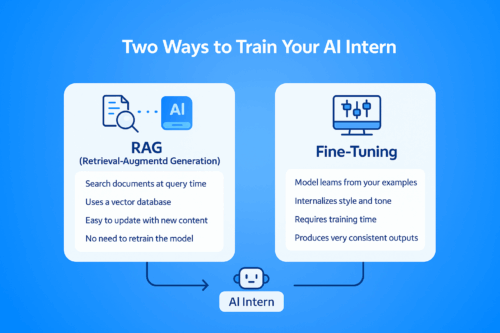
A visual comparison chart showing two methods for training an AI intern: Retrieval-Augmented Generation (RAG) on the left and Fine-Tuning on the right. The diagram uses a blue color palette and simple icons to illustrate the differences between search-based retrieval and model-based learning.
Comparison between RAG and Fine-Tuning — the two main methods for training a domain-specific AI intern.

There are two effective ways to train a domain-specific agent. Each method has its strengths.


Option 1: Retrieval-Augmented Generation (RAG)

RAG does not require model retraining. Instead, it allows the AI to search your documents during each query.

To use RAG:

  • Store your documents in a vector database such as Pinecone, Weaviate, Chroma, or Qdrant

  • Connect the database to a framework like LangChain or LlamaIndex

  • Link the retrieval pipeline to GPT or Claude

This method is flexible. Moreover, it keeps your system updated with new documents instantly. As a result, RAG is ideal for fast-changing industries.


Option 2: Fine-Tuning

Fine-tuning is suitable when you want deeper personalization.

To fine-tune:

  • Choose a base model such as GPT-3.5, Claude 3, or an open-source LLM

  • Create prompt-response pairs from your data

  • Use OpenAI, Anthropic, or open-source tools to train the model

Fine-tuning allows the AI to internalize your writing style, tone, vocabulary, and business reasoning. Because of this, it generates more consistent and natural responses.


Step 4: Set Guardrails and Feedback Loops

After training, the AI intern needs structure. Guardrails prevent mistakes. For example, you may require the agent to avoid mentioning prices or discounts without approval. You can also set review steps where a team member checks the output before use. These checkpoints improve safety and accuracy.

Feedback loops are equally important. By collecting corrections, ratings, and suggestions, the AI becomes more reliable. Over time, this creates a self-improving system that adapts to your needs.


E-Commerce Use Cases

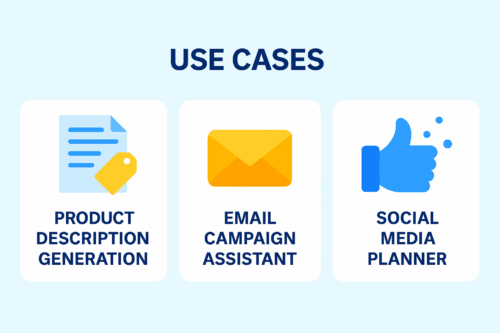
A clean 2D infographic showing three e-commerce AI use cases: Product Description Generation, Email Campaign Assistant, and Social Media Planner. Designed in a blue SaaS-style layout with white rounded cards and minimal icons.
E-commerce AI use cases: product descriptions, email campaigns, and social media planning.

1. Product Description Generation

A domain-trained AI can write accurate, SEO-friendly product descriptions. Because it understands tone and category rules, the text becomes more consistent and requires less editing.

2. Email Campaign Assistant

When trained on past campaigns, the AI can draft flash sale messages, abandoned cart emails, and loyalty program content. This reduces workload and speeds up campaign creation.

3. Social Media Planner

With access to your tone guidelines and previous posts, the AI can create caption options, weekly planning calendars, and campaign slogans.


SaaS Use Cases

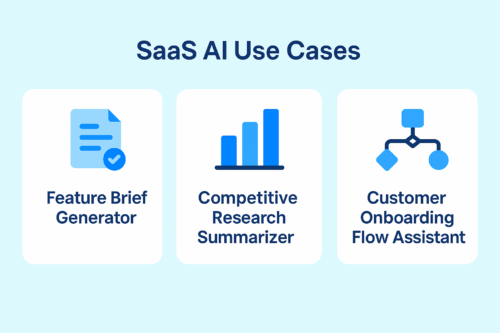
A 2D infographic showcasing three SaaS AI use cases: Feature Brief Generator, Competitive Research Summarizer, and Customer Onboarding Flow Assistant. The design uses a clean blue SaaS-style background with white rounded cards and minimal icons.
SaaS AI use cases: feature briefs, competitive insights, and customer onboarding support.

1. Feature Brief Generator

The AI can draft PRDs, epics, and user stories. Because it understands your terminology and roadmap, the writing becomes more structured.

2. Competitive Research Summarizer

You can provide internal battlecards and market research. As a result, the AI can summarize competitor updates and suggest positioning ideas.

3. Onboarding Flow Assistant

The AI can recommend onboarding steps, activation messages, and tooltips for different customer segments.


Final Thoughts

Training an AI intern isn’t just a technical process — it’s the beginning of teaching your systems to think, adapt, and support your team with real intelligence.

With Appgain, you’re not simply building an automated workflow.
You’re shaping an AI teammate that understands your domain, learns your style, and elevates the way your organization works.