The End of Cookies: Why WhatsApp & SMS Are the Future of Retargeting

For years, digital marketers relied on cookies to track visitors, retarget ads, and recover lost conversions. A user visited a website, viewed a product, and then saw ads follow them everywhere. That system worked — until privacy rules changed.

Today, that era is ending.

Major browsers are removing third-party cookies. As a result, traditional retargeting is losing accuracy, reach, and reliability. Marketers now face a critical question: how do you stay connected to your audience when browser tracking disappears?

The answer lies in first-party messaging channels.


The Death of the Cookie Era

Chrome, Safari, and Firefox have all tightened privacy controls. Third-party cookies are being phased out. Consequently, ad platforms can no longer track users across websites the way they used to.

This shift means:

  • Retargeting ads are less precise

  • Attribution is harder to measure

  • Customer journeys are fragmented

If a business does not own its audience data, it depends entirely on platforms it cannot control.


Why First-Party Data Wins

First-party data is information customers share directly with your business. This includes phone numbers, WhatsApp opt-ins, email addresses, and purchase behavior.

Because it is consent-based, first-party data is:

  • Privacy-compliant

  • More accurate

  • Future-proof

Moreover, it allows brands to communicate without relying on browsers or third-party trackers.


WhatsApp & SMS: The New Retargeting Powerhouses

Direct messaging channels are becoming the strongest alternative to cookie-based retargeting.

They offer:

  • Instant reach: Messages arrive directly on the user’s phone

  • High engagement: WhatsApp open rates reach up to 98%, while SMS exceeds 90%

  • Personalization at scale: Automation delivers relevant messages to each user

  • Privacy-friendly communication: No tracking, only consent

Instead of hoping an ad reaches a visitor again, brands can send a direct message about a product viewed, a cart left behind, or a reminder that actually gets seen.


How Appgain Enables Cookie-Free Retargeting

Appgain provides the infrastructure to shift from browser-based tracking to direct, owned communication.

With Appgain, businesses can:

  • Capture leads through forms, QR codes, and checkout flows

  • Segment users by behavior, location, or purchase history

  • Automate WhatsApp and SMS campaigns with personalization

  • Track performance without relying on cookies

As a result, retargeting becomes more reliable and measurable — even in a cookie-free environment.


Final Thoughts

The end of cookies doesn’t mean the end of retargeting — it means the end of guessing.

In a world where privacy comes first, brands that rely on WhatsApp and SMS gain something far more powerful than tracking: direct access, real consent, and meaningful conversations.

With Appgain, you’re not chasing users across the web.
You’re building a first-party messaging engine that keeps your audience close — and your campaigns effective.

Turn Clicks Into Campaigns: Retargeting with Short Links & Meta Pixels

Most clicks go unnoticed.
A user taps a link, views a product, and disappears.

However, with the right setup, every click can become a future opportunity — even if the user does not convert right away.

In this guide, you will learn how to use Appgain’s short links and Meta Pixels to capture user intent, build custom audiences, and automatically trigger retargeting campaigns across Meta platforms using n8n.


Why Short Links Are More Than Just Links

Short links are not only about shortening URLs. In fact, they act as behavioral tracking points across every channel.

Each time a user clicks an Appgain short link in WhatsApp, SMS, email, or social media, the system can:

  • Log the click inside your CRM

  • Detect the traffic source

  • Assign tags or events (for example: Clicked Product A)

  • Trigger actions in external platforms

As a result, every click becomes structured data that can be reused for targeting and automation.


The Power of Meta Pixel and Custom Audiences

The Meta Pixel tracks user activity on your website and sends that data back to Meta platforms such as Facebook and Instagram.

However, when you combine Meta Pixel data with Appgain short links and n8n, the value increases significantly. You can:

  • Combine link click data with on-site behavior

  • Automatically add users to Meta Custom Audiences

  • Retarget users based on the exact product or page they viewed

Because of this setup, retargeting becomes precise rather than generic.


Use Case 1: E-commerce Retargeting

Scenario

You send a WhatsApp broadcast with a short link to a “New Arrivals” page.
Several users click, browse products, and leave without purchasing.

Automation Flow

  • Appgain detects the short link click

  • Meta Pixel fires when the user lands on the product page

  • n8n matches the click with pixel activity

  • The user is added to a Meta Custom Audience

  • A retargeting ad is automatically shown within 24 hours

Result

Users see ads related to the exact products they viewed, which increases return visits and conversions.


Use Case 2: Influencer Traffic Capture

Scenario

An influencer shares your Appgain short link in an Instagram story.
Followers click the link and explore your website.

Automation Flow

  • Click triggers a tag such as Influencer_X

  • Meta Pixel tracks landing page behavior

  • n8n syncs users into a warm audience inside Meta

  • You retarget interested users who did not convert

In addition, the same audience can be reused to build lookalike campaigns.


How to Set It Up Step by Step

  1. Create an Appgain short link with UTM parameters

  2. Embed the Meta Pixel on the destination page

  3. Use n8n to:

    • Detect short link clicks

    • Match CRM tags or events

    • Update Meta Custom Audiences automatically

  4. Launch retargeting campaigns inside Meta Ads Manager

Once configured, the entire flow runs automatically without manual work.


Final Thoughts

Clicks are not the end of a user journey — they are the beginning.

With Appgain, you are not simply tracking traffic.
You are building a retargeting engine that captures intent, follows behavior, and converts interest into real results.

How to Use ChatGPT to Write WhatsApp Messages That Don’t Get Flagged as Spam

WhatsApp is one of the most effective channels for business communication, yet it enforces strict policies. When companies ignore these rules, their messages may be flagged as spam or their business numbers may face restrictions. Because of that, marketers need a clear method for creating safe, user-friendly WhatsApp messages.

In this guide, you will learn how to use ChatGPT to write compliant WhatsApp messages, how WhatsApp’s spam detection works, and how to test and improve your campaigns with Appgain’s WhatsApp API.


Why WhatsApp Flags Messages

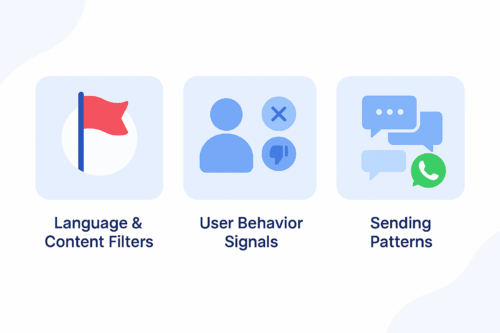
A clean blue infographic illustrating three reasons WhatsApp flags messages: language and content filters, user behavior signals, and sending patterns.
A simple infographic showing the main factors that cause WhatsApp messages to be flagged as spam.

WhatsApp protects users from unwanted or irrelevant content. Its detection system relies on three main components.

1. Language and Content Filters

WhatsApp automatically flags messages that include aggressive sales language, misleading claims, or repetitive promotional formatting.

2. User Behavior Signals

If users frequently block your number, report your messages, or never engage, WhatsApp lowers your sender quality score.

3. Sending Patterns

Sending the same unpersonalized message to large audiences or sending at a high frequency increases the risk of being flagged.


How ChatGPT Helps You Stay Compliant

ChatGPT allows marketers to generate message variations, personalize content, and avoid risky language. When used effectively, it helps you:

  • Avoid spam-triggering words

  • Maintain a conversational and friendly tone

  • Personalize messages at scale

  • Generate safe, compliant WhatsApp templates

Instead of guessing what may cause a message to be flagged, you can use ChatGPT to create structured, user-focused messages based on WhatsApp’s best practices.


Best Practices for Writing WhatsApp Messages

To improve compliance and engagement, follow these principles.

Focus on Value, Not Promotion

Avoid overly pushy sales messages.

Instead of:
“Buy now and get 50% off!”

Try:
“We thought you might like these new arrivals.”

Keep the Tone Conversational

Write naturally and avoid robotic or formal text.

Personalize Whenever Possible

Reference the user’s name, interest, or purchase history to reduce block rates.

Use Soft CTAs

Avoid commands such as “Act now.”
Use gentle guidance like “Would you like to explore the latest items?”


ChatGPT Prompt Examples for Safe WhatsApp Messaging

Use the prompt ideas below to generate compliant message templates:

Cart Reminder

“Write a friendly reminder for a user who left items in their cart. Keep the tone conversational and avoid strong promotional language.”

Personalized Follow-Up

“Create a message for a returning customer based on their last purchase. Offer something relevant without pressure.”

Re-Engagement Prompt

“Write a soft re-engagement message for a customer who has not interacted in 30 days.”

Order Confirmation with Suggestion

“Write an order confirmation message that includes a light suggestion for a related product.”

Limited-Time Announcement

“Create a short message inviting the user to view a relevant campaign without using pushy phrases.”


Testing and Improving with Appgain’s WhatsApp API

Once your messages are ready, you can test their performance using Appgain’s WhatsApp API.

Step 1: Send via WhatsApp API

Deliver personalized messages using templates, dynamic fields, and buttons.

Step 2: Monitor Message Performance

Track key metrics such as delivery rate, read rate, clicks, and opt-outs.

Step 3: Iterate Based on Feedback

If a message performs poorly, adjust the tone or content using ChatGPT and test a new version. Continuous iteration leads to stronger results.


Final Thoughts

Writing WhatsApp messages that avoid spam filters isn’t just a compliance task — it’s the foundation of building conversations that users actually want to receive. When your messaging feels natural, thoughtful, and personal, it earns trust instead of triggering blocks.

With Appgain, you’re not simply sending WhatsApp campaigns.
You’re shaping a messaging experience that respects the user, follows WhatsApp’s rules, and delivers measurable business impact.

Track Campaigns Like a Pro: Build Dashboards with Appgain +Looker Studio

Ever feel like you’re running campaigns in the dark?
Messages are going out, budgets are being spent — but where are the results? What’s working? What’s not?

It’s time to change that.
With Appgain + Looker Studio, you can turn raw campaign data into clear, visual dashboards that show you exactly what’s happening — in real time.

Let’s break it down step by step.

Step 1: Get Your Data from Appgain

Appgain tracks everything:
Who opened your message, clicked, replied, converted — and from which channel (WhatsApp, email, push, etc.).

The good news? You can export all this data directly into Google Sheets or BigQuery, ready to plug into a dashboard.

No manual reports. No messy spreadsheets. Just clean, useful data.
For a detailed guide on building an Appgain Looker Studio dashboard, check out [this comprehensive guide here].

Step 2: Visualize It in Looker Studio

Now the magic happens.

Use Looker Studio to create dashboards that:

  • Show message delivery and engagement trends
  • Compare campaign performance across channels
  • Highlight your top-performing segments
  • Track ROI, cost per message, and conversion rates — live

Whether you’re a marketer, a data analyst, or a founder — your KPIs are now visual, interactive, and always up to date.

Why This Changes Everything

This setup helps you:

  • Spot what’s working instantly
  • Fix underperforming campaigns fast
  • Share results with your team or boss in seconds
  • Make smarter decisions backed by real numbers

No more guessing. No more waiting for the monthly report.

Ready to See Your Marketing in Real Time?

With Appgain + Looker Studio, you’re not just collecting data —
you’re using it to grow.

WhatsApp Automation: Turn CRM Data Into Real-Time Sales

Most businesses today hold large volumes of customer data inside their CRM systems, yet very few unlock its true potential. This is where WhatsApp Campaign Automation becomes essential. By activating real-time, behavior-based messaging, businesses can engage customers instantly based on actions, intent, or inactivity.

When a customer browses, abandons a cart, or stops engaging, automation ensures the next step happens immediately. With Appgain’s WhatsApp API combined with n8n’s no-code workflows, marketing teams can build a complete automated funnel that moves customers from CRM to WhatsApp in a seamless, conversion-driven journey.


The Challenge: Fragmented Marketing Execution

Visual illustration showing fragmented communication channels scattered around a central workspace, symbolizing disorganized customer communication.
A visual snapshot of fragmented tools and channels before automation.

In many companies, marketing operations are spread across disconnected tools:

  • CRM platforms store customer data

  • Messaging tools handle communication

  • Analytics tools measure engagement and performance

This fragmentation leads to delays, inconsistent messaging, and missed sales opportunities. Without WhatsApp Campaign Automation, customer journeys become slow and heavily dependent on manual steps.


The Solution: A Fully Automated WhatsApp Funnel

By integrating Appgain with n8n, teams can activate CRM data instantly and send personalized WhatsApp messages in real time. This solution connects the entire customer journey inside one workflow:

Automated funnel illustration showing CRM data flowing through n8n automation nodes into WhatsApp message bubbles.
A visual funnel showing how CRM data moves through automation before reaching customers on WhatsApp.
  • Import CRM contacts

  • Build audience segments

  • Trigger automated campaigns

  • Deliver messages instantly

  • Track opens, clicks, and conversions

  • Push insights back into the CRM

This approach transforms static data into an active communication engine.


How WhatsApp Campaign Automation Works

Visual workflow showing CRM data flowing into automation, then delivered to customers through WhatsApp.
A simple workflow illustrating how CRM data moves through automation to WhatsApp messaging.

1. Import CRM Contacts Into n8n

Use native connectors or an API to sync contacts directly from your CRM into the workflow.

2. Segment Customers Based on Behavior

Create dynamic segments based on activity, lifecycle stage, geography, purchases, or product interest.

3. Build Campaign Logic

Examples of automation rules include:

  • If a cart is abandoned for 48 hours, send a WhatsApp reminder

  • If a customer is inactive for 14 days, trigger a re-engagement message

  • After a purchase, send a thank-you message or referral offer

4. Deliver Messages via Appgain’s WhatsApp API

This includes images, buttons, product recommendations, and dynamic personalization fields.

5. Track Performance in Real Time

Monitor delivery rates, message opens, clicks, and conversion events. Feed this performance data back into the CRM to continually improve segmentation and targeting.


Real Example: Automated Drip Campaign for E-commerce

A fashion retailer implemented a fully automated seven-day WhatsApp campaign using Appgain and n8n:

  • Day 1: Identify and segment VIP customers

  • Day 2: Send early access to new arrivals

  • Day 3: Deliver exclusive limited-time discount

  • Day 6: Trigger low-stock reminders

  • Day 7: Send thank-you message with referral incentive

Results included:

  • A 47 percent increase in click-through rate

  • A three-times higher conversion rate compared to email

  • A 30 percent drop in customer support tickets due to automated responses

This shows the power of WhatsApp Campaign Automation when CRM data is activated instantly.


Why WhatsApp Campaign Automation Works

Faster Execution
Campaigns can be created and deployed within hours rather than weeks.

Hyper-Personalization
Messages respond to customer behavior in real time.

No-Code Simplicity
Marketers can build workflows without engineering involvement.

Scalable Performance
A single automated workflow can serve thousands of customers simultaneously.

For deeper workflow examples, see n8n’s official documentation at:
https: // n8n . io


Additional Resources

For deeper workflow examples and automation best practices, you can explore the official n8n resource at  n8n.io.
If you want to learn more about the value of WhatsApp-first communication, check our internal guide on WhatsApp-first strategies available on the Appgain blog.

Conclusion

Customer data becomes valuable only when activated at the right moment with the right message. Through WhatsApp Campaign Automation using Appgain’s WhatsApp API and the automation power of n8n, businesses can build continuous, personalized communication that boosts engagement and accelerates revenue.

This is not just marketing automation.
It is a complete customer conversion engine.

From CRM to customer, every step becomes part of one automated, intelligent loop — where data turns into real conversations, and conversations turn into growth.


Ready to Market Like It’s 2025?

Unlock real-time, AI-powered WhatsApp campaigns and turn your CRM data into conversations that convert.

With Appgain, you can launch your first automated WhatsApp journey in under 10 minutes — no engineering, no complexity.

Start Your Smart Campaign Today

Personalization at Scale: How Appgain Helps You Speak 1-on-1 to Thousands

Modern customers expect more than just a name in a message. They want offers that match their behavior, timing that fits their habits, and recommendations that feel tailor-made.

The challenge? Doing that for thousands — without doing it manually.

This is where Appgain comes in. With behavioral segmentation, smart automation, and AI-powered workflows, you can personalize every message like it was written for one person — even when you’re sending it to thousands.

Why Personalization Matters More Than Ever

Generic campaigns no longer convert. Today’s consumers ignore one-size-fits-all messages.

According to industry benchmarks:

  • Personalized messages have up to 6x higher engagement
  • Behavioral-based campaigns outperform demographic ones
  • Cart-based personalization can boost revenue by 30% or more

The more relevant your message, the more likely your customer is to respond.

Step 1: Segment by Behavior, Not Just Demographics

Traditional segmentation relies on age, gender, or location. That’s not enough.

With Appgain’s CRM and analytics tools, you can segment based on:

  • Last product viewed
  • Time spent on page
  • Cart activity (added but not purchased)
  • Purchase frequency
  • Campaign click history

Example Segment:
“Users who added shoes to cart in the past 7 days but didn’t buy.”

Step 2: Add Context with Product Tagging

You can’t personalize without context. That’s where product tagging comes in.

Appgain allows you to assign tags like:

  • “Summer Collection”
  • “High-Interest”
  • “Repeat Buyer Favorite”
  • “Low Stock”

This enables messages like:

“Still thinking about the Summer Sandals? They’re almost gone.”

Step 3: Personalize Messaging with Automation + AI

Using Appgain’s integration with n8n, you can build workflows that:

  • Pull product data
  • Check customer behavior
  • Feed it into ChatGPT or Claude to generate tailored messages
  • Send through WhatsApp, SMS, or email

All of this happens automatically — no manual copywriting required.

Example Workflow:

  1. Customer abandons cart
  2. n8n pulls product info + behavior
  3. AI generates a unique follow-up message
  4. Appgain sends it via WhatsApp with product image and CTA

Step 4: Multi-Channel Delivery, One Strategy

Every customer prefers a different touchpoint. Appgain supports:

You can build one unified flow that delivers the right message to the right user via the right channel.

Real-World Impact

Brands using Appgain for personalization have reported:

  • 3x higher click-through rates
  • 40% better reactivation of inactive users
  • Reduced dependency on manual campaign building

Automation doesn’t just save time — it creates better customer experiences.

Final Thoughts

Personalization at scale isn’t a luxury anymore — it’s a requirement.

With Appgain, you can go beyond names and send truly relevant, context-aware, and conversion-driven messages to thousands — without losing the personal touch.

Ready to turn data into conversations?
Visit appgain.io to start personalizing at scale.

Training AI Personas: How to Build Bots That Feel Human

In 2025, it’s no longer enough for bots to just answer. They need to connect.

The future of AI communication lies in human-like personas — bots that respond naturally, carry context, and reflect your brand voice. Whether you’re building a WhatsApp assistant, a sales agent, or a support bot, the secret is in how you train your AI.

This guide walks you through the key steps to designing AI personas that feel real — and how to deploy them through Appgain’s WhatsApp API.

Why AI Personas Matter

Customers today can spot a generic bot from the first message. Robotic replies, inconsistent tone, or lack of context kill trust instantly.

AI personas solve that by giving your bots:

  • A distinct personality
  • Tone that matches your brand
  • Context memory to hold conversations
  • Natural fallback responses
  • The ability to learn and adapt over time

Step 1: Define the Role and Personality

Before you write a single prompt, ask:

  • Is this bot a sales agent, support rep, or onboarding guide?
  • Should it sound professional, friendly, witty, or calm?
  • What phrases, words, or emojis should it avoid or always use?

Example Persona Brief:

  • Name: Layla
  • Role: WhatsApp Sales Assistant
  • Tone: Friendly, helpful, not pushy
  • Traits: Uses customer name often, recommends based on behavior, never overpromises


Step 2: Create Prompt Templates

Prompts are what shape your AI’s behavior.

Instead of just saying:
“Send discount message.”

Use structured prompts like:
“You are a helpful sales assistant. Greet the customer by name, mention their interest in product X, and offer a limited-time 10% discount using natural language. Do not sound robotic or aggressive.”

Save different prompt templates for:

  • Product recommendation
  • Cart recovery
  • Lead qualification
  • Support replies
  • Follow-ups

Use tools like ChatGPT, Claude, or Hugging Face to test tone and consistency.

Step 3: Add Context and Memory

To make a bot feel human, it must remember what was said.

You can simulate memory in tools like:

  • ChatGPT with function calling or custom instructions
  • Hugging Face pipelines with history chaining
  • Flowise, LangChain, or vector databases for long-term context

Examples of context-aware behavior:

  • “You asked about size last time. Here’s a guide.”
  • “Just checking in — did the last offer work for you?”

Step 4: Design Smart Fallbacks

Not all questions will be covered.

To avoid cold responses like “I don’t understand,” design fallbacks like:

  • “Hmm, I’m not sure about that — but I can check with the team if you’d like.”
  • “Can I guide you to our support center for that?”
  • “Would you prefer to speak with a human agent now?”

Natural fallbacks preserve trust.

Step 5: Connect to WhatsApp via Appgain

Once your persona is ready, it’s time to deploy.

Using Appgain’s WhatsApp API and Automation Builder:

  • Plug your AI persona into message flows
  • Trigger the right prompt based on CRM data or user behavior
  • Send smart replies in real-time
  • Combine with buttons, rich media, and flows for full interaction

Example:
A customer abandons cart → AI bot checks last viewed items → sends friendly reminder with promo code → offers to answer product questions

Final Thoughts

Human-like AI isn’t just about tech — it’s about empathy, tone, and timing.

By designing AI personas with purpose and connecting them through Appgain, you create smarter, more natural conversations that convert.

Your bot doesn’t just reply — it represents your brand.

Ready to build a persona that sells, supports, and scales?
Visit appgain.io to get started.

Push Notifications vs. WhatsApp: Which Drives Better Re-Engagement?

In the world of re-engagement, one message can make the difference between a lost user and a returning customer.

But which channel delivers better results — Push Notifications or WhatsApp?

This article compares both channels across open rates, user experience, and use cases — and shows how to get the best of both with Appgain.

Push Notifications: Fast and Far-Reaching

Why marketers rely on it

  • Reaches users instantly, even outside your app
  • Ideal for short, urgent messages
  • Easy to implement for web or mobile

Performance Snapshot

  • Average Open Rate: 3% to 10%
  • Best For: Abandoned cart nudges, flash offers, quick alerts

Pros

  • Lightweight and low-cost
  • No contact list required
  • Works well for both mobile apps and websites

Cons

  • Can be blocked by user settings
  • Limited space for personalization
  • Higher opt-out rates over time


WhatsApp: Personal and High-Converting

Why it works

  • Reaches users in the app they use most
  • Supports two-way interaction and rich content
  • Excellent for event-based automations and AI integration

Performance Snapshot

  • Open Rate: 80% to 98%
  • Click-Through Rate: Up to 45%
  • Best For: Personalized re-engagement, cart recovery, drip campaigns

Pros

  • Deep personalization with media support
  • AI chatbot-friendly
  • Higher engagement and conversion

Cons

  • Requires opt-in
  • Daily templates need approval
  • Higher cost per message than push


When to Use Both Together

Top-performing brands use both channels strategically.

Sample Flow

  1. Push Notification: “Still thinking about your order? Items are selling fast.”
  2. WhatsApp Follow-Up (next day): “Need help finishing your purchase? Here’s a personal offer just for you.”


How Appgain Helps

  • Build flows in n8n using CRM or behavior triggers
  • Switch channels automatically based on engagement
  • Track delivery, clicks, and ROI in one dashboard

Performance Comparison

Channel Open Rate CTR Opt-In Required
Push 3% – 10% 0.5% – 2% No
WhatsApp 80% – 98% 20% – 45% Yes

Final Thoughts

Push notifications grab attention.
WhatsApp drives conversations and conversions.

But the most effective strategy isn’t picking one — it’s using both in harmony.

With Appgain’s automation tools, CRM integration, and unified messaging APIs, you can build smarter, faster, and more effective re-engagement campaigns.

Ready to boost retention with smarter messaging?
Visit appgain.io and get started today.

The Rise of AI Marketing Tools: What They Mean for You

Let’s stop pretending marketing is still a manual game.
The tools have changed. The expectations have changed. And if you’re not evolving with them, you’re getting left behind.

According to MarTech’s July 2024 roundup, a new generation of AI marketing tools is shaking up how brands plan, launch, and optimize their campaigns — powered not by human hands, but by autonomous agents and intelligent workflows.

What’s Changing: The AI Toolkit of 2025


Infographic showing the AI Toolkit of 2025: Autonomous AI Agents, Social Metric AI, and Deepfake Detectors

Here are the three most disruptive AI trends transforming marketing teams today:


1. Autonomous AI Agents

Think of them as your 24/7 digital marketers. These AI-driven systems:

  • Monitor performance metrics in real-time
  • Adjust budgets automatically
  • Recommend (and sometimes publish) optimized content
  • Handle A/B testing without waiting for human input

They don’t just follow rules — they learn, adapt, and act.

2. Social Metric AI Assistants

No more endless dashboards. These AI tools summarize social performance — sentiment shifts, audience reactions, virality triggers — into clear, actionable insights.

They turn noise into signal.

3. Deepfake & Brand Authenticity Detectors

With AI-generated content flooding the internet, tools are emerging to detect:

  • Misuse of brand identity
  • Deepfaked reviews, testimonials, or visuals
  • Off-brand messaging created by third parties or rogue actors

Brand protection now requires just as much AI as brand promotion.

What This Means for Your Marketing Team

These tools don’t just speed things up — they change the shape of your team:

  • Content teams become curators, not just creators
  • Data analysts are replaced by real-time insights
  • Campaign managers evolve into workflow designers
  • Small teams can compete with big budgets — if they automate smart

In short, AI lets you do more with less — if you use it right.

How Appgain Aligns with This Future

Appgain is already building for the autonomous era of marketing.
Here’s how:

? Predictive Segmentation (Built with AI)

Appgain auto-tags users based on behavior, timing, location, and past activity — then sorts them into smart CRM segments without human intervention.

Examples:

  • A customer opens a WhatsApp message, visits product page, but doesn’t buy? → Tagged as “Engaged but Hesitant”
  • Buyer with >3 purchases and high order value? → “Loyal + High LTV”

These segments feed directly into automations, upsells, or retargeting — no manual lists, no missed timing.

? Campaign Execution via Automation Builder

Appgain’s drag-and-drop Automation Builder lets you:

  • Set triggers (new signup, cart abandonment, no login for 7 days)
  • Personalize messages using CRM tags and AI content
  • Execute instantly, then optimize based on performance

You’re not scheduling campaigns anymore. You’re programming intent.

? Agent-Based Workflows via n8n Integration

Using Appgain’s n8n workflows, you can create intelligent marketing agents that:

  • Auto-respond to CRM events
  • Enrich data from third-party apps (e.g., Google Sheets, Shopify, Airtable)
  • Decide next steps based on real-time inputs
  • Trigger follow-ups, escalate to human reps, or notify Slack/Teams

This is where marketing logic becomes executable — with no code, no delay.

Why It Matters Now

The rise of AI tools isn’t just hype — it’s your competitive advantage or your biggest blindspot.

Early adopters are already:

  • Cutting campaign costs
  • Reducing dependency on large teams
  • Getting to market faster
  • Making smarter decisions at scale

And they’re doing it with tools that think, act, and improve — autonomously.

Final Word

AI tools don’t replace marketers. They free them — from dashboards, deadlines, and decision fatigue.

Appgain is your entry point into this smarter ecosystem — giving you:

  • Predictive insights
  • Real-time segmentation
  • No-code automation
  • Agent-style workflows that run your campaigns while you sleep

Because in 2025, smart marketing isn’t about working harder.
It’s about letting smarter tools work for you.

Ready to try AI-driven marketing the right way?
[Book a demo with Appgain and start building your future stack — today.]
Prefer a quick chat? [Contact us directly on WhatsApp].

Transform Your Events with Appgain’s Smart Communication Solutions

Say goodbye to chaos and hello to seamless engagement

In the fast-paced world of conferences and events, effective and timely communication can make or break the attendee experience. That’s why Appgain offers intelligent, automated solutions designed to instantly connect with your audience, delivering the right message at exactly the right moment.

Imagine this

A visitor walks into your event venue. Within seconds, they receive a message on their phone:
“Welcome! The opening keynote starts in 15 minutes at Hall A. Grab a coffee and get ready.”

No staff involvement. No delays. Just fast, relevant communication delivered automatically.
That’s what Appgain makes possible.

Appgain’s Smart Event Communication Tools

1. Location-Based SMS (LBA SMS)

With location-based messaging, attendees automatically receive personalized messages as soon as they enter a designated area within the event. It’s a powerful way to engage guests from the very first step.

Key features include:

  • Instant welcome messages upon arrival

  • Real-time delivery of schedules, session info, or venue guidelines

  • Automated reminders about important sessions or time-sensitive activities

This solution is directly integrated with mobile operators in Egypt, ensuring messages are delivered precisely when and where they’re needed.

2. QR-Based Attendance Registration and SMS Follow-Ups

Eliminate manual check-in processes and boost accuracy with a QR-based attendance system linked to automated SMS notifications.

How it works:

  • Each attendee receives a unique QR code during registration

  • Upon arrival, staff scan the code to confirm attendance

  • An SMS is automatically sent with their event schedule, map, or other helpful details

It’s a smooth, professional process that improves both attendee experience and operational efficiency.

Why Event Organizers Choose Appgain

  • Guaranteed message delivery through direct integration with Egyptian telecom providers

  • Accurate and error-free attendance tracking via QR code scanning

  • Seamless communication across SMS, WhatsApp, and email

  • Quick and simple setup with no technical complexity required

Proven Solutions for Real-World Events

Appgain’s smart communication tools are already trusted by leading event organizers across Egypt. From tech summits and corporate expos to training sessions and launch events, our solutions help ensure better communication, higher engagement, and a smoother experience for everyone involved.

Take Your Event to the Next Level

Whether you’re managing a small gathering or a large-scale conference, Appgain’s automated communication tools can help you create a more connected and organized event.

Get in touch with us today to learn how we can support your next event with smarter, faster communication.