WhatsApp Automation: 2026 Guide for MENA Businesses

Introduction

WhatsApp automation for business is no longer optional in the MENA region. It is now the main channel where customers ask about prices, confirm bookings, and make buying decisions.

However, most businesses still manage conversations manually. As a result, response times are slow, opportunities are missed, and potential customers move to competitors.

This guide explains how WhatsApp automation for business works in 2026, and how MENA companies can use it to improve response speed, reduce workload, and increase conversions.


Why WhatsApp Automation for Business Is No Longer Optional

During peak hours, most businesses receive dozens of WhatsApp messages at the same time.

For example, a customer might ask about availability while your team is busy handling other conversations. Therefore, the reply is delayed. In many cases, the customer leaves before receiving a response.

In addition, high-intent customers expect fast replies. If they do not get one, they move on quickly.

Key Statistics

  • Average manual response time: 2 to 4 hours
  • Customer patience: less than 5 minutes
  • Automation improves response speed by up to 60%
  • AI reduces agent workload by up to 80%

Clearly, this is not just an operational issue. It directly impacts revenue.


Types of WhatsApp Automation for Business

Not all automation solutions offer the same level of performance. Therefore, it is important to understand the different types.

1. Basic Auto-Reply

This is the simplest form of automation.

  • Sends replies outside working hours
  • Requires no integrations
  • Limited functionality

However, it only solves a small part of the problem.


2. Template-Based Messaging

This method uses pre-approved templates.

  • Order confirmations
  • Appointment reminders
  • Notifications

These messages are reliable. However, they are one-way and do not support full conversations.


3. Flow-Based Chatbots

These bots follow a structured path.

For example:

  • Press 1 for pricing
  • Press 2 for support

They are useful for handling repetitive inquiries. However, they often feel rigid and lack flexibility.


4. AI-Powered Conversational Agents

This is the most advanced form of WhatsApp automation for business.

  • Understands natural language
  • Responds instantly
  • Uses your business data
  • Updates CRM automatically

As a result, conversations feel natural and scalable at the same time.


5. WhatsApp CRM Integration

Every interaction becomes structured data.

  • Contacts are created automatically
  • Deals are updated
  • Follow-ups are triggered

Therefore, no lead is lost and no conversation is forgotten.


How to Build a WhatsApp Automation for Business Flow

A successful system starts with planning, not tools.

Step 1 — Identify Top Inquiries

Review your recent conversations.

In most businesses, customers ask about:

  • Pricing
  • Availability
  • Booking
  • Order status
  • Support

These should be automated first.


Step 2 — Design the Flow

For each inquiry, define:

  • What the customer wants
  • What data you need
  • What the final outcome is

For example, the flow may end with a booking, a response, or a human handoff.


Step 3 — Write Natural Messages

Messages should feel human.

  • Keep them short
  • Avoid complex words
  • Match your brand tone

In addition, support both Arabic and English to serve MENA audiences effectively.


Step 4 — Connect to Real Systems

Automation becomes powerful when it connects to live data.

For example:

  • Inventory systems
  • CRM platforms
  • Booking tools

Static answers are not enough.


Step 5 — Define Human Handoff

Not every conversation should be automated.

For instance, you should transfer to a human when:

  • The customer is frustrated
  • The request is complex
  • The lead is high-value

This balance improves both efficiency and customer experience.


Step 6 — Measure and Improve

Track key metrics from the start.

  • Response time
  • Resolution rate
  • Customer satisfaction

Over time, these insights help you improve performance.


ConnectGain: WhatsApp Automation for Business Platform

ConnectGain by Appgain is built specifically for WhatsApp automation for business in MENA.

Core Features

AI Flow Builder
A visual interface that allows you to build automation without coding.

WhatsApp API Integration
Supports large-scale messaging, media, and interactive communication.

Unified Inbox
Manages conversations across multiple channels in one place.

AI Auto-Reply (RAG)
Answers customer questions using your real business data.

Broadcast Campaigns
Send targeted WhatsApp messages with tracking and segmentation.

Post-Call Follow-Up
Automatically send messages after calls without manual effort.


Use Cases by Industry

Real Estate

  • Qualify leads
  • Recommend properties
  • Schedule viewings

Tourism and Hospitality

  • Handle bookings 24/7
  • Check availability
  • Send confirmations

Healthcare

  • Book appointments
  • Send reminders
  • Handle patient inquiries

E-commerce

  • Recover abandoned carts
  • Send order updates
  • Automate returns

Financial Services

  • Qualify leads
  • Send document reminders
  • Manage follow-ups

Common Mistakes to Avoid

No Human Option

Customers should always be able to reach a real person.


Robotic Messages

Generic responses reduce trust and engagement.


No Arabic Support

Automation must support Arabic to work effectively in MENA.


No CRM Integration

Disconnected systems lead to lost data.


No Performance Tracking

Without data, you cannot improve or scale.


Getting Started

If you are still handling WhatsApp manually, you are limiting your growth.

With the right setup, WhatsApp automation for business can:

  • Improve response speed
  • Reduce workload
  • Increase conversions
  • Ensure consistent follow-ups

To learn more, visit:
https://appgain.io
📱 WhatsApp: +20 111 9985526
🌐 Website: https://appgain.io
📩 Email: ***@*****in.io“>He***@*****in.io


Conclusion

Customers already use WhatsApp to communicate with your business. Therefore, your ability to respond quickly determines whether you win or lose the deal.

WhatsApp automation for business is no longer a competitive advantage. It is a necessity.
How to Train Your AI Intern: Building Domain-Specific Agents

Artificial intelligence is now more than a support tool. Today, it can function like a real team member. It manages tasks, drafts documents, and supports daily operations. However, the true value appears when the AI understands your domain. When this happens, the agent becomes more accurate, more helpful, and easier to trust.

In this guide, we explain how to train your AI intern step by step. We also show how to organize your data, choose the right training method, and design agents that match your industry. As a result, your AI can reflect your brand voice, understand your customers, and follow your internal processes. Because of this, the AI becomes a useful assistant instead of a generic chatbot. In addition, the same methods work for both e-commerce and SaaS, which makes this guide suitable for many industries.


Why Domain-Specific AI Matters

General-purpose models are powerful. However, they often lack the detailed context your business needs. They do not fully understand your product lines, customer types, KPIs, or tone of voice. As a result, the output may feel generic or inconsistent. When you train an agent with domain-specific data, its performance improves significantly. It becomes clearer, more consistent, and more aligned with your real workflows.

A domain-trained agent can deliver several benefits. For example, it can write product descriptions in your voice, draft campaign briefs based on previous launches, or respond to customers using accurate terminology. Moreover, it can summarize important metrics using your internal logic. Because of these advantages, a domain-specific agent becomes a dependable digital intern.


Step 1: Define the Role of Your AI Intern

Before you begin training, define the role clearly. This step acts as the job description for your AI intern. When the role is specific, the agent performs better.

E-commerce example:
Act as a junior copywriter who understands the product catalog, seasonal promotions, and SEO strategy.

SaaS example:
Act as a product manager who writes feature briefs, user stories, and competitor summaries.

Clear role definitions guide the entire training process. In addition, they help you measure whether your AI intern is improving over time.


Step 2: Collect Your Domain Data

Your AI intern learns through examples. Therefore, your dataset should include real content from your business. You can use product descriptions, blog posts, campaign emails, customer personas, internal SOPs, meeting notes, and feature requests. When the dataset is relevant and diverse, the agent becomes more accurate.

In addition, organizing your data makes training easier. Group similar documents together. Remove outdated information. Highlight patterns you want the AI to follow. Because of this preparation, the training steps become more reliable and predictable.


Step 3: Choose Between RAG or Fine-Tuning

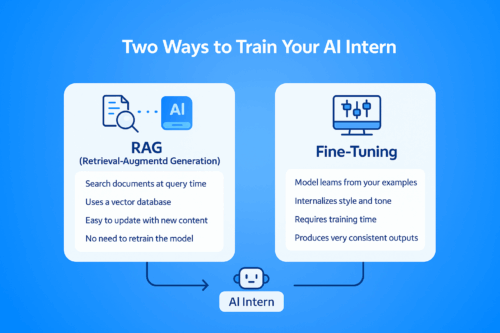
A visual comparison chart showing two methods for training an AI intern: Retrieval-Augmented Generation (RAG) on the left and Fine-Tuning on the right. The diagram uses a blue color palette and simple icons to illustrate the differences between search-based retrieval and model-based learning.
Comparison between RAG and Fine-Tuning — the two main methods for training a domain-specific AI intern.

There are two effective ways to train a domain-specific agent. Each method has its strengths.


Option 1: Retrieval-Augmented Generation (RAG)

RAG does not require model retraining. Instead, it allows the AI to search your documents during each query.

To use RAG:

  • Store your documents in a vector database such as Pinecone, Weaviate, Chroma, or Qdrant

  • Connect the database to a framework like LangChain or LlamaIndex

  • Link the retrieval pipeline to GPT or Claude

This method is flexible. Moreover, it keeps your system updated with new documents instantly. As a result, RAG is ideal for fast-changing industries.


Option 2: Fine-Tuning

Fine-tuning is suitable when you want deeper personalization.

To fine-tune:

  • Choose a base model such as GPT-3.5, Claude 3, or an open-source LLM

  • Create prompt-response pairs from your data

  • Use OpenAI, Anthropic, or open-source tools to train the model

Fine-tuning allows the AI to internalize your writing style, tone, vocabulary, and business reasoning. Because of this, it generates more consistent and natural responses.


Step 4: Set Guardrails and Feedback Loops

After training, the AI intern needs structure. Guardrails prevent mistakes. For example, you may require the agent to avoid mentioning prices or discounts without approval. You can also set review steps where a team member checks the output before use. These checkpoints improve safety and accuracy.

Feedback loops are equally important. By collecting corrections, ratings, and suggestions, the AI becomes more reliable. Over time, this creates a self-improving system that adapts to your needs.


E-Commerce Use Cases

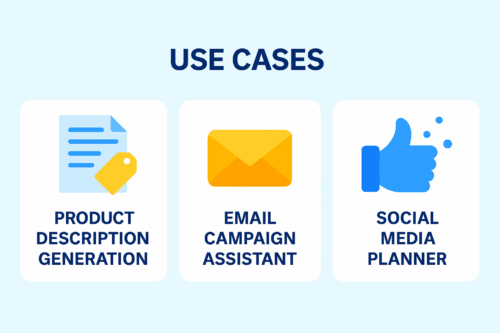
A clean 2D infographic showing three e-commerce AI use cases: Product Description Generation, Email Campaign Assistant, and Social Media Planner. Designed in a blue SaaS-style layout with white rounded cards and minimal icons.
E-commerce AI use cases: product descriptions, email campaigns, and social media planning.

1. Product Description Generation

A domain-trained AI can write accurate, SEO-friendly product descriptions. Because it understands tone and category rules, the text becomes more consistent and requires less editing.

2. Email Campaign Assistant

When trained on past campaigns, the AI can draft flash sale messages, abandoned cart emails, and loyalty program content. This reduces workload and speeds up campaign creation.

3. Social Media Planner

With access to your tone guidelines and previous posts, the AI can create caption options, weekly planning calendars, and campaign slogans.


SaaS Use Cases

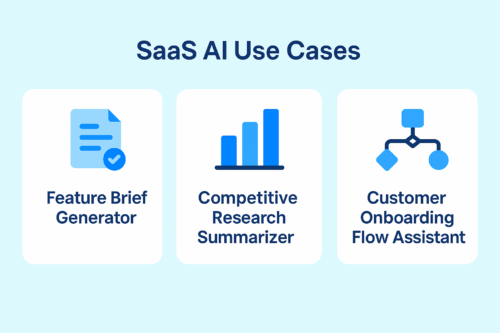
A 2D infographic showcasing three SaaS AI use cases: Feature Brief Generator, Competitive Research Summarizer, and Customer Onboarding Flow Assistant. The design uses a clean blue SaaS-style background with white rounded cards and minimal icons.
SaaS AI use cases: feature briefs, competitive insights, and customer onboarding support.

1. Feature Brief Generator

The AI can draft PRDs, epics, and user stories. Because it understands your terminology and roadmap, the writing becomes more structured.

2. Competitive Research Summarizer

You can provide internal battlecards and market research. As a result, the AI can summarize competitor updates and suggest positioning ideas.

3. Onboarding Flow Assistant

The AI can recommend onboarding steps, activation messages, and tooltips for different customer segments.


Final Thoughts

Training an AI intern isn’t just a technical process — it’s the beginning of teaching your systems to think, adapt, and support your team with real intelligence.

With Appgain, you’re not simply building an automated workflow.
You’re shaping an AI teammate that understands your domain, learns your style, and elevates the way your organization works.

Architecting Your Own Agent Infrastructure: A Power User’s Guide

The era of intelligent automation has arrived, and power users are no longer satisfied with generic chatbot templates. They want full control, deep integrations, and agents that can reason, act, and adapt within their ecosystem.

This guide outlines how to design and deploy your own agent infrastructure using LLMs, workflow orchestration, toolchains, memory layers, and control planes such as MCP. If you are ready to move beyond basic prompting and into system-level architecture, this guide provides the blueprint.


Why Build Your Own Agent Infrastructure?

Pre-built AI tools are useful for simple tasks, but they often present limitations such as:

  • Limited integration with external services

  • Rigid workflows

  • Shallow logical reasoning

  • Limited scalability

  • Lack of monitoring and governance

Power users and advanced teams require more flexibility. Building your own agent infrastructure enables:

  • Full modular customization

  • Advanced logical control

  • Secure and governed environments

  • Deep integration with internal tools

  • Higher performance and reliability

This is not about building a basic chatbot. It is about architecting a system that can think and act intelligently.


Core Components of a Modern Agent Architecture

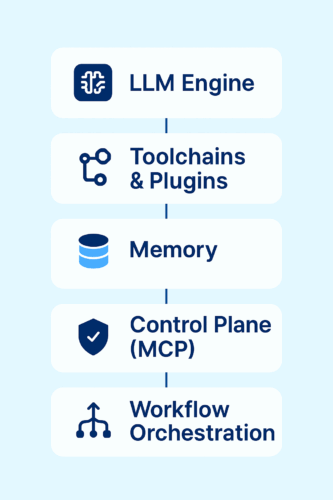
Infographic showing the five core components of an agent infrastructure: LLM Engine, Toolchains & Plugins, Memory Layer, Control Plane (MCP), and Workflow Orchestration.
Five core components of a modern agent infrastructure.

To build a structured and scalable agent environment, each of these components plays a unique role. Together, they enable reasoning, memory, action, and control across the entire system.


1. LLM Engine (The Brains)

The LLM is the reasoning core of the agent. It interprets user inputs, understands context, and determines what actions should be taken.

You may choose:

  • Cloud-hosted models such as GPT-4, Claude, or Gemini

  • Self-hosted open-source models like Llama 3 or Mistral

Your selection depends on latency, cost, security requirements, and infrastructure capacity.


2. Toolchains and Plugins (The Arms and Sensors)

Agents must be able to execute actions, not only generate text.

Using orchestration tools like Flowise, you can build toolchains that give your agent access to:

  • Databases

  • APIs

  • CRMs

  • Spreadsheets

  • File systems

  • Document processing

  • Search tools

Each node in Flowise represents a tool, condition, or action.


3. Memory Layer (Context Awareness)

A truly intelligent agent requires memory.

Vector stores such as:

  • Pinecone

  • ChromaDB

  • Weaviate

  • Qdrant

allow your system to store and retrieve contextual information. This enables:

  • Multi-turn conversations

  • Retrieval-augmented generation

  • Personalized responses

  • Long-term context retention

Without memory, an agent cannot learn, adapt, or handle complex workflows.


4. Control Plane (MCP or Custom)

The Model Control Plane acts as the DevOps layer for your agent. It handles:

  • Authentication

  • API key management

  • Model switching and fallback logic

  • Rate limiting

  • Usage logging

  • Monitoring and error tracking

  • Version control

This ensures the agent remains secure, scalable, and easy to manage.


5. Workflow Orchestration (Logic Layer)

This layer defines how the agent behaves and makes decisions.

Tools like Flowise or n8n allow you to create visual workflows that include:

  • Conditional branches

  • Loops

  • API calls

  • Custom functions

  • Output formatting

  • Multi-step sequences

With proper orchestration, the LLM becomes part of a functional system rather than just a text generator.


Visualizing the Architecture

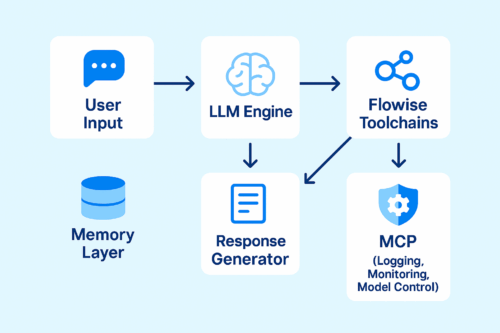
To better understand how the different components work together, the diagram below illustrates the complete architecture of a modern agent system. It shows the flow from user input, through the LLM and toolchain layers, down to orchestration and control.

A clean diagram showing the agent infrastructure architecture, including User Input, LLM Engine, Flowise Toolchains, Memory Layer, Response Generator, and MCP control layer.
Diagram illustrating the full architecture of a modern AI agent system.

This architecture is fully modular, meaning each layer can be swapped, upgraded, or scaled independently. You can replace the LLM, extend toolchains, add new APIs, or enhance the memory layer without rewriting the entire system.


Getting Started: Build Your First Agent in Under One Hour

A simple but functional setup can be achieved quickly by following these steps:

  1. Choose your LLM backend (OpenAI, Claude, or local Ollama).

  2. Install Flowise locally.

  3. Build your first workflow:
    Input → LLM → Weather API → Output Formatter

  4. Add ChromaDB to store conversation memory.

  5. Use MCP or a proxy layer to manage authentication, logging, and model routing.

Within an hour, you will have a fully operational starter agent.


Real-World Use Cases

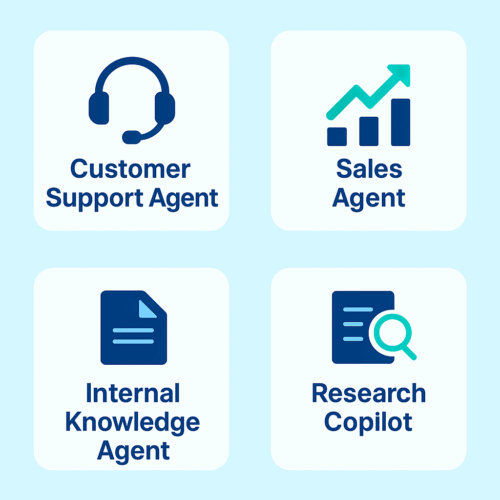
The diagram below highlights four of the most common and powerful real-world use cases enabled by agent infrastructure. Each represents a functional area where intelligent agents significantly improve efficiency and performance.

Four-card infographic showing AI agent use cases: Customer Support Agent, Sales Agent, Internal Knowledge Agent, and Research Copilot.
Common real-world use cases for modern AI agent systems.

A well-architected agent infrastructure can power multiple applications, from customer support automation to internal knowledge search and research assistance. These use cases demonstrate how agents combine reasoning, memory, and tool access to produce meaningful results in practical workflows.

Customer Support Agent

Connects to your CRM, answers inquiries, and escalates complex issues.

Sales Agent

Retrieves product data, pricing, inventory, and handles common objections.

Internal Knowledge Agent

Searches company documents, SOPs, and knowledge bases.

Research Copilot

Reads PDFs, performs academic searches, and summarizes findings.


Final Thoughts

Human-like AI isn’t just about answers — it’s about tone, timing, and the feeling of talking to someone who understands.

With Appgain, you’re not just building a bot.
You’re shaping a digital persona that sells, supports, and strengthens the way your brand communicates.