Multi-Agent Systems for E-commerce: Coordinating Sales, Support, and Fulfillment Bots

Discover how multi-agent systems coordinate sales, support, and fulfillment bots to create seamless e-commerce experiences and boost conversion rates.

The e-commerce landscape is evolving rapidly with AI technologies transforming how online businesses interact with customers. At the forefront of this revolution are multi-agent systems—coordinated networks of specialized AI bots working together throughout the customer journey. These systems are revolutionizing how personalized shopping experiences are delivered at scale, creating seamless interactions from initial product discovery to post-purchase support.

What Are Multi-Agent Systems in E-commerce?

Multi-agent systems in e-commerce are collaborative networks of AI agents, each designed to handle specific aspects of the customer journey. Unlike standalone chatbots, these systems feature multiple specialized bots that communicate with each other, share data, and coordinate their actions to provide a cohesive customer experience.

The core components typically include:

  • Sales Agents: Product recommendation engines and conversational shopping assistants
  • Support Agents: Customer service bots handling inquiries and issue resolution
  • Fulfillment Agents: Order processing, inventory management, and logistics coordination bots

These agents work in concert, sharing customer data and context to create a seamless experience across touchpoints.

The Orchestration of AI Agents Throughout the Customer Journey

Pre-Purchase: Sales Agents in Action

The customer journey begins with sales agents that engage potential buyers through personalized recommendations and interactive shopping assistance. These agents analyze browsing behavior, purchase history, and demographic data to suggest relevant products.

Modern sales agents can:

  • Provide real-time product comparisons
  • Offer personalized discounts based on browsing behavior
  • Answer detailed product questions instantly
  • Guide customers through complex product configurations

By training these AI personas to feel human, e-commerce businesses can create engaging shopping experiences that significantly boost conversion rates.

During Purchase: Coordinated Handoffs Between Agents

As customers move toward purchase decisions, the system orchestrates smooth transitions between different agent types. For example, when a customer asks about shipping options, the sales agent can seamlessly transfer the conversation to a fulfillment agent while maintaining context.

This coordination happens through:

  • Shared customer profiles and conversation history
  • Real-time inventory and pricing data synchronization
  • Contextual handoffs that preserve the conversation flow

The key to successful multi-agent systems is making these transitions invisible to the customer, creating the impression of interacting with a single, knowledgeable entity.

Post-Purchase: Support and Fulfillment Agents

After purchase, support and fulfillment agents take center stage. Fulfillment agents track orders, coordinate with inventory systems, and provide shipping updates. Meanwhile, support agents handle post-purchase questions, returns processing, and proactive customer satisfaction checks.

These agents can:

  • Provide real-time order tracking information
  • Process return requests automatically
  • Offer troubleshooting assistance for products
  • Collect and analyze customer feedback

The Technology Behind Multi-Agent Coordination

Effective multi-agent systems rely on sophisticated orchestration technologies that enable communication and coordination between different AI agents. This orchestration layer manages the flow of information, determines which agent should handle specific customer needs, and ensures consistent customer experiences.

Key technologies enabling this coordination include:

  • Shared Knowledge Bases: Centralized repositories of product information, customer data, and conversation history
  • Intent Recognition Systems: AI that accurately identifies customer needs to route them to the appropriate agent
  • Context Management: Systems that maintain conversation context during agent handoffs
  • Workflow Automation: Predefined processes for common customer journeys

By architecting a robust agent infrastructure, e-commerce businesses can create systems that scale efficiently while maintaining personalized customer experiences.

Real-World Benefits of Multi-Agent Systems

E-commerce businesses implementing multi-agent systems are seeing significant benefits:

Increased Conversion Rates

By providing personalized product recommendations and answering questions instantly, sales agents can significantly boost conversion rates. Research shows that AI-powered product recommendations can increase conversion rates by 30% or more.

Reduced Cart Abandonment

Support agents that proactively address concerns during checkout can dramatically reduce cart abandonment. For example, instantly answering shipping questions or offering real-time assistance with payment issues can recover sales that would otherwise be lost.

Enhanced Customer Satisfaction

The seamless experience provided by coordinated agents leads to higher customer satisfaction. Customers receive consistent, personalized service across all touchpoints, building trust and loyalty.

Operational Efficiency

Automating routine customer interactions frees human staff to focus on complex issues and high-value activities. This improves operational efficiency while reducing costs.

Implementation Challenges and Solutions

Despite their benefits, implementing multi-agent systems comes with challenges:

Data Integration Complexity

Multi-agent systems require integration with multiple data sources, including product catalogs, inventory systems, customer databases, and order management systems.

Solution: Implement a unified data layer that standardizes information from different sources, making it accessible to all agents in a consistent format.

Maintaining Conversation Coherence

Ensuring smooth transitions between agents without losing context can be difficult.

Solution: Develop robust context management systems that maintain conversation history and customer intent during handoffs.

Training Specialized Agents

Each agent type requires specialized training for its specific role in the customer journey.

Solution: Use role-specific training datasets and continuous learning processes to improve agent performance over time.

Future Trends in Multi-Agent E-commerce Systems

The evolution of multi-agent systems in e-commerce is just beginning. Several emerging trends will shape their future development:

Emotion Recognition and Response

Future agents will better recognize customer emotions and adjust their responses accordingly, providing more empathetic and effective service.

Proactive Engagement

Rather than waiting for customer inquiries, advanced systems will proactively engage customers at optimal moments in their shopping journey.

Cross-Channel Coordination

Multi-agent systems will seamlessly coordinate across channels, maintaining context whether the customer is on a website, mobile app, or messaging platform.

Autonomous Decision-Making

Advanced agents will gain more autonomy to make decisions within defined parameters, such as offering personalized discounts or expedited shipping to prevent cart abandonment.

Key Takeaways

  • Multi-agent systems coordinate specialized AI bots across the entire customer journey, creating seamless e-commerce experiences
  • Effective orchestration between sales, support, and fulfillment agents is critical for maintaining context and conversation coherence
  • These systems can significantly increase conversion rates, reduce cart abandonment, and improve customer satisfaction
  • Successful implementation requires robust data integration, context management, and specialized agent training
  • Future systems will incorporate emotion recognition, proactive engagement, and greater autonomy in decision-making

Conclusion

Multi-agent systems represent the future of e-commerce customer engagement, moving beyond single-purpose chatbots to create truly integrated, intelligent shopping experiences. By coordinating specialized agents across the customer journey, e-commerce businesses can deliver personalized service at scale while improving operational efficiency.

As these technologies continue to evolve, the businesses that successfully implement multi-agent systems will gain significant competitive advantages through enhanced customer experiences and increased operational efficiency. The future of e-commerce belongs to those who can effectively orchestrate these digital workforces to create seamless, personalized customer journeys.

Building Your First Marketing AI Agent: A Step-by-Step Guide Using Appgain’s Platform

Transform your marketing operations with autonomous AI agents that work around the clock. This comprehensive guide walks you through creating your first marketing AI agent using Appgain’s platform, empowering you to automate complex workflows and deliver personalized customer experiences. As generative AI continues to revolutionize marketing content, building your own specialized agents has become essential for staying competitive in today’s digital landscape.

Why Marketing AI Agents Are Changing the Game

Marketing AI agents represent the next evolution in automation—autonomous systems that can make decisions, execute tasks, and optimize campaigns without constant human supervision. Unlike traditional automation tools that follow rigid rules, AI agents can:

  • Adapt to changing customer behaviors
  • Process and act on real-time data
  • Perform complex, multi-step marketing workflows
  • Learn and improve from interactions over time

Prerequisites for Building Your Marketing AI Agent

Before diving into the technical steps, ensure you have:

  • An active Appgain account with appropriate permissions
  • Clear marketing objectives for your AI agent
  • Basic understanding of your customer journey
  • Relevant data sources identified

Step 1: Define Your Agent’s Purpose and Scope

Every effective AI agent starts with a clear mission. Begin by answering these questions:

  • What specific marketing problem will this agent solve?
  • Which customer segments will it target?
  • What actions will it be authorized to take?
  • How will you measure its success?

For example, you might create an agent that identifies customers at risk of churn and automatically executes re-engagement campaigns through multiple channels.

Step 2: Access the Agent Builder in Appgain

Log into your Appgain dashboard and navigate to the AI Agents section. Click “Create New Agent” to access the agent builder interface. Here, you’ll provide basic information:

  • Agent Name: Choose something descriptive (e.g., “Churn Prevention Agent”)
  • Description: Detail what the agent does and its intended outcomes
  • Category: Select from options like “Customer Engagement,” “Lead Nurturing,” etc.

Step 3: Configure Data Sources and Permissions

Your agent needs access to relevant data to make informed decisions. In the Data Sources tab:

  • Connect CRM systems containing customer data
  • Link analytics platforms for behavioral insights
  • Integrate communication channels (email, SMS, WhatsApp, etc.)
  • Set appropriate data access permissions

Appgain’s platform makes it easy to connect with popular tools through pre-built integrations, eliminating the need for complex API work.

Step 4: Design Your Agent’s Decision Logic

This is where the magic happens. Using Appgain’s visual workflow builder:

  1. Create trigger conditions that activate your agent (e.g., “Customer hasn’t opened app in 14 days”)
  2. Define decision points with conditional logic
  3. Set up action sequences for different scenarios
  4. Establish feedback loops for continuous learning

The platform offers both pre-built templates and custom options to accommodate different levels of complexity. Training your AI agent with domain-specific knowledge significantly improves its effectiveness in specialized marketing contexts.

Step 5: Set Up Communication Templates

Your agent will need pre-approved content to communicate with customers. Create templates for:

  • Email sequences
  • SMS/WhatsApp messages
  • Push notifications
  • Social media interactions

Include personalization variables that your agent can dynamically populate based on customer data. Learning how to craft WhatsApp messages that don’t get flagged as spam is particularly valuable for agents that use messaging channels.

Step 6: Implement Safeguards and Limitations

Autonomous agents require appropriate guardrails. Configure:

  • Maximum budget allocations
  • Rate limits for customer communications
  • Approval workflows for high-impact decisions
  • Automatic pausing criteria if performance metrics drop

These safeguards ensure your agent operates within acceptable parameters and doesn’t create negative customer experiences.

Step 7: Test Your Agent in Sandbox Mode

Before letting your agent loose on real customers, thoroughly test it in Appgain’s sandbox environment:

  1. Create test customer profiles with varied attributes
  2. Simulate trigger events to activate your agent
  3. Review the decision paths taken
  4. Examine the content and timing of communications

Refine your agent’s logic and templates based on test results until you’re confident in its performance.

Step 8: Deploy and Monitor Your Marketing AI Agent

Once testing is complete, deploy your agent to production:

  1. Set the activation date and time
  2. Define the initial customer segment size (consider starting small)
  3. Configure monitoring dashboards to track key metrics
  4. Set up alert systems for any anomalies

Building comprehensive dashboards with Appgain and Looker Studio allows you to visualize your agent’s performance and impact on marketing KPIs.

Step 9: Optimize Based on Performance Data

As your agent operates, it will generate valuable performance data. Use this information to:

  • Refine decision thresholds
  • Improve message content and timing
  • Expand or narrow the agent’s scope
  • Adjust resource allocations

Appgain’s platform includes AI-powered optimization suggestions that help identify improvement opportunities based on your agent’s performance history.

Advanced Features for Experienced Users

Once you’re comfortable with basic agent creation, explore these advanced capabilities:

  • Multi-agent orchestration for complex customer journeys
  • Custom AI model integration for specialized prediction tasks
  • Advanced A/B testing frameworks for message optimization
  • Cross-channel coordination with AI-powered smart timing to maximize engagement

Key Takeaways

  • Marketing AI agents automate complex workflows while adapting to changing conditions
  • Appgain’s platform simplifies agent creation with visual builders and pre-built integrations
  • Start with a clear purpose and appropriate guardrails for your agent
  • Test thoroughly in sandbox mode before deploying to real customers
  • Continuously monitor and optimize your agent based on performance data

Conclusion

Building your first marketing AI agent may seem daunting, but Appgain’s platform makes the process accessible even to marketers without technical backgrounds. By following this step-by-step guide, you can create autonomous agents that transform your marketing operations, deliver personalized experiences at scale, and free your team to focus on strategic initiatives. As marketing continues to evolve, those who harness AI agents will gain significant competitive advantages through enhanced efficiency, responsiveness, and customer understanding.

Ready to build your first marketing AI agent? Log into your Appgain account today and put these steps into action. Your marketing automation journey is about to reach an entirely new level of sophistication and effectiveness.

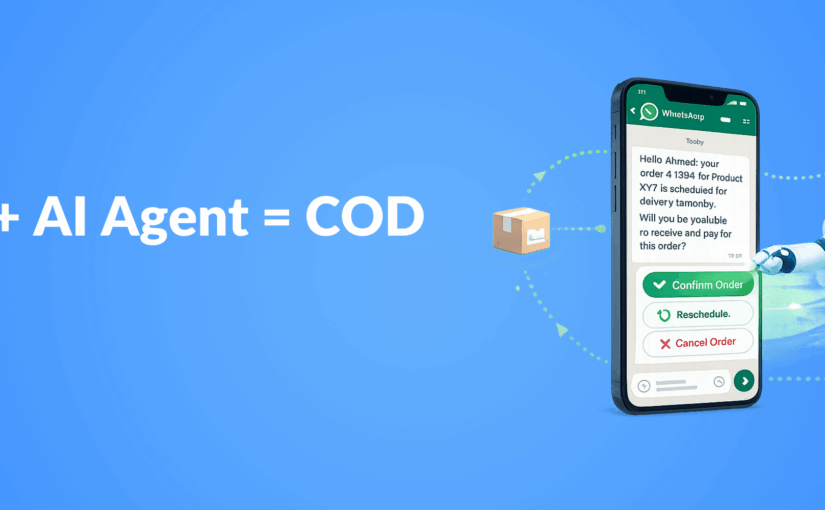
COD Order Confirmation Automation: Reducing Failed Deliveries by 40% with WhatsApp AI Agents

In the competitive e-commerce landscape, Cash on Delivery (COD) remains a popular payment method in many markets, despite presenting unique challenges for retailers. Failed deliveries due to customer unavailability, address issues, or order cancellations can significantly impact your bottom line. This case study explores how implementing WhatsApp automation for customer conversations with AI-powered confirmation workflows reduced failed COD deliveries by an impressive 40%, saving businesses thousands in operational costs while improving customer satisfaction.

The COD Delivery Challenge

Cash on Delivery orders face several unique challenges compared to prepaid orders:

  • Higher cancellation rates (15-30% industry average)
  • Increased return costs for failed delivery attempts
  • Customer unavailability at delivery time
  • Address verification issues
  • Last-minute order cancellations

For many e-commerce businesses, especially those operating in regions where digital payment adoption is still growing, COD remains essential despite these challenges. Each failed delivery attempt costs between $5-15 in logistics expenses, not counting the opportunity cost of inventory tied up in transit.

The Traditional Approach vs. WhatsApp AI Agents

Before implementing an automated solution, most businesses relied on:

  1. Manual phone calls by customer service agents (time-consuming and expensive)
  2. Basic SMS notifications (low engagement rates, no confirmation mechanism)
  3. Email confirmations (low open rates for time-sensitive communications)

The breakthrough came with AI-powered WhatsApp agents trained to feel human in their interactions. These agents could handle the entire confirmation workflow while maintaining a conversational, helpful tone that customers responded to positively.

The Automated Confirmation Workflow

The solution implemented a three-stage confirmation process through WhatsApp:

Stage 1: Initial Order Confirmation

Within 30 minutes of order placement:

  • AI agent sends personalized confirmation message with order details
  • Customer confirms order with a simple “Yes”
  • Address verification with option to update if needed
  • Payment method confirmation

Stage 2: Pre-Delivery Confirmation

24 hours before scheduled delivery:

  • Delivery time window notification
  • Option to reschedule if customer won’t be available
  • Final confirmation of delivery address
  • Reminder about payment amount needed

Stage 3: Day-of-Delivery Communication

2 hours before delivery:

  • Real-time delivery status updates
  • Direct line to delivery agent through the same WhatsApp thread
  • Last-minute rescheduling option if needed

Technical Implementation

The solution was built using:

  • WhatsApp Business API integration through Appgain
  • Custom-trained AI agents with domain-specific knowledge
  • Integration with existing order management systems
  • Real-time logistics tracking integration
  • Automated workflow triggers based on order status changes

The implementation leveraged custom agent infrastructure to ensure the AI could handle complex customer inquiries, not just follow a rigid script. This allowed the system to resolve edge cases without human intervention in over 85% of interactions.

Results: 40% Reduction in Failed Deliveries

After implementing the WhatsApp AI confirmation workflow, the client experienced:

  • 40% reduction in failed delivery attempts
  • 92% customer confirmation rate (compared to 45% with previous methods)
  • 68% decrease in “customer not available” cases
  • 73% reduction in address-related delivery issues
  • 31% decrease in last-minute cancellations
  • $12,500 monthly savings in redelivery costs

Beyond the direct savings, customer satisfaction scores increased by 27% for COD orders, and the average delivery time decreased by 1.2 days due to fewer failed attempts.

Customer Feedback Analysis

Customer surveys revealed several key factors behind the success:

  • Convenience: 89% of customers preferred WhatsApp over phone calls
  • Flexibility: 76% appreciated the ability to reschedule deliveries easily
  • Responsiveness: 82% rated the AI agent responses as “helpful” or “very helpful”
  • Personalization: 71% felt the communication was personalized to their needs

The personalization at scale was particularly important, as customers reported feeling like they were chatting with a helpful customer service agent rather than a bot.

Implementation Challenges and Solutions

The project wasn’t without challenges:

Challenge: Language Variations and Slang

Solution: The AI was trained on regional language patterns and common slang to improve comprehension and maintain conversation flow.

Challenge: Complex Customer Questions

Solution: Implementing a hybrid system where AI handled 85% of interactions but could seamlessly transfer to human agents for complex cases.

Challenge: Integration with Legacy Systems

Solution: Creating middleware connectors to bridge the gap between modern API-based WhatsApp systems and older order management platforms.

Key Takeaways

  • WhatsApp AI agents can significantly reduce COD delivery failures through proactive, multi-stage confirmation
  • Customers strongly prefer messaging-based confirmation over traditional phone calls
  • Personalized, conversational AI drives higher engagement than template-based messages
  • The ROI on automated confirmation workflows is substantial, with both direct cost savings and improved customer satisfaction
  • Implementation success depends on seamless integration with existing systems and thoughtful AI training

Conclusion: The Future of COD Order Management

This case study demonstrates that COD orders, often seen as problematic for e-commerce operations, can be efficiently managed through intelligent automation. By leveraging WhatsApp’s high engagement rates and combining them with well-trained AI agents, businesses can dramatically reduce failed deliveries while improving the customer experience.

The 40% reduction in failed deliveries represents not just a significant cost saving but also a competitive advantage in markets where COD remains an important payment option. As AI technology continues to advance, we expect these systems to become even more sophisticated, potentially eliminating the majority of preventable delivery failures.


Smart Timing in Marketing Automation: Let AI Choose the Best Send Time

Discover how AI-powered send time optimization can dramatically improve your marketing campaign performance by delivering messages when customers are most receptive.

In the competitive landscape of digital marketing, timing isn’t just important—it’s everything. Your carefully crafted message means nothing if it arrives when your audience isn’t paying attention. This is where AI-powered marketing automation is revolutionizing campaign effectiveness through smart send time optimization. By analyzing user behavior patterns and engagement data, AI can determine the optimal moment to deliver your message for maximum impact.

Why Timing Matters in Marketing Campaigns

The difference between a successful campaign and a failed one often comes down to timing. Consider these statistics:

  • Emails sent at optimal times can see up to 30% higher open rates
  • Push notifications delivered during peak engagement hours achieve 3-7x higher click-through rates
  • SMS messages timed correctly can increase conversion rates by up to 25%

When messages arrive at the right moment, they feel less intrusive and more helpful, transforming what might have been perceived as spam into a valuable service.

How AI Determines the Perfect Send Time

Traditional marketing relied on broad generalizations about when audiences might be receptive. Modern AI-powered send time optimization is far more sophisticated, analyzing:

Individual User Behavior Patterns

AI algorithms track when each user typically engages with your content across channels. Does Jane usually check her email at 7 AM before work? Does Michael tend to browse shopping apps during his lunch break? These individual patterns create a personalized engagement profile for each customer.

Historical Engagement Data

The system analyzes past interactions with your campaigns—opens, clicks, conversions, and purchases—to identify trends in when specific users or segments are most responsive.

Contextual Factors

Advanced AI considers contextual elements like:

  • Time zone differences
  • Day of week variations in engagement
  • Seasonal behavioral changes
  • Device usage patterns (mobile vs. desktop)

Continuous Learning

Unlike static send time rules, AI systems continuously refine their understanding with each campaign, improving predictions over time through machine learning.

The Business Impact of Smart Timing

Implementing AI-driven send time optimization delivers measurable benefits:

Improved Campaign Performance

When messages arrive at the optimal moment, performance metrics improve across the board:

  • Higher open and click-through rates
  • Increased conversion rates
  • Better ROI on marketing spend

Enhanced Customer Experience

Smart timing creates a better customer experience by respecting users’ natural rhythms and preferences. This personalization at scale makes customers feel understood rather than bombarded.

Reduced Unsubscribe Rates

When messages arrive at inconvenient times, users are more likely to unsubscribe or mark content as spam. Optimal timing significantly reduces these negative actions.

Implementing AI Send Time Optimization

To leverage this powerful capability in your marketing strategy:

Data Collection Phase

Begin by collecting sufficient engagement data across channels. The AI needs historical information to establish baseline patterns. This typically requires:

  • 3-6 months of campaign data
  • User engagement metrics across channels
  • Conversion tracking implementation

Integration with Marketing Automation

Smart timing works best when integrated with your broader marketing automation strategy, allowing for seamless execution across email, SMS, push notifications, and other channels.

Testing and Refinement

Even with AI, it’s important to test and validate results:

  • Run A/B tests comparing AI-optimized timing against control groups
  • Monitor key performance indicators to measure impact
  • Refine algorithms based on results

Beyond Basic Timing: Advanced Applications

The most sophisticated marketing teams are taking AI-powered timing to the next level:

Multi-Channel Coordination

Advanced systems can coordinate timing across channels, ensuring that your email, SMS, and push notification strategy work in harmony rather than overwhelming customers.

Journey-Based Timing

Rather than optimizing individual messages in isolation, AI can determine the ideal cadence for entire customer journeys, spacing touchpoints appropriately based on the customer’s position in the sales funnel.

Predictive Engagement Modeling

The most advanced systems don’t just react to past behavior—they predict future engagement windows based on complex behavioral models, anticipating when a customer is likely to be receptive even before they establish a clear pattern.

Key Takeaways

  • AI-powered send time optimization dramatically improves campaign performance by delivering messages when recipients are most likely to engage
  • The technology analyzes individual behavior patterns, historical engagement data, and contextual factors to determine optimal timing
  • Benefits include improved metrics, enhanced customer experience, and reduced unsubscribe rates
  • Implementation requires sufficient historical data, integration with marketing automation systems, and ongoing testing
  • Advanced applications include multi-channel coordination, journey-based timing, and predictive engagement modeling

Conclusion

In the age of information overload, capturing attention requires more than compelling content—it demands perfect timing. AI-powered send time optimization represents one of the most impactful applications of artificial intelligence in marketing today, allowing brands to meet customers in their moments of receptivity.

By implementing smart timing in your marketing automation strategy, you’re not just improving campaign metrics—you’re fundamentally transforming how customers experience your brand, shifting from interruption to anticipation. In a world where every second counts, letting AI choose the best send time isn’t just a tactical advantage—it’s a strategic imperative for customer-centric marketing.

Ready to take your campaign performance to the next level? Smart timing is just the beginning of what AI can do for your marketing automation strategy.

What is RCS (Rich Communication Services) and How Can Your Business Use It?

RCS (Rich Communication Services) is an upgrade from SMS (Short Message Service). In fact, it improves messaging features and goes beyond regular text messages. Moreover, with support from major phone carriers, RCS allows businesses to connect with customers using rich media and interactive content within messaging apps.

Key Features of RCS

RCS has many advanced features. For instance:

  • Rich Media Support: Users can share high-quality images, videos, GIFs, and audio files. This capability enhances the overall communication experience.
  • Group Chats: RCS allows messaging groups, so you can talk to many people at once. Consequently, it makes group communication easier.
  • Typing Notifications: RCS shows when someone is typing as well as when messages are sent or read. Thus, users can better understand communication flow.
  • Branded Messaging: Businesses can create unique messages for promotions and customer service. This feature enables companies to build their brand identity.
  • Action Buttons: Messages can include buttons for tasks like visiting a website or making a purchase. As a result, this leads to increased engagement.

Overall, these features make RCS a valuable tool for improving customer interaction.

How Businesses Can Use RCS

RCS is useful in many fields. Here are several ways businesses can use RCS:

1. Customer Support

  • Better Interaction: RCS allows live chats with images and videos. For example, customers can send pictures of their problems, and support can reply with guides.
  • AI Chatbots: AI can answer common questions and pass complex issues to human agents. Thus, this improves the efficiency of customer support.

2. Marketing Campaigns

  • Rich Promotions: Businesses can send messages with images or videos to show new products. Additionally, they can create interactive campaigns that capture customer interest.
  • Interactive Engagement: Customers can vote in polls or enter contests directly in messages. As a consequence, this encourages customer participation.

3. E-commerce

  • Interactive Catalogs: Retailers can send product catalogs, allowing customers to browse and buy directly. Moreover, RCS can help with tracking orders and recovering abandoned carts.
  • Order Tracking: RCS can help track orders and send personalized messages to encourage purchases.

4. Appointment Reminders

  • Automated Reminders: Send reminders about appointments. As a result, customers can confirm, reschedule, or cancel easily.
  • Follow-Up Messages: Send surveys or suggestions after appointments to improve service quality.

5. Travel and Hospitality

  • Booking Confirmations: Travel agencies can send booking confirmations and real-time updates. Consequently, this keeps travelers informed and engaged.

6. Financial Services

  • Secure Notifications: Banks can send alerts about accounts and transactions securely through RCS. In addition, they can provide fraud alerts.
  • Fraud Alerts: Customers can verify or dispute transactions directly in messages, which enhances security.

7. Retail and Loyalty Programs

  • Tailored Updates: Send personalized notifications about loyalty points and offers. For instance, retailers can provide exclusive deals to loyal customers.
  • Interactive Coupons: Customers can redeem coupons easily, which improves their shopping experience.

8. Event Management

  • Engaging Invitations: Send event invites that let recipients confirm attendance and access details. Furthermore, you can provide real-time updates about the event.
  • Real-Time Updates: Communicate schedule changes using rich media, so attendees stay informed.

9. Transportation

  • Ride-Hailing Confirmations: Send booking confirmations and tracking info through RCS. Similarly, public transport updates can be provided.
  • Public Transport Updates: Provide real-time updates on schedules and routes to keep passengers informed.

10. Utility and Telecom Services

  • Service Notifications: Notify customers about service interruptions and upcoming bills. Additionally, telecom companies can advertise new plans with engaging content.
  • Promotional Content: Advertise new plans using engaging media, which attracts customers.

How RCS Differs from SMS

SMS is limited to 160 characters of text. In contrast, RCS allows rich media and interactive experiences. Therefore, RCS is better for business communication. It leads to more engagement and higher sales.

Why Your Business Should Use RCS

RCS helps businesses improve customer interaction. Not only does it offer app-like features in messaging apps, but it also means customers don’t need extra apps. This, in turn, makes it easier to engage with clients and promote products effectively.

By using RCS, businesses can:

  • Enhance Engagement: Create dynamic, interesting content that captures attention.
  • Improve Customer Experience: Use tailored messaging for better interactions with clients.
  • Increase Sales: Utilize action buttons and branding to drive purchases.
  • Boost Efficiency: Automate replies and support with chatbots for faster service.

RCS Availability

RCS is widely available in countries like Canada, Mexico, Brazil, the UK, Germany, France, Spain, Italy, and India. However, other regions have some support through local carriers or Google services.

In summary,, RCS is a key tool for businesses that want to modernize communication. Ultimately, it improves customer engagement and makes interactions easier through rich, interactive messaging, with Appgain.io providing these services with the highest efficiency.