Building Your First Marketing AI Agent: A Step-by-Step Guide Using Appgain’s Platform

Transform your marketing operations with autonomous AI agents that work around the clock. This comprehensive guide walks you through creating your first marketing AI agent using Appgain’s platform, empowering you to automate complex workflows and deliver personalized customer experiences. As generative AI continues to revolutionize marketing content, building your own specialized agents has become essential for staying competitive in today’s digital landscape.

Why Marketing AI Agents Are Changing the Game

Marketing AI agents represent the next evolution in automation—autonomous systems that can make decisions, execute tasks, and optimize campaigns without constant human supervision. Unlike traditional automation tools that follow rigid rules, AI agents can:

  • Adapt to changing customer behaviors
  • Process and act on real-time data
  • Perform complex, multi-step marketing workflows
  • Learn and improve from interactions over time

Prerequisites for Building Your Marketing AI Agent

Before diving into the technical steps, ensure you have:

  • An active Appgain account with appropriate permissions
  • Clear marketing objectives for your AI agent
  • Basic understanding of your customer journey
  • Relevant data sources identified

Step 1: Define Your Agent’s Purpose and Scope

Every effective AI agent starts with a clear mission. Begin by answering these questions:

  • What specific marketing problem will this agent solve?
  • Which customer segments will it target?
  • What actions will it be authorized to take?
  • How will you measure its success?

For example, you might create an agent that identifies customers at risk of churn and automatically executes re-engagement campaigns through multiple channels.

Step 2: Access the Agent Builder in Appgain

Log into your Appgain dashboard and navigate to the AI Agents section. Click “Create New Agent” to access the agent builder interface. Here, you’ll provide basic information:

  • Agent Name: Choose something descriptive (e.g., “Churn Prevention Agent”)
  • Description: Detail what the agent does and its intended outcomes
  • Category: Select from options like “Customer Engagement,” “Lead Nurturing,” etc.

Step 3: Configure Data Sources and Permissions

Your agent needs access to relevant data to make informed decisions. In the Data Sources tab:

  • Connect CRM systems containing customer data
  • Link analytics platforms for behavioral insights
  • Integrate communication channels (email, SMS, WhatsApp, etc.)
  • Set appropriate data access permissions

Appgain’s platform makes it easy to connect with popular tools through pre-built integrations, eliminating the need for complex API work.

Step 4: Design Your Agent’s Decision Logic

This is where the magic happens. Using Appgain’s visual workflow builder:

  1. Create trigger conditions that activate your agent (e.g., “Customer hasn’t opened app in 14 days”)
  2. Define decision points with conditional logic
  3. Set up action sequences for different scenarios
  4. Establish feedback loops for continuous learning

The platform offers both pre-built templates and custom options to accommodate different levels of complexity. Training your AI agent with domain-specific knowledge significantly improves its effectiveness in specialized marketing contexts.

Step 5: Set Up Communication Templates

Your agent will need pre-approved content to communicate with customers. Create templates for:

  • Email sequences
  • SMS/WhatsApp messages
  • Push notifications
  • Social media interactions

Include personalization variables that your agent can dynamically populate based on customer data. Learning how to craft WhatsApp messages that don’t get flagged as spam is particularly valuable for agents that use messaging channels.

Step 6: Implement Safeguards and Limitations

Autonomous agents require appropriate guardrails. Configure:

  • Maximum budget allocations
  • Rate limits for customer communications
  • Approval workflows for high-impact decisions
  • Automatic pausing criteria if performance metrics drop

These safeguards ensure your agent operates within acceptable parameters and doesn’t create negative customer experiences.

Step 7: Test Your Agent in Sandbox Mode

Before letting your agent loose on real customers, thoroughly test it in Appgain’s sandbox environment:

  1. Create test customer profiles with varied attributes
  2. Simulate trigger events to activate your agent
  3. Review the decision paths taken
  4. Examine the content and timing of communications

Refine your agent’s logic and templates based on test results until you’re confident in its performance.

Step 8: Deploy and Monitor Your Marketing AI Agent

Once testing is complete, deploy your agent to production:

  1. Set the activation date and time
  2. Define the initial customer segment size (consider starting small)
  3. Configure monitoring dashboards to track key metrics
  4. Set up alert systems for any anomalies

Building comprehensive dashboards with Appgain and Looker Studio allows you to visualize your agent’s performance and impact on marketing KPIs.

Step 9: Optimize Based on Performance Data

As your agent operates, it will generate valuable performance data. Use this information to:

  • Refine decision thresholds
  • Improve message content and timing
  • Expand or narrow the agent’s scope
  • Adjust resource allocations

Appgain’s platform includes AI-powered optimization suggestions that help identify improvement opportunities based on your agent’s performance history.

Advanced Features for Experienced Users

Once you’re comfortable with basic agent creation, explore these advanced capabilities:

  • Multi-agent orchestration for complex customer journeys
  • Custom AI model integration for specialized prediction tasks
  • Advanced A/B testing frameworks for message optimization
  • Cross-channel coordination with AI-powered smart timing to maximize engagement

Key Takeaways

  • Marketing AI agents automate complex workflows while adapting to changing conditions
  • Appgain’s platform simplifies agent creation with visual builders and pre-built integrations
  • Start with a clear purpose and appropriate guardrails for your agent
  • Test thoroughly in sandbox mode before deploying to real customers
  • Continuously monitor and optimize your agent based on performance data

Conclusion

Building your first marketing AI agent may seem daunting, but Appgain’s platform makes the process accessible even to marketers without technical backgrounds. By following this step-by-step guide, you can create autonomous agents that transform your marketing operations, deliver personalized experiences at scale, and free your team to focus on strategic initiatives. As marketing continues to evolve, those who harness AI agents will gain significant competitive advantages through enhanced efficiency, responsiveness, and customer understanding.

Ready to build your first marketing AI agent? Log into your Appgain account today and put these steps into action. Your marketing automation journey is about to reach an entirely new level of sophistication and effectiveness.

COD Order Confirmation Automation: Reducing Failed Deliveries by 40% with WhatsApp AI Agents

In the competitive e-commerce landscape, Cash on Delivery (COD) remains a popular payment method in many markets, despite presenting unique challenges for retailers. Failed deliveries due to customer unavailability, address issues, or order cancellations can significantly impact your bottom line. This case study explores how implementing WhatsApp automation for customer conversations with AI-powered confirmation workflows reduced failed COD deliveries by an impressive 40%, saving businesses thousands in operational costs while improving customer satisfaction.

The COD Delivery Challenge

Cash on Delivery orders face several unique challenges compared to prepaid orders:

  • Higher cancellation rates (15-30% industry average)
  • Increased return costs for failed delivery attempts
  • Customer unavailability at delivery time
  • Address verification issues
  • Last-minute order cancellations

For many e-commerce businesses, especially those operating in regions where digital payment adoption is still growing, COD remains essential despite these challenges. Each failed delivery attempt costs between $5-15 in logistics expenses, not counting the opportunity cost of inventory tied up in transit.

The Traditional Approach vs. WhatsApp AI Agents

Before implementing an automated solution, most businesses relied on:

  1. Manual phone calls by customer service agents (time-consuming and expensive)
  2. Basic SMS notifications (low engagement rates, no confirmation mechanism)
  3. Email confirmations (low open rates for time-sensitive communications)

The breakthrough came with AI-powered WhatsApp agents trained to feel human in their interactions. These agents could handle the entire confirmation workflow while maintaining a conversational, helpful tone that customers responded to positively.

The Automated Confirmation Workflow

The solution implemented a three-stage confirmation process through WhatsApp:

Stage 1: Initial Order Confirmation

Within 30 minutes of order placement:

  • AI agent sends personalized confirmation message with order details
  • Customer confirms order with a simple “Yes”
  • Address verification with option to update if needed
  • Payment method confirmation

Stage 2: Pre-Delivery Confirmation

24 hours before scheduled delivery:

  • Delivery time window notification
  • Option to reschedule if customer won’t be available
  • Final confirmation of delivery address
  • Reminder about payment amount needed

Stage 3: Day-of-Delivery Communication

2 hours before delivery:

  • Real-time delivery status updates
  • Direct line to delivery agent through the same WhatsApp thread
  • Last-minute rescheduling option if needed

Technical Implementation

The solution was built using:

  • WhatsApp Business API integration through Appgain
  • Custom-trained AI agents with domain-specific knowledge
  • Integration with existing order management systems
  • Real-time logistics tracking integration
  • Automated workflow triggers based on order status changes

The implementation leveraged custom agent infrastructure to ensure the AI could handle complex customer inquiries, not just follow a rigid script. This allowed the system to resolve edge cases without human intervention in over 85% of interactions.

Results: 40% Reduction in Failed Deliveries

After implementing the WhatsApp AI confirmation workflow, the client experienced:

  • 40% reduction in failed delivery attempts
  • 92% customer confirmation rate (compared to 45% with previous methods)
  • 68% decrease in “customer not available” cases
  • 73% reduction in address-related delivery issues
  • 31% decrease in last-minute cancellations
  • $12,500 monthly savings in redelivery costs

Beyond the direct savings, customer satisfaction scores increased by 27% for COD orders, and the average delivery time decreased by 1.2 days due to fewer failed attempts.

Customer Feedback Analysis

Customer surveys revealed several key factors behind the success:

  • Convenience: 89% of customers preferred WhatsApp over phone calls
  • Flexibility: 76% appreciated the ability to reschedule deliveries easily
  • Responsiveness: 82% rated the AI agent responses as “helpful” or “very helpful”
  • Personalization: 71% felt the communication was personalized to their needs

The personalization at scale was particularly important, as customers reported feeling like they were chatting with a helpful customer service agent rather than a bot.

Implementation Challenges and Solutions

The project wasn’t without challenges:

Challenge: Language Variations and Slang

Solution: The AI was trained on regional language patterns and common slang to improve comprehension and maintain conversation flow.

Challenge: Complex Customer Questions

Solution: Implementing a hybrid system where AI handled 85% of interactions but could seamlessly transfer to human agents for complex cases.

Challenge: Integration with Legacy Systems

Solution: Creating middleware connectors to bridge the gap between modern API-based WhatsApp systems and older order management platforms.

Key Takeaways

  • WhatsApp AI agents can significantly reduce COD delivery failures through proactive, multi-stage confirmation
  • Customers strongly prefer messaging-based confirmation over traditional phone calls
  • Personalized, conversational AI drives higher engagement than template-based messages
  • The ROI on automated confirmation workflows is substantial, with both direct cost savings and improved customer satisfaction
  • Implementation success depends on seamless integration with existing systems and thoughtful AI training

Conclusion: The Future of COD Order Management

This case study demonstrates that COD orders, often seen as problematic for e-commerce operations, can be efficiently managed through intelligent automation. By leveraging WhatsApp’s high engagement rates and combining them with well-trained AI agents, businesses can dramatically reduce failed deliveries while improving the customer experience.

The 40% reduction in failed deliveries represents not just a significant cost saving but also a competitive advantage in markets where COD remains an important payment option. As AI technology continues to advance, we expect these systems to become even more sophisticated, potentially eliminating the majority of preventable delivery failures.


Smart Timing in Marketing Automation: Let AI Choose the Best Send Time

Discover how AI-powered send time optimization can dramatically improve your marketing campaign performance by delivering messages when customers are most receptive.

In the competitive landscape of digital marketing, timing isn’t just important—it’s everything. Your carefully crafted message means nothing if it arrives when your audience isn’t paying attention. This is where AI-powered marketing automation is revolutionizing campaign effectiveness through smart send time optimization. By analyzing user behavior patterns and engagement data, AI can determine the optimal moment to deliver your message for maximum impact.

Why Timing Matters in Marketing Campaigns

The difference between a successful campaign and a failed one often comes down to timing. Consider these statistics:

  • Emails sent at optimal times can see up to 30% higher open rates
  • Push notifications delivered during peak engagement hours achieve 3-7x higher click-through rates
  • SMS messages timed correctly can increase conversion rates by up to 25%

When messages arrive at the right moment, they feel less intrusive and more helpful, transforming what might have been perceived as spam into a valuable service.

How AI Determines the Perfect Send Time

Traditional marketing relied on broad generalizations about when audiences might be receptive. Modern AI-powered send time optimization is far more sophisticated, analyzing:

Individual User Behavior Patterns

AI algorithms track when each user typically engages with your content across channels. Does Jane usually check her email at 7 AM before work? Does Michael tend to browse shopping apps during his lunch break? These individual patterns create a personalized engagement profile for each customer.

Historical Engagement Data

The system analyzes past interactions with your campaigns—opens, clicks, conversions, and purchases—to identify trends in when specific users or segments are most responsive.

Contextual Factors

Advanced AI considers contextual elements like:

  • Time zone differences
  • Day of week variations in engagement
  • Seasonal behavioral changes
  • Device usage patterns (mobile vs. desktop)

Continuous Learning

Unlike static send time rules, AI systems continuously refine their understanding with each campaign, improving predictions over time through machine learning.

The Business Impact of Smart Timing

Implementing AI-driven send time optimization delivers measurable benefits:

Improved Campaign Performance

When messages arrive at the optimal moment, performance metrics improve across the board:

  • Higher open and click-through rates
  • Increased conversion rates
  • Better ROI on marketing spend

Enhanced Customer Experience

Smart timing creates a better customer experience by respecting users’ natural rhythms and preferences. This personalization at scale makes customers feel understood rather than bombarded.

Reduced Unsubscribe Rates

When messages arrive at inconvenient times, users are more likely to unsubscribe or mark content as spam. Optimal timing significantly reduces these negative actions.

Implementing AI Send Time Optimization

To leverage this powerful capability in your marketing strategy:

Data Collection Phase

Begin by collecting sufficient engagement data across channels. The AI needs historical information to establish baseline patterns. This typically requires:

  • 3-6 months of campaign data
  • User engagement metrics across channels
  • Conversion tracking implementation

Integration with Marketing Automation

Smart timing works best when integrated with your broader marketing automation strategy, allowing for seamless execution across email, SMS, push notifications, and other channels.

Testing and Refinement

Even with AI, it’s important to test and validate results:

  • Run A/B tests comparing AI-optimized timing against control groups
  • Monitor key performance indicators to measure impact
  • Refine algorithms based on results

Beyond Basic Timing: Advanced Applications

The most sophisticated marketing teams are taking AI-powered timing to the next level:

Multi-Channel Coordination

Advanced systems can coordinate timing across channels, ensuring that your email, SMS, and push notification strategy work in harmony rather than overwhelming customers.

Journey-Based Timing

Rather than optimizing individual messages in isolation, AI can determine the ideal cadence for entire customer journeys, spacing touchpoints appropriately based on the customer’s position in the sales funnel.

Predictive Engagement Modeling

The most advanced systems don’t just react to past behavior—they predict future engagement windows based on complex behavioral models, anticipating when a customer is likely to be receptive even before they establish a clear pattern.

Key Takeaways

  • AI-powered send time optimization dramatically improves campaign performance by delivering messages when recipients are most likely to engage
  • The technology analyzes individual behavior patterns, historical engagement data, and contextual factors to determine optimal timing
  • Benefits include improved metrics, enhanced customer experience, and reduced unsubscribe rates
  • Implementation requires sufficient historical data, integration with marketing automation systems, and ongoing testing
  • Advanced applications include multi-channel coordination, journey-based timing, and predictive engagement modeling

Conclusion

In the age of information overload, capturing attention requires more than compelling content—it demands perfect timing. AI-powered send time optimization represents one of the most impactful applications of artificial intelligence in marketing today, allowing brands to meet customers in their moments of receptivity.

By implementing smart timing in your marketing automation strategy, you’re not just improving campaign metrics—you’re fundamentally transforming how customers experience your brand, shifting from interruption to anticipation. In a world where every second counts, letting AI choose the best send time isn’t just a tactical advantage—it’s a strategic imperative for customer-centric marketing.

Ready to take your campaign performance to the next level? Smart timing is just the beginning of what AI can do for your marketing automation strategy.

Generative AI Is Changing Social Content — Are You Ready?

Introduction: The Social Media Game Has Changed

The social media landscape has officially entered a new era.

What once required a full team of writers, designers, editors, and strategists can now be generated in seconds — powered by generative AI.

In 2025, content is no longer just created — it’s generated, personalized, and automated.

If your brand is still relying on manual workflows, traditional content calendars, and slow production cycles, you’re not just behind — you’re invisible.


Meta and TikTok Are Leading the AI Content Shift

Social platforms are no longer passive distribution channels.
They are now AI-powered content engines.

How Meta Is Using Generative AI

Meta has introduced a suite of AI-powered tools that help brands and creators publish faster and smarter:

  • Automatic script generation for Reels and Stories

  • Caption suggestions based on trending phrases and audience behavior

  • Visual enhancement tools (lighting, background cleanup, framing)

  • Voice cloning and AI-powered voiceovers

These tools significantly reduce production time while increasing content consistency.


TikTok’s Creative Assistant: Built for Speed & Performance

TikTok has fully embraced AI to support high-performing short-form content:

  • Smart scripting based on niche, hook, and CTA

  • Auto-generated captions and subtitles

  • AI-assisted transitions and visual filters

  • Thumbnail generation and post timing optimization

The result is that anyone can now produce platform-native, high-performing content without a large creative team.


Why Generative AI Matters for Modern Marketing Teams

Before generative AI, scaling content meant scaling people.

Traditional Content Creation Required:

  • Writers

  • Designers

  • Editors

  • Strategists

With Generative AI, Small Teams Can:

  • Script and publish short-form videos in minutes

  • Test multiple hooks, captions, and CTAs instantly

  • Localize content for different markets without new production cycles

The Outcome:

  • More content

  • Less effort

  • Faster speed-to-market

This isn’t about cutting teams — it’s about amplifying productivity.


Appgain: From Content Creation to Smart Distribution

Generative AI solves creation.
Appgain solves delivery, targeting, and action.

Once content is created, Appgain ensures it reaches the right audience — on the channels that convert.


WhatsApp API Distribution

  • Send new Reels or TikToks directly to engaged followers

  • Add quick-reply buttons like “Watch Now” or “Get the Deal”

  • Turn content into instant conversations

WhatsApp isn’t just a channel — it’s a conversion engine.


Push Notifications

  • Instantly notify users when new content goes live

  • Smart targeting based on past engagement

  • Ideal for product launches, announcements, and viral content


Email Broadcasts (AI-Personalized)

  • Embed videos directly inside email campaigns

  • Use AI-generated captions customized per segment

  • Personalize based on behavior, interest, and interaction history


Example Automation Flow Using n8n + Appgain

Appgain’s native n8n integration allows full automation from post to performance.

Sample Workflow:

Step 1: A new video is published on Instagram
Step 2: n8n extracts the caption, link, and thumbnail
Step 3: Appgain automatically:

  • Sends WhatsApp messages to the highly engaged segment

  • Triggers push notifications for users who watched previous Reels

  • Adds the video to a weekly curated email digest

All of this happens without manual work.


The Results Brands See with AI + Appgain

Teams combining generative AI with Appgain automation report:

  • Three times faster content rollout

  • Forty percent higher click-through rates on WhatsApp

  • Fifty percent reduction in time spent on content delivery and segmentation

This is how modern content teams scale — without burnout.


Final Thoughts: Content Is Generated. Distribution Wins.

Generative AI has already changed how content is created.

Appgain ensures that content is:

  • Delivered

  • Seen

  • Acted on

Whether you’re a fast-growing brand or a social team managing multiple channels, AI-powered creation combined with automated distribution is no longer optional — it’s the new standard.

Let AI create it.
Let Appgain deliver it.

The End of Cookies: Why WhatsApp & SMS Are the Future of Retargeting

For years, digital marketers relied on cookies to track visitors, retarget ads, and recover lost conversions. A user visited a website, viewed a product, and then saw ads follow them everywhere. That system worked — until privacy rules changed.

Today, that era is ending.

Major browsers are removing third-party cookies. As a result, traditional retargeting is losing accuracy, reach, and reliability. Marketers now face a critical question: how do you stay connected to your audience when browser tracking disappears?

The answer lies in first-party messaging channels.


The Death of the Cookie Era

Chrome, Safari, and Firefox have all tightened privacy controls. Third-party cookies are being phased out. Consequently, ad platforms can no longer track users across websites the way they used to.

This shift means:

  • Retargeting ads are less precise

  • Attribution is harder to measure

  • Customer journeys are fragmented

If a business does not own its audience data, it depends entirely on platforms it cannot control.


Why First-Party Data Wins

First-party data is information customers share directly with your business. This includes phone numbers, WhatsApp opt-ins, email addresses, and purchase behavior.

Because it is consent-based, first-party data is:

  • Privacy-compliant

  • More accurate

  • Future-proof

Moreover, it allows brands to communicate without relying on browsers or third-party trackers.


WhatsApp & SMS: The New Retargeting Powerhouses

Direct messaging channels are becoming the strongest alternative to cookie-based retargeting.

They offer:

  • Instant reach: Messages arrive directly on the user’s phone

  • High engagement: WhatsApp open rates reach up to 98%, while SMS exceeds 90%

  • Personalization at scale: Automation delivers relevant messages to each user

  • Privacy-friendly communication: No tracking, only consent

Instead of hoping an ad reaches a visitor again, brands can send a direct message about a product viewed, a cart left behind, or a reminder that actually gets seen.


How Appgain Enables Cookie-Free Retargeting

Appgain provides the infrastructure to shift from browser-based tracking to direct, owned communication.

With Appgain, businesses can:

  • Capture leads through forms, QR codes, and checkout flows

  • Segment users by behavior, location, or purchase history

  • Automate WhatsApp and SMS campaigns with personalization

  • Track performance without relying on cookies

As a result, retargeting becomes more reliable and measurable — even in a cookie-free environment.


Final Thoughts

The end of cookies doesn’t mean the end of retargeting — it means the end of guessing.

In a world where privacy comes first, brands that rely on WhatsApp and SMS gain something far more powerful than tracking: direct access, real consent, and meaningful conversations.

With Appgain, you’re not chasing users across the web.
You’re building a first-party messaging engine that keeps your audience close — and your campaigns effective.

How to Use ChatGPT to Write WhatsApp Messages That Don’t Get Flagged as Spam

WhatsApp is one of the most effective channels for business communication, yet it enforces strict policies. When companies ignore these rules, their messages may be flagged as spam or their business numbers may face restrictions. Because of that, marketers need a clear method for creating safe, user-friendly WhatsApp messages.

In this guide, you will learn how to use ChatGPT to write compliant WhatsApp messages, how WhatsApp’s spam detection works, and how to test and improve your campaigns with Appgain’s WhatsApp API.


Why WhatsApp Flags Messages

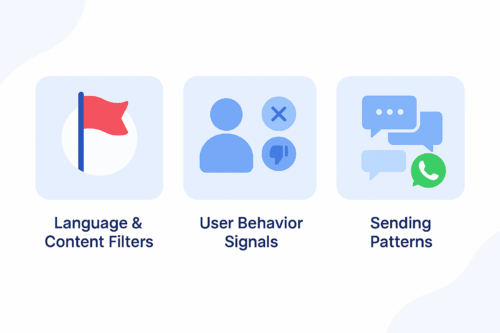
A clean blue infographic illustrating three reasons WhatsApp flags messages: language and content filters, user behavior signals, and sending patterns.
A simple infographic showing the main factors that cause WhatsApp messages to be flagged as spam.

WhatsApp protects users from unwanted or irrelevant content. Its detection system relies on three main components.

1. Language and Content Filters

WhatsApp automatically flags messages that include aggressive sales language, misleading claims, or repetitive promotional formatting.

2. User Behavior Signals

If users frequently block your number, report your messages, or never engage, WhatsApp lowers your sender quality score.

3. Sending Patterns

Sending the same unpersonalized message to large audiences or sending at a high frequency increases the risk of being flagged.


How ChatGPT Helps You Stay Compliant

ChatGPT allows marketers to generate message variations, personalize content, and avoid risky language. When used effectively, it helps you:

  • Avoid spam-triggering words

  • Maintain a conversational and friendly tone

  • Personalize messages at scale

  • Generate safe, compliant WhatsApp templates

Instead of guessing what may cause a message to be flagged, you can use ChatGPT to create structured, user-focused messages based on WhatsApp’s best practices.


Best Practices for Writing WhatsApp Messages

To improve compliance and engagement, follow these principles.

Focus on Value, Not Promotion

Avoid overly pushy sales messages.

Instead of:
“Buy now and get 50% off!”

Try:
“We thought you might like these new arrivals.”

Keep the Tone Conversational

Write naturally and avoid robotic or formal text.

Personalize Whenever Possible

Reference the user’s name, interest, or purchase history to reduce block rates.

Use Soft CTAs

Avoid commands such as “Act now.”
Use gentle guidance like “Would you like to explore the latest items?”


ChatGPT Prompt Examples for Safe WhatsApp Messaging

Use the prompt ideas below to generate compliant message templates:

Cart Reminder

“Write a friendly reminder for a user who left items in their cart. Keep the tone conversational and avoid strong promotional language.”

Personalized Follow-Up

“Create a message for a returning customer based on their last purchase. Offer something relevant without pressure.”

Re-Engagement Prompt

“Write a soft re-engagement message for a customer who has not interacted in 30 days.”

Order Confirmation with Suggestion

“Write an order confirmation message that includes a light suggestion for a related product.”

Limited-Time Announcement

“Create a short message inviting the user to view a relevant campaign without using pushy phrases.”


Testing and Improving with Appgain’s WhatsApp API

Once your messages are ready, you can test their performance using Appgain’s WhatsApp API.

Step 1: Send via WhatsApp API

Deliver personalized messages using templates, dynamic fields, and buttons.

Step 2: Monitor Message Performance

Track key metrics such as delivery rate, read rate, clicks, and opt-outs.

Step 3: Iterate Based on Feedback

If a message performs poorly, adjust the tone or content using ChatGPT and test a new version. Continuous iteration leads to stronger results.


Final Thoughts

Writing WhatsApp messages that avoid spam filters isn’t just a compliance task — it’s the foundation of building conversations that users actually want to receive. When your messaging feels natural, thoughtful, and personal, it earns trust instead of triggering blocks.

With Appgain, you’re not simply sending WhatsApp campaigns.
You’re shaping a messaging experience that respects the user, follows WhatsApp’s rules, and delivers measurable business impact.

How E-commerce Brands Use WhatsApp to Boost Sales, Recover Carts, and Engage Customers

WhatsApp is no longer just a messaging app; it has become a powerful tool driving success in e-commerce. Today, brands are leveraging it in innovative ways to enhance customer engagement, boost sales, and improve the shopping experience. Through real-world examples, such as Ways E-commerce Industries Use WhatsApp for Customer Engagement and Fashion WhatsApp Success Story, we explore how different industries are utilizing WhatsApp to achieve their business goals.

Strategies to Enhance Customer Engagement on WhatsApp

Effective customer engagement on WhatsApp relies on personalized and direct communication that makes customers feel valued. Here are some key strategies businesses can use to maximize engagement through WhatsApp:

1- Personalized Messaging & Targeted Promotions

Segmenting your audience allows you to send customized offers, updates, and recommendations based on their interests and past behavior. For example, offering exclusive deals or early access to new products for VIP customers enhances their sense of exclusivity and increases engagement.

Studies show that targeted messages via WhatsApp, such as offering a discount on a previously browsed product, significantly increase conversion rates. Learn more here.

2- AI-Powered Chatbots for Instant Support

WhatsApp chatbots provide 24/7 customer support, answer FAQs, guide customers through the purchasing process, and even offer personalized product recommendations. Brands like Zara use AI-powered bots to help customers check product availability and get styling advice, creating an interactive shopping experience.

For example, Modanisa’s chatbot “Nisa” operates in five languages, delivering personalized interactions, improving response times, and boosting engagement rates. See case studies here.

3- Direct Communication & Community Building

WhatsApp enables businesses to connect with customers directly, allowing them to ask product-related questions, check availability, and understand return policies. This reduces hesitation and builds trust.

Additionally, WhatsApp can be used to gather customer feedback, run contests, and launch interactive campaigns that strengthen brand relationships. See how brands are using this strategy.

Best Practices for Customer Engagement:

  • Always get customer consent before sending messages.
  • Maintain a personal and conversational tone, using names and past purchase details when possible.
  • Use multimedia elements like images, videos, and interactive buttons to make messages engaging.
  • Provide real value, such as exclusive tips, special deals, and early product access.

Strategies to Increase Sales via WhatsApp

WhatsApp isn’t just a tool for engagement—it’s also a powerful platform for driving sales and recovering lost revenue through strategic messaging.

1- Recovering Abandoned Carts & Boosting Conversions

WhatsApp has an open rate of 98%, making it an ideal channel to recover abandoned carts.

For example, fashion brand Mango achieved a 24% cart recovery rate by sending WhatsApp reminders. A retailer in Latin America recovered $4M in lost sales in just one year using automated follow-ups.

A simple message like “You left some items in your cart! Complete your purchase now before they sell out.” can be highly effective in driving customers to checkout. See how brands use this strategy.

2- Smart Product Recommendations & Cross-Selling

WhatsApp allows businesses to send personalized product suggestions based on a customer’s browsing history and past purchases.

For example, a fashion retailer can send a message like “Since you liked [Product X], you might also love [Product Y]”, with a direct purchase link.

Interactive WhatsApp catalogs also make it easy for customers to browse and buy seamlessly. Learn more about this approach.

3- Increasing Order Value with Upselling & Urgency Offers

Businesses can use WhatsApp to increase average order value by suggesting premium products or complementary add-ons during checkout.

For example, Under Armour used WhatsApp for urgency-based upselling, achieving a 63% abandoned cart recovery rate through exclusive flash sales. Read more.

Best Practices for Driving Sales via WhatsApp:

  • Send cart reminders within 1-2 hours for maximum impact.
  • Personalize messages by mentioning the exact products left in the cart.
  • Offer incentives like free shipping or limited-time discounts to encourage purchases.
  • Provide direct purchase links or a “Buy Now” button within messages to streamline the process.

Enhancing Customer Support and Automation with WhatsApp Business API

The WhatsApp Business API is transforming how eCommerce businesses engage with customers, offering automation while maintaining a personal touch. From order updates to customer service chatbots, WhatsApp provides an efficient and interactive communication channel that enhances customer satisfaction and streamlines operations.

Automated Order Updates & Notifications

One of the most impactful uses of WhatsApp in eCommerce is automating transactional messages. Businesses can instantly send order confirmations, shipping updates, and delivery alerts via WhatsApp, ensuring that customers stay informed in real-time. Unlike emails that might go unread, WhatsApp messages have high open rates, making them a reliable channel for keeping customers updated.

For example, instead of waiting for customers to check their email, a simple message like “Your order #1234 has been shipped! Track it here: [tracking link]” ensures instant engagement. These notifications can be interactive, allowing customers to track their package or ask follow-up questions with just one tap. Companies that implement this system experience fewer “Where is my order?” inquiries, reducing support workload and improving customer experience. Read more about how eCommerce industries use WhatsApp for customer engagement.

AI-Powered Customer Support Chatbots

Automating customer service via WhatsApp chatbots allows businesses to handle common inquiries instantly. AI-powered chatbots can assist customers with product availability, return policies, and order tracking 24/7, reducing the burden on human agents.

A notable example is Modanisa, an online fashion retailer that developed a WhatsApp chatbot to handle 70% of customer inquiries autonomously. The chatbot provides real-time responses on order statuses, FAQs, and returns, leading to a 36% reduction in call center costs. Similarly, Nykaa, a beauty eCommerce platform, uses WhatsApp to offer personalized beauty advice, increasing customer satisfaction and loyalty. Explore case studies on WhatsApp success stories here.

Simplifying Returns & After-Sales Support

Handling returns and post-purchase queries can be time-consuming, but WhatsApp automation streamlines these processes. Businesses can implement self-service options where customers can initiate return requests, schedule pickup services, or check refund statuses without waiting for support.

For instance, a consumer electronics eCommerce store saw a 30% drop in cart abandonment rates after integrating WhatsApp for real-time customer support. Quick responses to pre-purchase concerns helped customers complete their orders confidently. Learn why WhatsApp is essential for eCommerce engagement.

CRM Integration & Automated Marketing Workflows

WhatsApp Business API seamlessly integrates with CRM systems and eCommerce platforms, enabling businesses to trigger automated messages based on customer actions. Key automation strategies include:

  • Welcome Messages: Engaging new subscribers with a personalized greeting.
  • Back-in-Stock Alerts: Notifying interested shoppers when an item is available.
  • Reorder Reminders: Encouraging repeat purchases by reminding customers when they might be running low on a product.

For instance, a supplement brand can send a timely message like, “Hi Alex, running low on your protein powder? Reorder now and enjoy 10% off!” This type of personalized engagement drives repeat sales more effectively than traditional email campaigns. See how businesses use WhatsApp for personalized customer experiences.

Best Practices for Effective WhatsApp Automation

  • Hybrid Support Model: Combine AI chatbots with human agents for complex issues or VIP customers.
  • Data-Driven Optimization: Monitor chatbot performance and refine responses based on analytics.
  • Compliance & Message Templates: Use approved WhatsApp templates to ensure seamless communication.
  • Personalization: Integrate WhatsApp with your order database and CRM to fetch customer details for tailored interactions.

Industry-Specific WhatsApp Use Cases

Different industries are leveraging WhatsApp in unique ways to boost engagement and efficiency. Discover how various eCommerce sectors are optimizing WhatsApp for customer service and sales.

By embracing WhatsApp automation, eCommerce brands can enhance customer engagement, reduce operational costs, and drive more sales—all while delivering a seamless, real-time shopping experience.

1. Fashion & Apparel: Personalized Shopping Experiences

Fashion retailers use WhatsApp to provide a personalized shopping experience through direct chat, offering styling advice and helping customers discover products effortlessly. For example, Zara utilizes WhatsApp to provide fashion recommendations and answer customer queries, enhancing engagement and driving sales.

One of the most effective strategies is sending notifications about new arrivals and exclusive deals. Brands build subscriber lists on WhatsApp to instantly notify customers about limited-time offers or restocked items. Due to the app’s instant nature, these messages often lead to quick sales and high conversion rates.

Another game-changer in the fashion industry is cart recovery messages. For instance, Mango successfully recovered 24% of abandoned carts using WhatsApp reminders, while Under Armour achieved an impressive 63% recovery rate during one of its promotional campaigns.

2. Electronics & Gadgets: Instant Support and Sales Acceleration

Electronics purchases often require careful consideration, making WhatsApp a valuable tool for providing real-time consultations. Online stores can share product specifications via PDFs or promotional videos to help customers make informed decisions.

After-sales support is another critical aspect where WhatsApp shines. Brands use it to offer instant customer service, such as troubleshooting assistance or sending user guides. One e-commerce store reduced cart abandonment by 30% after integrating WhatsApp for instant customer support, leading to higher conversion rates.

Additionally, WhatsApp helps drive repeat purchases through restock alerts and promotional messages. Brands can notify customers when an out-of-stock product becomes available or suggest compatible accessories for previously purchased items, increasing cross-selling opportunities.

3. Food & Beverage: Streamlining Orders and Enhancing Customer Engagement

WhatsApp has become a direct sales channel for restaurants and grocery stores, offering a seamless ordering experience. KFC South Africa, for example, introduced a WhatsApp ordering system that allows customers to browse menus, place orders, and make payments—all within the app. This innovation simplified the ordering process and significantly increased demand, prompting KFC to expand its infrastructure.

Restaurants also use WhatsApp to keep customers informed about their order status by sending updates like “Your order is being prepared” or “Your delivery is on the way.” This transparency enhances the customer experience. After delivery, businesses can request quick feedback via WhatsApp, resulting in higher response rates compared to traditional email surveys.

Grocery retailers have also transformed their operations using WhatsApp. JioMart in India introduced a fully integrated WhatsApp shopping experience, allowing customers to browse products, add items to their cart, and complete purchases without leaving the app. This streamlined approach caters especially to customers who prefer a simplified shopping experience.

Success Stories from Leading Brands

  • Modanisa (Fashion Retailer): Implemented WhatsApp chatbots for customer support and shopping guidance, reducing call center costs by 36% and driving 55% of new customer inquiries through WhatsApp.
  • Mango (Fashion): Recovered 24% of abandoned carts using WhatsApp reminders.
  • Under Armour (Sportswear): Achieved a 63% cart recovery rate through exclusive WhatsApp promotions.
  • KFC (Restaurants): Launched a WhatsApp ordering system that attracted massive user engagement, requiring infrastructure expansion.
  • Nykaa (Beauty & Cosmetics): Provided beauty consultations via WhatsApp, increasing customer satisfaction and boosting sales.

Conclusion: Why Your E-commerce Store Should Embrace WhatsApp Now

These success stories demonstrate how WhatsApp has become an essential tool for e-commerce, enabling brands to connect with customers instantly, recover lost sales, and provide a seamless shopping experience. Whether you run a fashion store, an electronics business, or a restaurant, WhatsApp offers unparalleled opportunities to enhance customer engagement and drive sustainable growth.

Is your store ready to harness the power of WhatsApp? Now is the time to integrate it into your marketing strategy and unlock its full potential!

Contact us today to discover the best solutions and strategies to grow your business through WhatsApp!

How to Build a Flexible and Cost-Effective Marketing Dashboard

How I Built a Scalable Marketing Dashboard with Airbyte, BigQuery, and Looker Studio

Hi, I’m Mohamed Shaheen, CEO and co-founder of Appgain. Managing our fintech app alongside our e-commerce platform means my days are packed with strategic decisions—from product innovation to customer engagement. One recurring challenge was keeping a real-time pulse on our marketing performance without incurring excessive costs.

In our early days, we relied on Funnel.io for our marketing dashboards due to its ease of setup. However, as our business expanded and our marketing channels multiplied, the cost of maintaining dashboards grew significantly. We needed a more flexible and cost-effective solution.

After thorough discussions with our in-house data engineers, we decided to build our own marketing dashboard using an open-source stack: Airbyte for data extraction, Google BigQuery for data storage and processing, and Looker Studio for visualization. This is the story of how we transformed our marketing reporting system—and how you can do the same.

The Challenge: Scaling Reporting Without Breaking the Bank

Initially, Funnel.io provided a seamless experience with its drag-and-drop interface, allowing us to integrate multiple marketing channels like Instagram, Facebook, Google Ads, and Apple Search Ads. It enabled us to build dashboards quickly and monitor our campaigns in real time. However, as our marketing efforts scaled, so did the costs. Each new dashboard added another layer of expenses, making it unsustainable.

I recall reviewing our monthly expenses late at night, realizing that while our marketing efforts fueled growth, reporting costs were eating into our margins. That’s when we began exploring open-source alternatives.

Discovering Airbyte: A New Direction

During a brainstorming session with our data team, one of our engineers introduced Airbyte—a modern, open-source data integration tool. Airbyte allowed us to extract data from various sources and load it into our data warehouse without the escalating fees of Funnel.io. The flexibility and active community support were key advantages.

Airbyte provided a growing library of pre-built connectors, enabling us to quickly integrate with key marketing channels:

Instead of paying more for each additional dashboard, we could configure and customize connectors as needed.

Building Our New Marketing Dashboard

Step 1: Data Extraction with Airbyte

We began by setting up Airbyte to extract raw data from our marketing channels:

  • Deployment: We deployed Airbyte on our servers using Docker, making installation straightforward for our engineers.
  • Connector Setup: Using Airbyte’s extensive library, we connected to our marketing channels and configured each connector to extract essential metrics like impressions, clicks, cost per click, and conversion rates.
  • Automated Syncs: Airbyte’s scheduling features allowed us to set up automatic syncs, ensuring our data was always up to date without manual intervention.

This process provided efficiency and flexibility, giving us full control over our data without additional costs for every new connector.

Step 2: Centralizing Data in Google BigQuery

“To make the process easier, we created a diagram that illustrates the key steps for connecting Airbyte to BigQuery. Follow these steps as shown below:

Once extracted, our data was stored in Google BigQuery, a centralized, scalable data warehouse.

  • Seamless Integration: Airbyte smoothly loaded our data into BigQuery, which is designed to handle vast amounts of data efficiently.
  • Data Cleaning and Transformation: We performed minimal transformations to standardize data across channels, ensuring consistency in key performance indicators.
  • Scalability: BigQuery’s architecture allowed us to manage growing data volumes effortlessly.

Step 3: Visualization with Looker Studio

With data centralized and cleaned in BigQuery, we used Looker Studio for visualization.

  • Direct Connection: We connected Looker Studio directly to our BigQuery datasets, enabling real-time data access.
  • Custom Dashboard Design: With Looker Studio’s drag-and-drop interface, we created dynamic dashboards displaying key marketing metrics such as ad spend, ROI, engagement rates, and conversion performance.
  • Real-Time Insights: The dashboards refreshed in real time, ensuring our data was always up to date, allowing for quick, data-driven decisions.

The Benefits We Experienced

Transitioning from Funnel.io to our Airbyte + BigQuery + Looker Studio stack revolutionized our marketing reporting:

  • Cost Efficiency: By leveraging open-source tools and scalable cloud solutions, we significantly reduced recurring costs, making expenses predictable and manageable.
  • Flexibility: Our data engineers gained complete control over the ETL process, enabling full customization without vendor lock-in.
  • Scalability: Google BigQuery efficiently handled our expanding data needs, while Looker Studio kept visualizations interactive and responsive.
  • Real-Time Insights: Automated syncs and live data updates allowed for immediate decision-making, optimizing our marketing strategies on the fly.

Lessons Learned and Future Roadmap

Building our custom marketing dashboard taught us valuable lessons:

  • Embrace Flexibility: Open-source tools like Airbyte provide the freedom to innovate without restrictive pricing models.
  • Invest in Scalability: A scalable data warehouse like BigQuery ensures infrastructure isn’t a bottleneck.
  • Prioritize Real-Time Data: Access to live data enhances agility in marketing decision-making.
  • Empower Your Team: Giving data engineers control over ETL processes fosters innovative solutions tailored to business needs.

Looking ahead, we plan to refine our dashboards further and integrate additional data sources for deeper insights. Our journey is just beginning, with endless possibilities ahead.

Ready to Transform Your Marketing Reporting?

If you’re struggling with high reporting costs and inflexible dashboards, it may be time to rethink your data strategy. At Appgain, we built a solution that reduces costs while delivering real-time, actionable insights—helping us stay ahead in a competitive market.

Are you ready to build a custom marketing funnel, reporting dashboard, and growth engine tailored to your business? Contact us for a demo and let’s explore how we can turn your marketing data into a powerful asset.

Contact Us for a Demo

Mastering Geolocation Push Notifications: Strategies for Engagement and Sales

Geolocation push notifications are useful tools for businesses. Not only do they help you connect with customers, but they also increase sales. In this article, we will explain what geolocation push notifications are and provide tips for success.

What Are Geolocation Push Notifications?

Geolocation push notifications send messages based on where a user is located. You can use them for various purposes, such as promotions, updates, or alerts. Furthermore, personalizing these messages makes them even more relevant to users.

There are two main types:

  1. Global Notifications: These notifications reach all subscribers, regardless of their location. Consequently, they work well for announcements that everyone should see.
  2. Location-Based Notifications: In contrast, these notifications target users in specific areas, such as a city. Therefore, they are especially effective for local offers or events.

Examples of Geolocation Push Notifications

Many brands successfully use geolocation push notifications. Here are a few examples:

  • Starbucks: For instance, they send reminders to help customers find the nearest store. As a result, this approach makes customers feel welcome.
  • Ritual: This app, on the other hand, offers discounts for local restaurants and sends messages at lunchtime. This timing maximizes engagement.
  • McDonald’s: Additionally, they provide discounts tied to local events, like sports wins. Thus, this strategy effectively grabs attention.
  • Hunter Boots: Furthermore, they send weather alerts to encourage purchases during bad weather. This can significantly increase sales during those times.

Best Practices for Geolocation Push Notifications

To create effective geolocation campaigns, follow these tips:

  • Encourage Users to Subscribe: First, invite users to opt in. Making the opt-in box on your website attractive is crucial for higher subscription rates.
  • Write Clear Messages: Next, keep your notifications simple. Use easy language that encourages users to act immediately.
  • Check and Improve Your Campaigns: Finally, regularly review how your notifications perform. Use this data to adjust your strategy. For example, A/B testing can help you find what works best.

Conclusion

In summary, geolocation push notifications can help businesses connect with customers and boost sales. By understanding how they work and following these tips, you can create effective campaigns. Therefore, explore the potential of geolocation push notifications and watch your business grow.Start now and discover how Appgain.io can be the perfect partner for your business growth