Building Your First Marketing AI Agent: A Step-by-Step Guide Using Appgain’s Platform

Transform your marketing operations with autonomous AI agents that work around the clock. This comprehensive guide walks you through creating your first marketing AI agent using Appgain’s platform, empowering you to automate complex workflows and deliver personalized customer experiences. As generative AI continues to revolutionize marketing content, building your own specialized agents has become essential for staying competitive in today’s digital landscape.

Why Marketing AI Agents Are Changing the Game

Marketing AI agents represent the next evolution in automation—autonomous systems that can make decisions, execute tasks, and optimize campaigns without constant human supervision. Unlike traditional automation tools that follow rigid rules, AI agents can:

  • Adapt to changing customer behaviors
  • Process and act on real-time data
  • Perform complex, multi-step marketing workflows
  • Learn and improve from interactions over time

Prerequisites for Building Your Marketing AI Agent

Before diving into the technical steps, ensure you have:

  • An active Appgain account with appropriate permissions
  • Clear marketing objectives for your AI agent
  • Basic understanding of your customer journey
  • Relevant data sources identified

Step 1: Define Your Agent’s Purpose and Scope

Every effective AI agent starts with a clear mission. Begin by answering these questions:

  • What specific marketing problem will this agent solve?
  • Which customer segments will it target?
  • What actions will it be authorized to take?
  • How will you measure its success?

For example, you might create an agent that identifies customers at risk of churn and automatically executes re-engagement campaigns through multiple channels.

Step 2: Access the Agent Builder in Appgain

Log into your Appgain dashboard and navigate to the AI Agents section. Click “Create New Agent” to access the agent builder interface. Here, you’ll provide basic information:

  • Agent Name: Choose something descriptive (e.g., “Churn Prevention Agent”)
  • Description: Detail what the agent does and its intended outcomes
  • Category: Select from options like “Customer Engagement,” “Lead Nurturing,” etc.

Step 3: Configure Data Sources and Permissions

Your agent needs access to relevant data to make informed decisions. In the Data Sources tab:

  • Connect CRM systems containing customer data
  • Link analytics platforms for behavioral insights
  • Integrate communication channels (email, SMS, WhatsApp, etc.)
  • Set appropriate data access permissions

Appgain’s platform makes it easy to connect with popular tools through pre-built integrations, eliminating the need for complex API work.

Step 4: Design Your Agent’s Decision Logic

This is where the magic happens. Using Appgain’s visual workflow builder:

  1. Create trigger conditions that activate your agent (e.g., “Customer hasn’t opened app in 14 days”)
  2. Define decision points with conditional logic
  3. Set up action sequences for different scenarios
  4. Establish feedback loops for continuous learning

The platform offers both pre-built templates and custom options to accommodate different levels of complexity. Training your AI agent with domain-specific knowledge significantly improves its effectiveness in specialized marketing contexts.

Step 5: Set Up Communication Templates

Your agent will need pre-approved content to communicate with customers. Create templates for:

  • Email sequences
  • SMS/WhatsApp messages
  • Push notifications
  • Social media interactions

Include personalization variables that your agent can dynamically populate based on customer data. Learning how to craft WhatsApp messages that don’t get flagged as spam is particularly valuable for agents that use messaging channels.

Step 6: Implement Safeguards and Limitations

Autonomous agents require appropriate guardrails. Configure:

  • Maximum budget allocations
  • Rate limits for customer communications
  • Approval workflows for high-impact decisions
  • Automatic pausing criteria if performance metrics drop

These safeguards ensure your agent operates within acceptable parameters and doesn’t create negative customer experiences.

Step 7: Test Your Agent in Sandbox Mode

Before letting your agent loose on real customers, thoroughly test it in Appgain’s sandbox environment:

  1. Create test customer profiles with varied attributes
  2. Simulate trigger events to activate your agent
  3. Review the decision paths taken
  4. Examine the content and timing of communications

Refine your agent’s logic and templates based on test results until you’re confident in its performance.

Step 8: Deploy and Monitor Your Marketing AI Agent

Once testing is complete, deploy your agent to production:

  1. Set the activation date and time
  2. Define the initial customer segment size (consider starting small)
  3. Configure monitoring dashboards to track key metrics
  4. Set up alert systems for any anomalies

Building comprehensive dashboards with Appgain and Looker Studio allows you to visualize your agent’s performance and impact on marketing KPIs.

Step 9: Optimize Based on Performance Data

As your agent operates, it will generate valuable performance data. Use this information to:

  • Refine decision thresholds
  • Improve message content and timing
  • Expand or narrow the agent’s scope
  • Adjust resource allocations

Appgain’s platform includes AI-powered optimization suggestions that help identify improvement opportunities based on your agent’s performance history.

Advanced Features for Experienced Users

Once you’re comfortable with basic agent creation, explore these advanced capabilities:

  • Multi-agent orchestration for complex customer journeys
  • Custom AI model integration for specialized prediction tasks
  • Advanced A/B testing frameworks for message optimization
  • Cross-channel coordination with AI-powered smart timing to maximize engagement

Key Takeaways

  • Marketing AI agents automate complex workflows while adapting to changing conditions
  • Appgain’s platform simplifies agent creation with visual builders and pre-built integrations
  • Start with a clear purpose and appropriate guardrails for your agent
  • Test thoroughly in sandbox mode before deploying to real customers
  • Continuously monitor and optimize your agent based on performance data

Conclusion

Building your first marketing AI agent may seem daunting, but Appgain’s platform makes the process accessible even to marketers without technical backgrounds. By following this step-by-step guide, you can create autonomous agents that transform your marketing operations, deliver personalized experiences at scale, and free your team to focus on strategic initiatives. As marketing continues to evolve, those who harness AI agents will gain significant competitive advantages through enhanced efficiency, responsiveness, and customer understanding.

Ready to build your first marketing AI agent? Log into your Appgain account today and put these steps into action. Your marketing automation journey is about to reach an entirely new level of sophistication and effectiveness.

COD Order Confirmation Automation: Reducing Failed Deliveries by 40% with WhatsApp AI Agents

In the competitive e-commerce landscape, Cash on Delivery (COD) remains a popular payment method in many markets, despite presenting unique challenges for retailers. Failed deliveries due to customer unavailability, address issues, or order cancellations can significantly impact your bottom line. This case study explores how implementing WhatsApp automation for customer conversations with AI-powered confirmation workflows reduced failed COD deliveries by an impressive 40%, saving businesses thousands in operational costs while improving customer satisfaction.

The COD Delivery Challenge

Cash on Delivery orders face several unique challenges compared to prepaid orders:

  • Higher cancellation rates (15-30% industry average)
  • Increased return costs for failed delivery attempts
  • Customer unavailability at delivery time
  • Address verification issues
  • Last-minute order cancellations

For many e-commerce businesses, especially those operating in regions where digital payment adoption is still growing, COD remains essential despite these challenges. Each failed delivery attempt costs between $5-15 in logistics expenses, not counting the opportunity cost of inventory tied up in transit.

The Traditional Approach vs. WhatsApp AI Agents

Before implementing an automated solution, most businesses relied on:

  1. Manual phone calls by customer service agents (time-consuming and expensive)
  2. Basic SMS notifications (low engagement rates, no confirmation mechanism)
  3. Email confirmations (low open rates for time-sensitive communications)

The breakthrough came with AI-powered WhatsApp agents trained to feel human in their interactions. These agents could handle the entire confirmation workflow while maintaining a conversational, helpful tone that customers responded to positively.

The Automated Confirmation Workflow

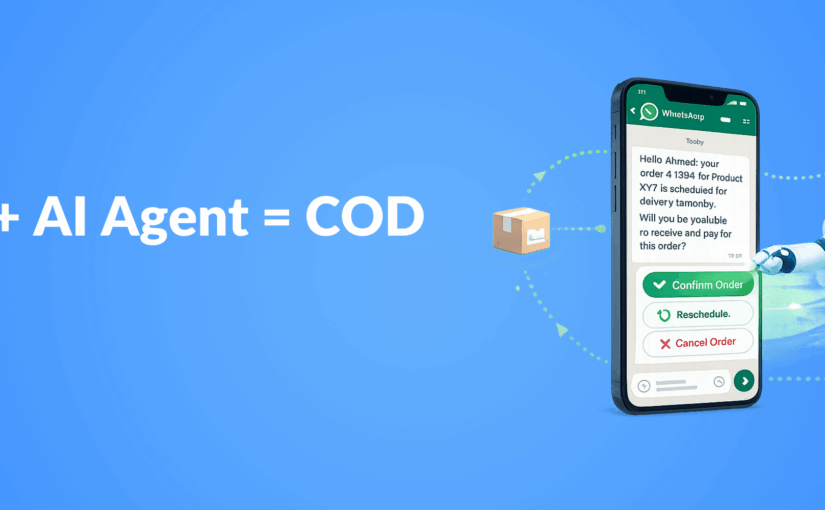
The solution implemented a three-stage confirmation process through WhatsApp:

Stage 1: Initial Order Confirmation

Within 30 minutes of order placement:

  • AI agent sends personalized confirmation message with order details
  • Customer confirms order with a simple “Yes”
  • Address verification with option to update if needed
  • Payment method confirmation

Stage 2: Pre-Delivery Confirmation

24 hours before scheduled delivery:

  • Delivery time window notification
  • Option to reschedule if customer won’t be available
  • Final confirmation of delivery address
  • Reminder about payment amount needed

Stage 3: Day-of-Delivery Communication

2 hours before delivery:

  • Real-time delivery status updates
  • Direct line to delivery agent through the same WhatsApp thread
  • Last-minute rescheduling option if needed

Technical Implementation

The solution was built using:

  • WhatsApp Business API integration through Appgain
  • Custom-trained AI agents with domain-specific knowledge
  • Integration with existing order management systems
  • Real-time logistics tracking integration
  • Automated workflow triggers based on order status changes

The implementation leveraged custom agent infrastructure to ensure the AI could handle complex customer inquiries, not just follow a rigid script. This allowed the system to resolve edge cases without human intervention in over 85% of interactions.

Results: 40% Reduction in Failed Deliveries

After implementing the WhatsApp AI confirmation workflow, the client experienced:

  • 40% reduction in failed delivery attempts
  • 92% customer confirmation rate (compared to 45% with previous methods)
  • 68% decrease in “customer not available” cases
  • 73% reduction in address-related delivery issues
  • 31% decrease in last-minute cancellations
  • $12,500 monthly savings in redelivery costs

Beyond the direct savings, customer satisfaction scores increased by 27% for COD orders, and the average delivery time decreased by 1.2 days due to fewer failed attempts.

Customer Feedback Analysis

Customer surveys revealed several key factors behind the success:

  • Convenience: 89% of customers preferred WhatsApp over phone calls
  • Flexibility: 76% appreciated the ability to reschedule deliveries easily
  • Responsiveness: 82% rated the AI agent responses as “helpful” or “very helpful”
  • Personalization: 71% felt the communication was personalized to their needs

The personalization at scale was particularly important, as customers reported feeling like they were chatting with a helpful customer service agent rather than a bot.

Implementation Challenges and Solutions

The project wasn’t without challenges:

Challenge: Language Variations and Slang

Solution: The AI was trained on regional language patterns and common slang to improve comprehension and maintain conversation flow.

Challenge: Complex Customer Questions

Solution: Implementing a hybrid system where AI handled 85% of interactions but could seamlessly transfer to human agents for complex cases.

Challenge: Integration with Legacy Systems

Solution: Creating middleware connectors to bridge the gap between modern API-based WhatsApp systems and older order management platforms.

Key Takeaways

  • WhatsApp AI agents can significantly reduce COD delivery failures through proactive, multi-stage confirmation
  • Customers strongly prefer messaging-based confirmation over traditional phone calls
  • Personalized, conversational AI drives higher engagement than template-based messages
  • The ROI on automated confirmation workflows is substantial, with both direct cost savings and improved customer satisfaction
  • Implementation success depends on seamless integration with existing systems and thoughtful AI training

Conclusion: The Future of COD Order Management

This case study demonstrates that COD orders, often seen as problematic for e-commerce operations, can be efficiently managed through intelligent automation. By leveraging WhatsApp’s high engagement rates and combining them with well-trained AI agents, businesses can dramatically reduce failed deliveries while improving the customer experience.

The 40% reduction in failed deliveries represents not just a significant cost saving but also a competitive advantage in markets where COD remains an important payment option. As AI technology continues to advance, we expect these systems to become even more sophisticated, potentially eliminating the majority of preventable delivery failures.


Smart Timing in Marketing Automation: Let AI Choose the Best Send Time

Discover how AI-powered send time optimization can dramatically improve your marketing campaign performance by delivering messages when customers are most receptive.

In the competitive landscape of digital marketing, timing isn’t just important—it’s everything. Your carefully crafted message means nothing if it arrives when your audience isn’t paying attention. This is where AI-powered marketing automation is revolutionizing campaign effectiveness through smart send time optimization. By analyzing user behavior patterns and engagement data, AI can determine the optimal moment to deliver your message for maximum impact.

Why Timing Matters in Marketing Campaigns

The difference between a successful campaign and a failed one often comes down to timing. Consider these statistics:

  • Emails sent at optimal times can see up to 30% higher open rates
  • Push notifications delivered during peak engagement hours achieve 3-7x higher click-through rates
  • SMS messages timed correctly can increase conversion rates by up to 25%

When messages arrive at the right moment, they feel less intrusive and more helpful, transforming what might have been perceived as spam into a valuable service.

How AI Determines the Perfect Send Time

Traditional marketing relied on broad generalizations about when audiences might be receptive. Modern AI-powered send time optimization is far more sophisticated, analyzing:

Individual User Behavior Patterns

AI algorithms track when each user typically engages with your content across channels. Does Jane usually check her email at 7 AM before work? Does Michael tend to browse shopping apps during his lunch break? These individual patterns create a personalized engagement profile for each customer.

Historical Engagement Data

The system analyzes past interactions with your campaigns—opens, clicks, conversions, and purchases—to identify trends in when specific users or segments are most responsive.

Contextual Factors

Advanced AI considers contextual elements like:

  • Time zone differences
  • Day of week variations in engagement
  • Seasonal behavioral changes
  • Device usage patterns (mobile vs. desktop)

Continuous Learning

Unlike static send time rules, AI systems continuously refine their understanding with each campaign, improving predictions over time through machine learning.

The Business Impact of Smart Timing

Implementing AI-driven send time optimization delivers measurable benefits:

Improved Campaign Performance

When messages arrive at the optimal moment, performance metrics improve across the board:

  • Higher open and click-through rates
  • Increased conversion rates
  • Better ROI on marketing spend

Enhanced Customer Experience

Smart timing creates a better customer experience by respecting users’ natural rhythms and preferences. This personalization at scale makes customers feel understood rather than bombarded.

Reduced Unsubscribe Rates

When messages arrive at inconvenient times, users are more likely to unsubscribe or mark content as spam. Optimal timing significantly reduces these negative actions.

Implementing AI Send Time Optimization

To leverage this powerful capability in your marketing strategy:

Data Collection Phase

Begin by collecting sufficient engagement data across channels. The AI needs historical information to establish baseline patterns. This typically requires:

  • 3-6 months of campaign data
  • User engagement metrics across channels
  • Conversion tracking implementation

Integration with Marketing Automation

Smart timing works best when integrated with your broader marketing automation strategy, allowing for seamless execution across email, SMS, push notifications, and other channels.

Testing and Refinement

Even with AI, it’s important to test and validate results:

  • Run A/B tests comparing AI-optimized timing against control groups
  • Monitor key performance indicators to measure impact
  • Refine algorithms based on results

Beyond Basic Timing: Advanced Applications

The most sophisticated marketing teams are taking AI-powered timing to the next level:

Multi-Channel Coordination

Advanced systems can coordinate timing across channels, ensuring that your email, SMS, and push notification strategy work in harmony rather than overwhelming customers.

Journey-Based Timing

Rather than optimizing individual messages in isolation, AI can determine the ideal cadence for entire customer journeys, spacing touchpoints appropriately based on the customer’s position in the sales funnel.

Predictive Engagement Modeling

The most advanced systems don’t just react to past behavior—they predict future engagement windows based on complex behavioral models, anticipating when a customer is likely to be receptive even before they establish a clear pattern.

Key Takeaways

  • AI-powered send time optimization dramatically improves campaign performance by delivering messages when recipients are most likely to engage
  • The technology analyzes individual behavior patterns, historical engagement data, and contextual factors to determine optimal timing
  • Benefits include improved metrics, enhanced customer experience, and reduced unsubscribe rates
  • Implementation requires sufficient historical data, integration with marketing automation systems, and ongoing testing
  • Advanced applications include multi-channel coordination, journey-based timing, and predictive engagement modeling

Conclusion

In the age of information overload, capturing attention requires more than compelling content—it demands perfect timing. AI-powered send time optimization represents one of the most impactful applications of artificial intelligence in marketing today, allowing brands to meet customers in their moments of receptivity.

By implementing smart timing in your marketing automation strategy, you’re not just improving campaign metrics—you’re fundamentally transforming how customers experience your brand, shifting from interruption to anticipation. In a world where every second counts, letting AI choose the best send time isn’t just a tactical advantage—it’s a strategic imperative for customer-centric marketing.

Ready to take your campaign performance to the next level? Smart timing is just the beginning of what AI can do for your marketing automation strategy.

Centralized Cross‑Channel Marketing: WhatsApp, Facebook & Instagram in One Flow


Why does every campaign still feel like a juggling act? One message on Facebook, another on WhatsApp, and somehow email never quite fits.

It doesn’t have to be that way anymore.

In July 2025, Meta made a quiet announcement with massive implications: you can now manage campaigns across WhatsApp, Facebook, and Instagram — all from one place.

That’s more than just convenience.
It’s a whole new way of thinking about customer engagement.

From Fragmented to Fluid

Your customer doesn’t see channels. They see your brand.
And if your messaging feels scattered, so will your customer experience.

A unified, cross-channel approach means:

  • One story across every touchpoint
  • Messages that build on each other
  • And a customer journey that actually makes sense

No more mixed signals. No more missed opportunities.


What Happens When Channels Work Together?

When WhatsApp, SMS, email, and push notifications operate in sync, marketing becomes more than a broadcast — it becomes a conversation.

Here’s what you unlock:

  • Higher conversions, driven by timely, personalized nudges
  • Smarter targeting, using unified CRM data and behavioral triggers
  • Brand consistency, with one voice across all channels
  • Fewer silos, less chaos, and faster execution

It’s not about doing more. It’s about doing it right.

How Appgain Makes It Simple

All your channels. All your campaigns. One smart dashboard.

Appgain is a cross-channel marketing platform built for clarity, speed, and results.
From a single dashboard, you can:

  • Launch WhatsApp campaigns
  • Trigger backup SMS for unread messages
  • Send personalized product recommendations by email
  • Push urgent deals via mobile notifications

All orchestrated with:

  • Messaging APIs (WhatsApp, SMS, Email, Push)
  • CRM Segments & Automation Builder
  • OpenAI integration for dynamic content
  • n8n Workflows that connect every step

It’s a marketing automation tool that lets your channels work as one — with zero friction.

A Real-Life Example: Flash Sale Recovery Flow

Scenario: A fashion store runs a 24-hour flash sale.

Here’s the flow with Appgain:

  1. Email blast to announce the offer
  2. Push notification to those who didn’t open
  3. WhatsApp message with item suggestions based on past purchases
  4. SMS reminder a few hours before the sale ends
  5. Follow-up the next day for those who didn’t complete checkout

Results?

  • 3x engagement
  • 45% cart recovery
  • No copy-pasting across platforms. No manual syncs.

The End of Marketing Silos

Meta gave us the signal. Appgain builds the system.

Whether you’re running a Shopify store or managing enterprise campaigns, Appgain gives you the tools to deliver unified customer engagement at scale.

Because smart marketing doesn’t just reach people.
It respects their journey.

One dashboard. All channels. Total clarity.

Ready to See It in Action?

Appgain helps you move fast, stay personal, and grow with precision — all from one platform.

Ready to See It in Action?
Appgain helps you move fast, stay personal, and grow with precision — all from one platform.
Book a free demo and start building connected campaigns that actually convert.

? Want to talk now?
Chat with our team on WhatsApp and discover how Appgain can unify your marketing — without the chaos.
? Start a WhatsApp Chat